
The Notifications screen displays list of alerts related to your pets’ activities and events. It helps you stay informed about important updates such as location alerts and other system-generated notifications.
To Get Started
- Log in to your account.
- Go to Notification.

- When you are on the Home screen, the following interface will be displayed.
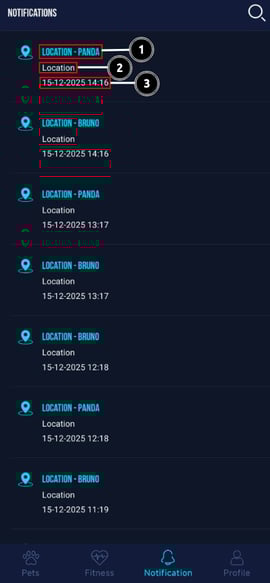
Notification List
- Each notification entry includes:
- Alert Type & Pet Name (for example, Location – BRUNO or Location – PANDA)
- Notification Category (such as Location)
- Date & Time when the alert was generated
- The most recent notifications appear at the top of the list.
Please Note: The user cannot delete the notification.
Search Notification
-
Tap the Search icon
 at the top right to quickly find specific notifications based on pet name or alert type.