The Payment feature allows users to conveniently process online payments for the renewal of vehicle licenses in alignment with the configured tariff plan.
Please Note: The Payment option will appear only if the Tariff Plan is configured for the particular Consumer.
There are 2 Methods to Make Payment
Method 1: Renew subscription from the Home Screen.
- Login to your account.
- Go to
 Home page and tap on the multi-vehicle selction option.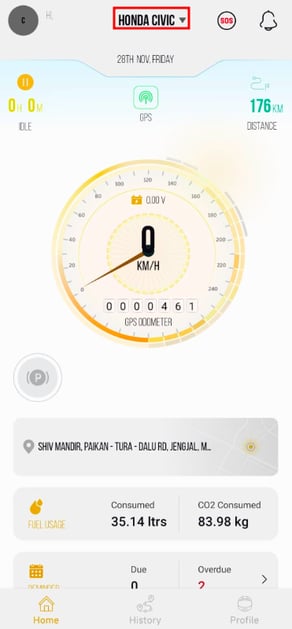
- The following Screen will Open.
- You will also find the expiry date of the vehicle mentioned inside.
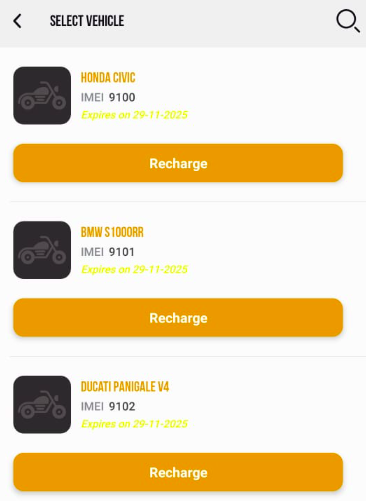
- You will also find the expiry date of the vehicle mentioned inside.
- To renew the subscription, tap the Recharge button on the vehicle you want to renew.
- Click on
 search icon to find for the vehicle.
- Click on
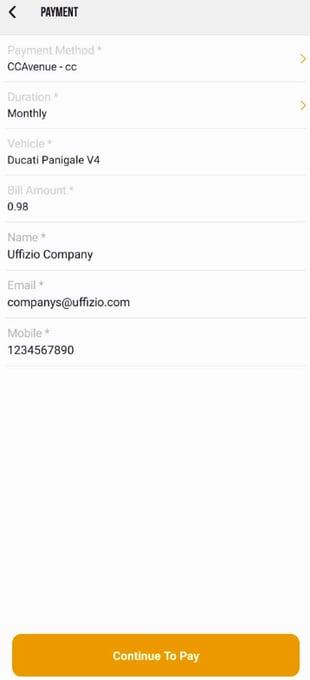
- Once you tap on Recharge, The following screen will open.
-
Choose Payment Method: Select the payment gateway you want to use.
-
Select Duration: Pick your preferred subscription plan.
The bill amount will update automatically based on the duration. -
Vehicle: Your vehicle will be selected by default.
-
Review Your Details
-
Name: Pre-filled. Edit if needed.
-
Email: Pre-filled. Edit if needed.
-
Mobile Number: Pre-filled. Edit if needed.
-
-
Continue to Pay: Tap Continue to Pay. You will be redirected to the payment gateway to complete the transaction.
- Once the Payment Process is Completed it will be reflected on the Payment Overview Screen.
Please Note: Once the payment is successfully completed, your subscription will be renewed automatically.The new vehicle expiry date will be updated and visible in the app.
Method 2: Renew subscription from Payment Screen
- Login to your account.
- Go to Profile > Payment.
When you click on Payment, you will be taken to the Payment Overview page.
Here, you can view all your previous payments in one place.
- To make subscription payment click on the
 icon,
icon,
- The following Sscreen will open, you can now renew your subscription.
-
Choose Payment Method: Select the payment gateway you want to use.
-
Select Duration: Pick your preferred subscription plan.
The bill amount will update automatically based on the duration. -
Vehicle: Select the vehicle that you want to recharge.
-
Review Your Details
-
Name: Pre-filled. Edit if needed.
-
Email: Pre-filled. Edit if needed.
-
Mobile Number: Pre-filled. Edit if needed.
-
-
Continue to Pay: Tap Continue to Pay. You will be redirected to the payment gateway to complete the transaction.
- Once the Payment Process is Completed it will be reflected on the Payment Overview Screen.
Please Note: Once the payment is successfully completed, your subscription will be renewed automatically.The new vehicle expiry date will be updated and visible in the app.
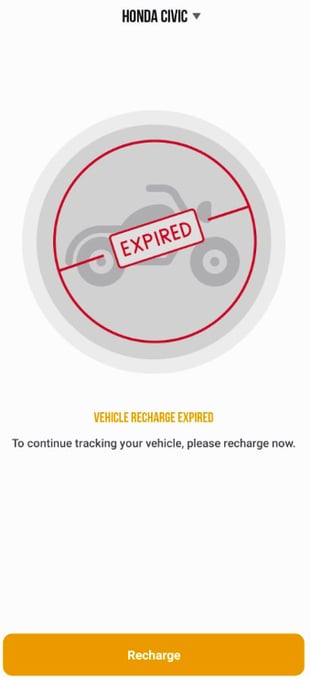
- When the vehicle subscription has expired and you have not renewed the subscription, the system will show the following screen and won't let you enter until you have renewed the subscription.
- Tap on the multi-vehicle selction option or the Recharge button to renew the subscription.