
Addresses can be created to accurately identify specific locations. For instance, if a vehicle regularly travels to an office, users can create an address for that location to receive notifications when the vehicle arrives. This functionality enables users to effectively monitor and track their vehicles with ease.
Uses of Address Feature:
- Addresses can be used to identify the arrival and departure of the vehicle to particular locations.
To Edit Address from Mobile Application
- Log in to your account.
- Go to Profile > Address.
Upon clicking on Address, you will be directed to the Address Overview page, where you can view and manage all the address records.
To Edit Address.
- Click on the
 icon or tap on the address that you want to edit.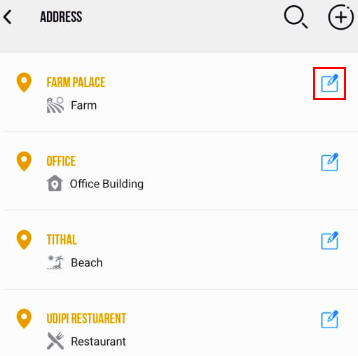
- The Address configuration screen will open.
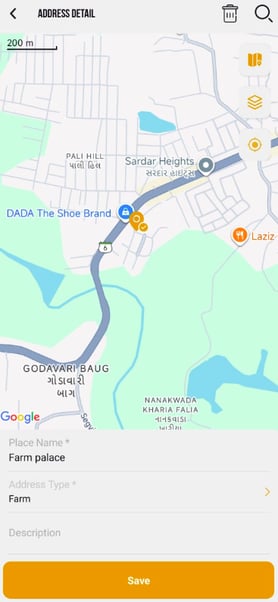
- you can edit the Place Name of the address.
- you can chnage the Address Type from the dropdown list.
- you can change the Description if necessary.
- To edit the location: you have 2 options.
- click on
 search and choose the desired Address location. Utilize the marker to pinpoint the exact location accurately.
 - Click on the
 icon to add your current location as address.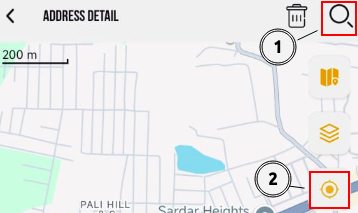
- click on
Please Note: While using the 2nd option to add location, you need to grant the location permission for the device.
- Click on the Save icon.
To Delete the Address.
- Click on the
 icon to delete the address.