
The Wallet module enables Admins, Resellers, and Companies to maintain a prepaid wallet balance within Trakzee. The wallet can be used to perform recharge and renewal transactions without making a payment each time through a payment gateway. Users can add funds to the wallet, utilize the available balance for subscription payments, and track all wallet credit and debit activities from a single report.
The module ensures quick payment processing, centralized balance management, and complete transaction transparency by maintaining invoices and transaction history for every wallet activity.
Note: Before using the Wallet module:
- A valid tariff must be assigned to the Admin account.
- Wallet functionality is available for both Prepaid and Postpaid account types.
- A payment gateway must be configured in the system.
- Only authorized users with Wallet screen rights can access this feature.
To Get Started
- Log in to your account
- Go to setting >Billing > Wallet
Wallet Screen Overview
The Wallet Detail screen allows users to add funds to their wallet. 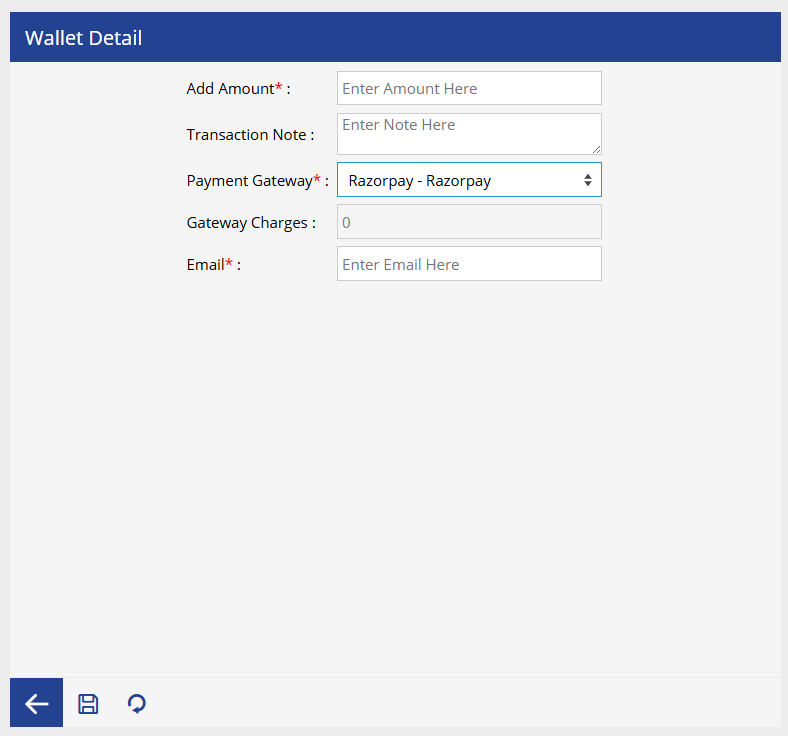
- Enter the amount that you want to credit to your wallet.
- Enter remarks or notes for the wallet transaction. This field is optional.
- Select the payment gateway through which the wallet amount will be added.
- Displays the applicable payment gateway charges based on the selected payment gateway. This value is calculated automatically.
- Enter the email address where the payment confirmation and transaction details will be sent.
- Click Save button.
Note: Once the payment is successful, the wallet balance is updated automatically.
Using Wallet Balance for Recharge
The available wallet balance can be used while performing:
- Subscription Recharges
- Subscription Renewals
- Other supported billing transactions
During the recharge process:
- Enable the Use Wallet Balance option.
- The system automatically displays the available wallet balance.
- After recharge, the deducted amount is reflected immediately in the wallet.
Note: If the available balance is insufficient, the system displays the following message:
"Insufficient Wallet Balance. Please recharge your wallet."