
The Object Monthly Cost Report provides a detailed view of the monthly operating cost associated with each vehicle or tracking object. It combines distance travelled, variable expenses, fixed monthly expenses, taxes, and cost per kilometre or mile to help users understand the overall cost of operating each object.
The report also provides previous month cost-per-km/mi values, allowing users to compare the current month's operating cost with the previous month.
Benefits
- Monitor the monthly operating cost of individual vehicles.
- Compare variable and fixed expenses across objects.
- Analyze operating cost against the distance travelled.
- Review current and previous month cost per km/mi.
- Identify major cost components such as fuel, maintenance, insurance, and driver expenses.
How to Access
- Report-->Expense-->Object Monthy Cost
Filters
Use the available filters to generate the report: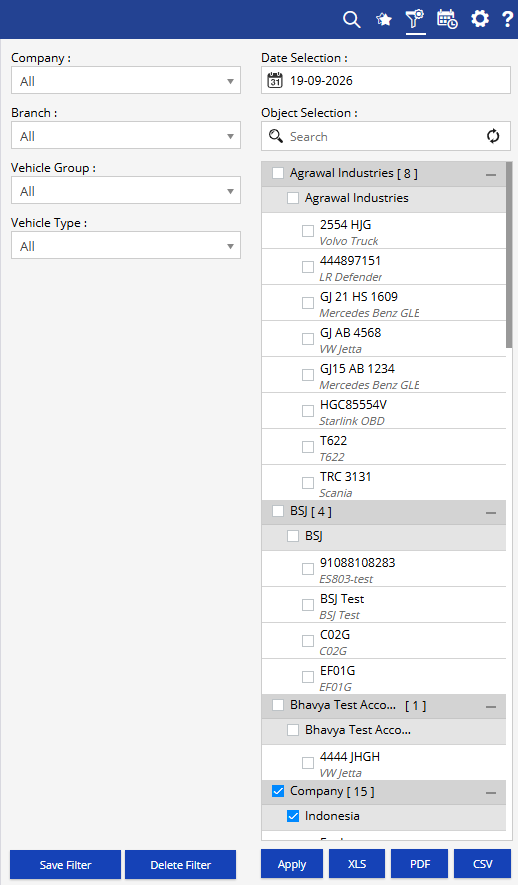
- Company: Select the required company.
- Date Selection: Select the required date or date range.
- Branch: Select the required branch.
- Vehicle Group: Select the required vehicle group.
- Vehicle Type: Select the required vehicle type.
- Object Selection: Select the required vehicle or tracking object.
Additional options include Save Filter, Delete Filter, Apply, XLS, PDF, and CSV.
Report Layers
The Object Monthly Cost Report provides a detailed object-level view of monthly operating costs.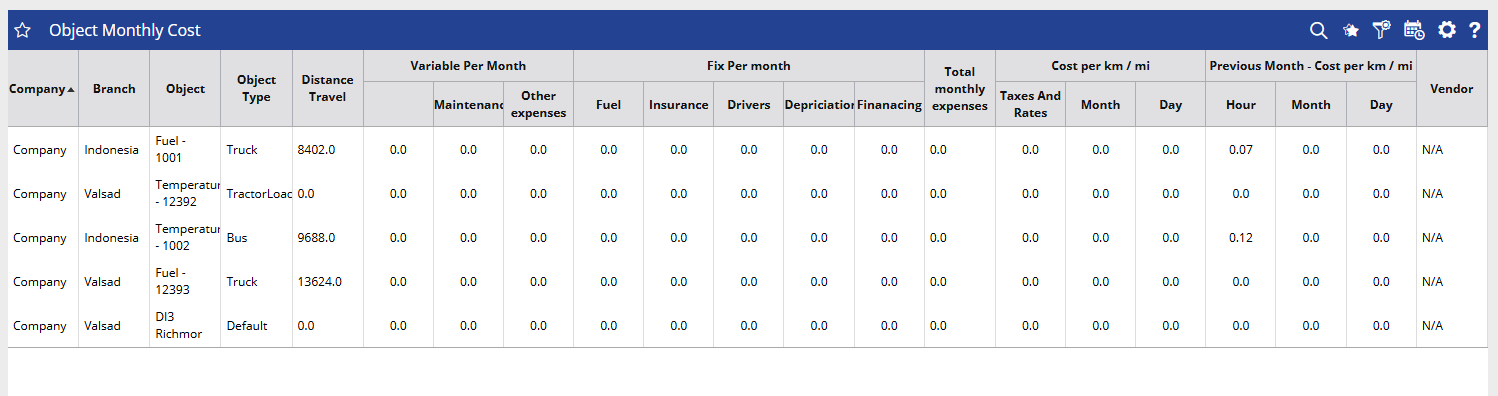
Object Monthly Cost Details
Each row represents an individual vehicle or tracking object and displays its distance travelled, variable expenses, fixed expenses, total monthly expenses, cost per km/mi, previous month comparison, and vendor information.
How to Read
- Company identifies the company under which the object is recorded.
- Branch shows the branch associated with the object.
- Object identifies the vehicle or tracking object for which the cost is calculated.
- Object Type shows the configured type of the object, such as Truck, Bus, Tractor/Loader, or Default.
- Distance Travel indicates the distance travelled by the object during the selected period.
Variable Per Month
- Fuel shows the fuel expense recorded for the object.
- Maintenance displays the maintenance expense recorded during the period.
- Other Expenses shows other variable expenses associated with the object.
Fix Per Month
- Fuel displays the fixed monthly fuel cost, where configured.
- Insurance shows the fixed monthly insurance expense.
- Drivers displays the fixed driver-related expense.
- Depreciation shows the depreciation cost allocated to the object.
- Financing displays the financing-related monthly cost.
- Total Monthly Expenses shows the combined monthly expenses associated with the object.
- Taxes And Rates displays applicable taxes or rates included in the cost calculation.
Cost per km / mi
- Month shows the cost per kilometre or mile calculated for the monthly period.
- Day shows the cost per kilometre or mile based on the daily cost calculation.
- Hour shows the cost per kilometre or mile based on the hourly cost calculation.
Previous Month - Cost per km / mi
- Month shows the previous month's cost per kilometre or mile.
- Day shows the previous month's daily cost-per-km/mi value.
- Vendor identifies the vendor associated with the object, where available.
Take Action
- Apply Company, Branch, Vehicle Group, Vehicle Type, and Object filters to focus the report on specific vehicles.
- Review Distance Travel together with Total Monthly Expenses to understand operating costs in relation to vehicle usage.
- Compare Fuel, Maintenance, Other Expenses, Insurance, Drivers, Depreciation, and Financing to identify the major cost components.
- Review Cost per km/mi to evaluate the operating cost relative to distance travelled.
- Compare current and previous month cost per km/mi values to identify changes in operating costs.
- Use the Vendor information to review vendor-related object records where applicable.
- Export the report in XLS, PDF, or CSV format for further analysis or sharing.
Important Notes
- The report is generated according to the selected date, company, branch, vehicle group, vehicle type, and object filters.
- Distance Travel is based on the tracking data available for the selected object and period.
- Variable and fixed expenses depend on the expense information configured and recorded for the object.
- Cost per km/mi is calculated using the applicable expense and distance information available for the selected period.
- Previous month values are provided for comparison with the corresponding cost-per-km/mi figures.
- Vendor information is displayed when a vendor is associated with the object.