
The Geofence Visited Detail Report provides detailed information about vehicle visits to configured geofences during the selected period. It helps users understand when a vehicle reached and departed from a geofence, the locations recorded at arrival and departure, the time spent inside and outside the geofence, and temperature information where applicable.
The report is particularly useful for monitoring vehicle visits to specific locations and analyzing the duration and conditions associated with each visit.
Benefits
- Track individual vehicle visits to defined geofences.
- Review reach and departure times and locations.
- Analyze the duration spent inside and outside a geofence.
- Monitor temperature readings at reach, departure, and throughout the visit.
- Review historical vehicle movement associated with a geofence visit using Playback.
- Support location-based operational and visit analysis.
How to Access
- Report-->Geofence-Address-->Geofence Visited Detail report
Filters
Use the available filters to generate the report: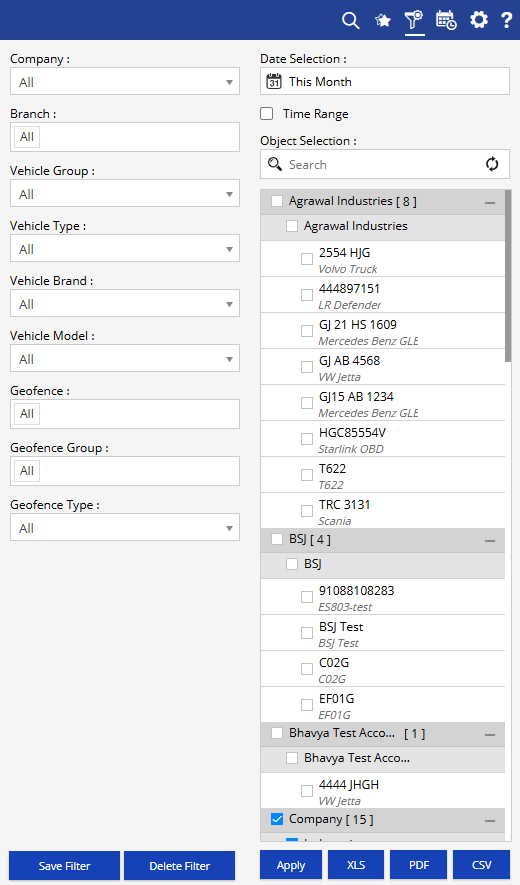
- Company: Select the required company.
- Date Selection: Select the required date or date range.
- Branch: Select the required branch.
- Vehicle Group: Select the required vehicle group.
- Vehicle Type: Select the required vehicle type.
- Vehicle Brand: Select the required vehicle brand.
- Vehicle Model: Select the required vehicle model.
- Geofence: Select the required geofence.
- Geofence Group: Select the required geofence group.
- Geofence Type: Select the required geofence type.
- Object Selection: Select the required vehicle or tracking object.
Additional options include Save Filter, Delete Filter, Apply, XLS, PDF, and CSV.
Report Layers
The Geofence Visited Detail Report has two levels of information:
Layer 1 – Geofence Visited Summary
Provides a summary of geofence visits for each selected vehicle, including the number of visits, total geofence duration, and total geofence outside duration.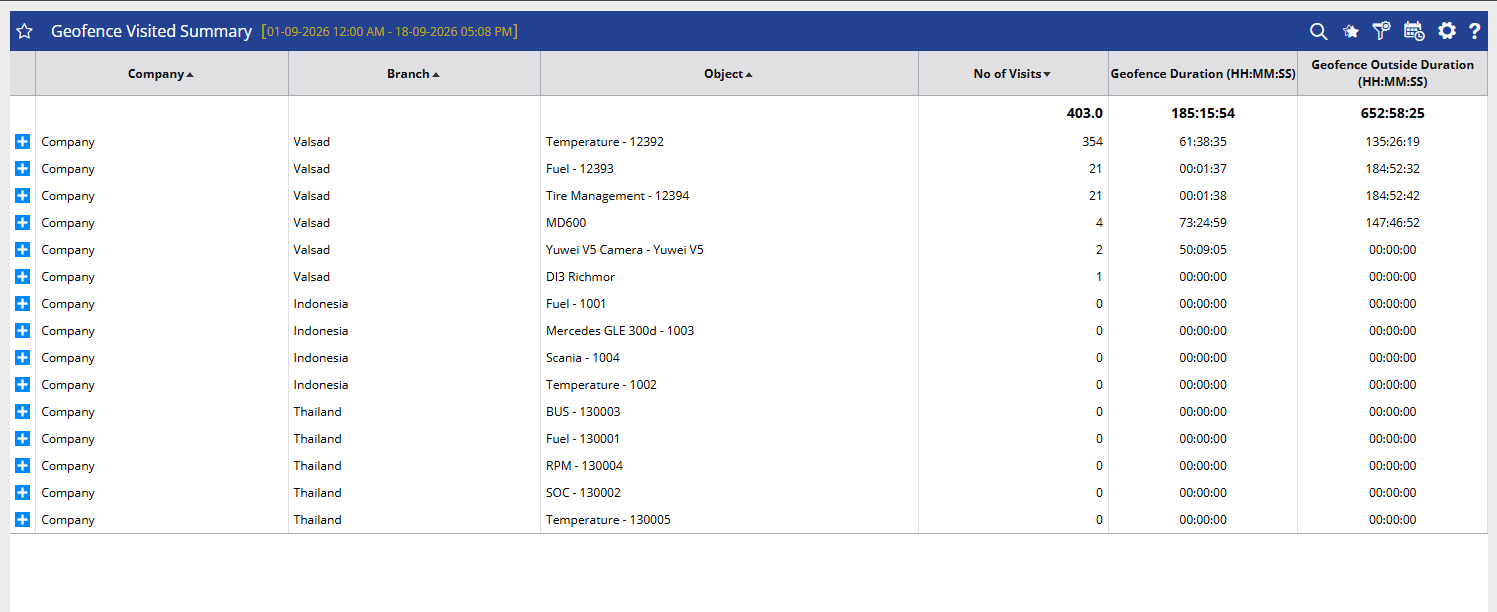
Layer 2 – Geofence Visited Detail
Displays detailed information for individual geofence visits, including reach and departure information, duration, temperature readings, and Playback.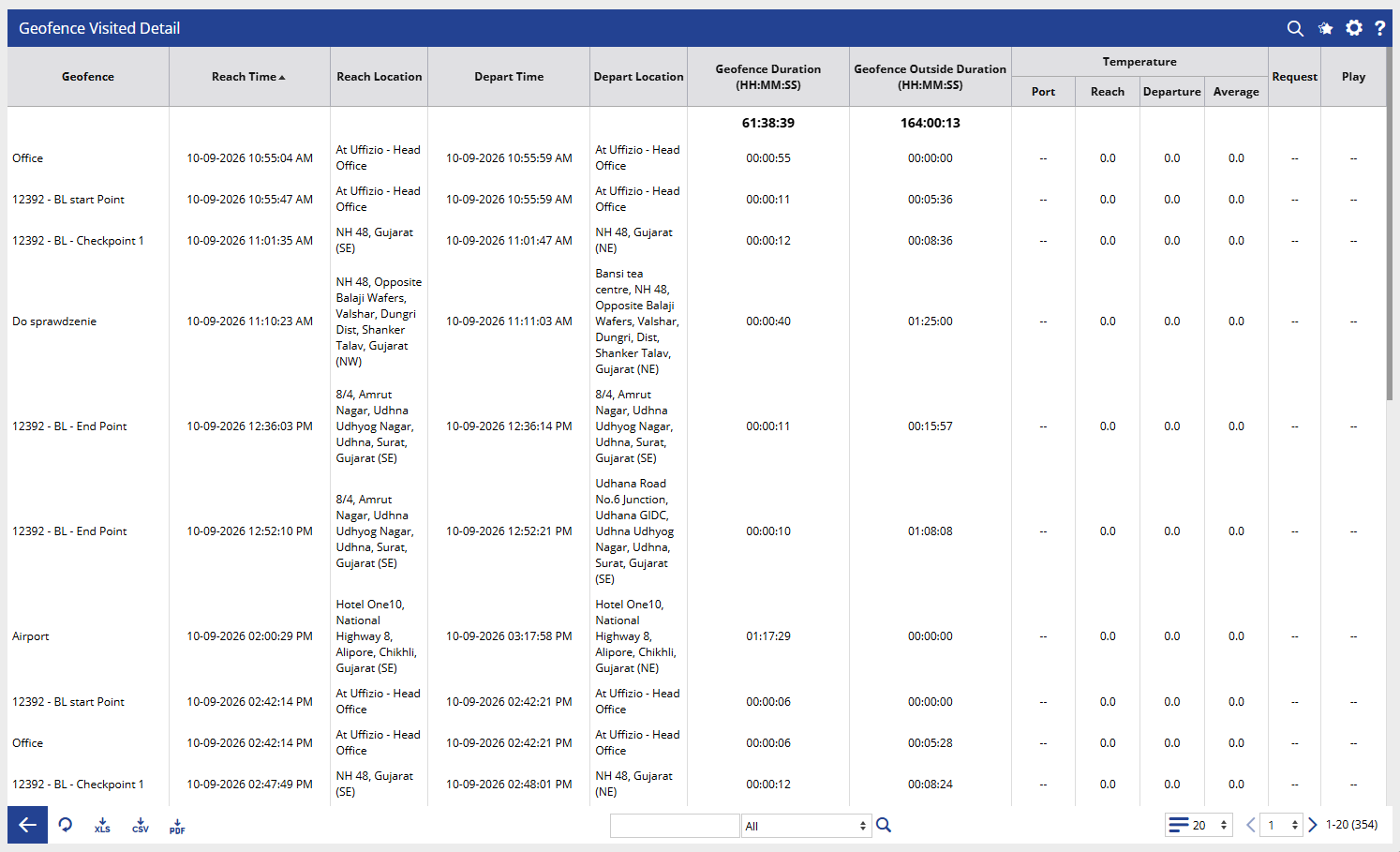
How to Read
Geofence Visited Detail
- Geofence identifies the geofence visited by the vehicle. It helps determine the specific location associated with the visit.
- Reach Time indicates the date and time when the vehicle reached the selected geofence.
- Reach Location shows the location or address recorded when the vehicle reached the geofence. This helps verify the vehicle's arrival location.
- Depart Time indicates the date and time when the vehicle departed from the geofence.
- Depart Location shows the location or address recorded when the vehicle departed from the geofence. This can be compared with the reach location to review the movement associated with the visit.
- Geofence Duration (HH:MM:SS) shows the total time the vehicle remained within the geofence during the recorded visit. For example, 00:01:17:29 represents the duration spent inside the geofence based on the report's displayed time format.
- Geofence Outside Duration (HH:MM:SS) indicates the time the vehicle remained outside the geofence between recorded visits. This helps understand the interval between consecutive visits.
- Temperature – Port identifies the temperature port or sensor associated with the temperature readings, where applicable.
- Temperature – Reach displays the temperature recorded when the vehicle reached the geofence.
- Temperature – Departure displays the temperature recorded when the vehicle departed from the geofence.
- Temperature – Average shows the average temperature recorded during the geofence visit, where temperature data is available.
- Request displays the request-related information associated with the visit, where applicable.
- Play provides the option to review the vehicle's movement associated with the selected geofence visit.
Take Action
- Apply date, vehicle, branch, and geofence filters to focus the report on specific visits.
- Review Reach Time and Depart Time to understand when the vehicle arrived at and left the geofence.
- Compare Reach Location and Depart Location to verify the recorded locations.
- Check Geofence Duration to identify how long the vehicle remained inside the geofence.
- Review Geofence Outside Duration to understand the time between consecutive visits.
- Monitor Temperature – Reach, Temperature – Departure, and Temperature – Average for temperature-sensitive operations.
- Use Play when detailed vehicle movement verification is required.
- Export the report in XLS, PDF, or CSV format for further analysis or sharing.
Important Notes
- The report is generated according to the selected date, object, branch, and geofence filters.
- A separate record is displayed for each recorded visit to a geofence.
- Reach Time and Depart Time are based on the tracking data received from the selected vehicle.
- Geofence Duration represents the time associated with the vehicle's recorded presence inside the geofence.
- Geofence Outside Duration represents the interval between recorded geofence visits.
- Temperature-related fields are applicable when the selected vehicle has compatible temperature monitoring and data is available.
- Reach Location and Depart Location depend on the location data available from the tracking system.
- Playback availability depends on the historical tracking data available for the selected vehicle and period.