
The Driver Rating Report provides an overview of driver performance based on driving behavior and recorded violations during the selected period. It evaluates drivers using parameters such as speeding, harsh driving, idling, ADAS, DMS, and total violations, and presents a rating, driving behavior, penalty points, and overall score.
The report also allows users to drill down into the detailed violation records of a selected driver to understand the events contributing to the driver's rating and score.
Benefits
- Evaluate driver performance based on recorded driving behavior.
- Identify speeding, harsh driving, and idling events.
- Review ADAS and DMS-related violations.
- Understand total violations and penalty points for each driver.
- View the driver's rating, driving behavior, and overall score.
- Drill down into individual violation records for detailed analysis.
How to Access
-
Report-->Driver-->Driver Rating
Filters
Use the available filters to generate the report: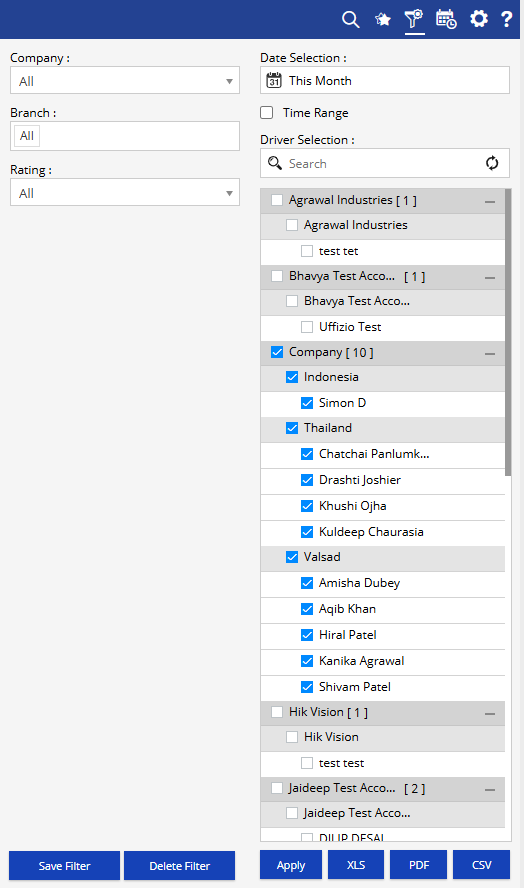
- Company: Select the required company.
- Branch: Select the required branch.
- Date Selection: Select the required reporting period.
- Time Range: Enable this option to specify a particular time range, where applicable.
- Rating: Select the required driver rating.
- Driver Selection: Select the required drivers.
Additional options include Save Filter, Delete Filter, Apply, XLS, PDF, and CSV.
Report Layers
The Driver Rating Report has two levels of information:
Layer 1 – Driver Rating
Provides a summary of driver performance, including driving activity, violations, rating, driving behavior, penalty points, and score.
Layer 2 – Eco Driving Detail
Displays the detailed violation records for the selected driver, including the date and time, location, violation type, duration, penalty points, and map reference.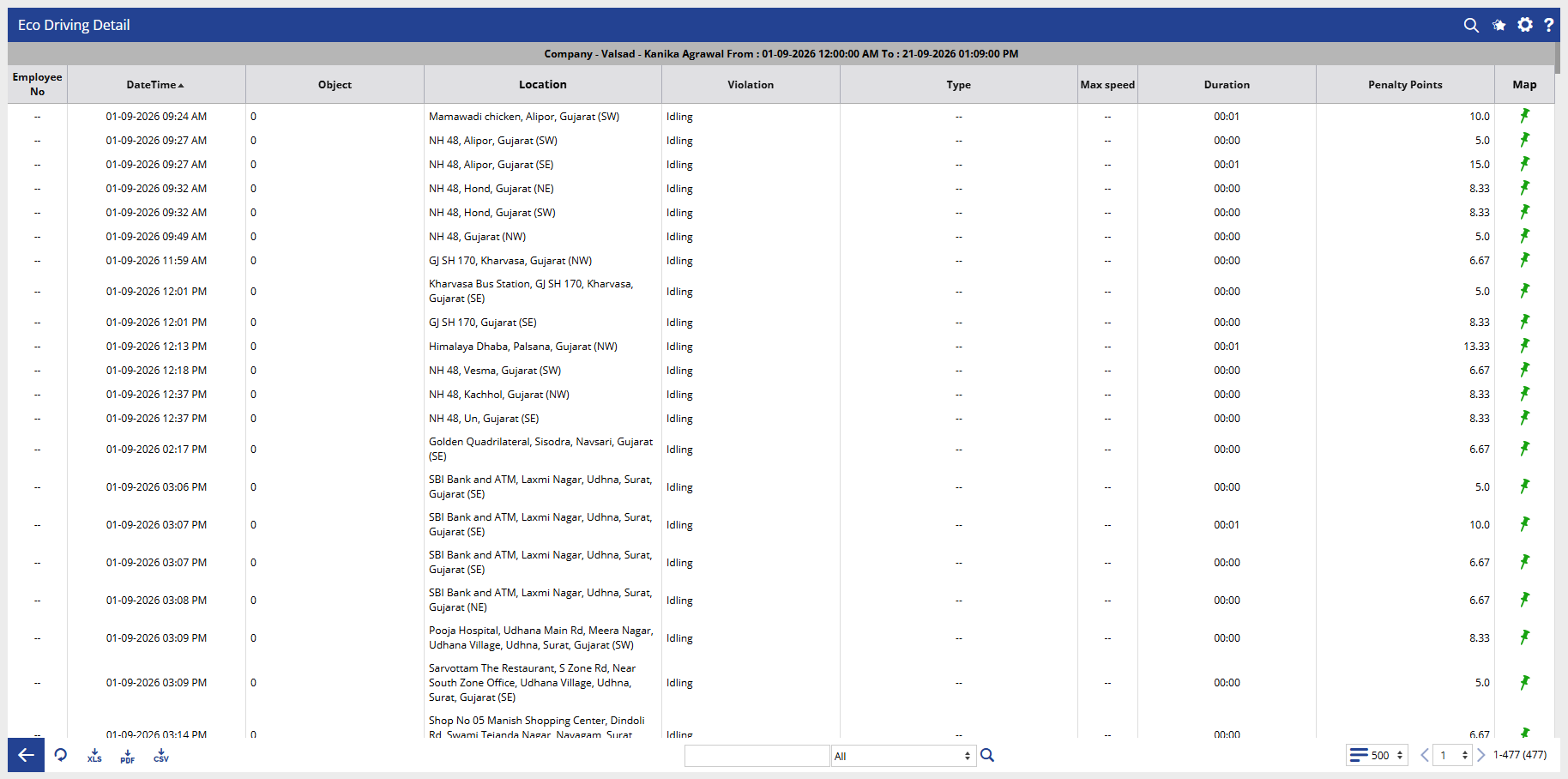
How to Read
Driver Rating
- Company identifies the company associated with the driver.
- Branch shows the branch associated with the driver.
- Object identifies the vehicle or tracking object assigned to the driver.
- Driver shows the driver whose performance is being evaluated.
- Employee No displays the employee number associated with the driver, where available.
- Distance shows the total distance covered by the driver during the selected period.
- Running shows the total running duration recorded for the driver's assigned object.
- No of Speeding shows the number of speeding violations recorded.
- No of Harsh Driving shows the number of harsh driving events detected.
- No of Idling shows the number of idling events recorded.
- ADAS displays the number of violations detected through the ADAS system.
- DMS displays the number of violations detected through the Driver Monitoring System.
- Total Violations shows the total number of recorded driving violations.
- Rating displays the driver's rating based on the configured driving performance parameters.
- Driving Behavior indicates the driver's behavior classification, such as Excellent or Extremely Risky.
- Penalty Points shows the penalty points accumulated from recorded violations.
- Score displays the driver's overall performance score for the selected period.
Eco Driving Detail
- Employee No displays the employee number associated with the selected driver, where available.
- DateTime shows when the driving violation was recorded.
- Object identifies the vehicle or tracking object associated with the violation.
- Location shows the location where the violation occurred.
- Violation identifies the type of violation recorded, such as Idling.
- Type displays the specific violation type or classification, where applicable.
- Max Speed shows the maximum speed recorded for the event, where applicable.
- Duration shows the duration of the recorded violation.
- Penalty Points displays the penalty points assigned to the violation.
- Map provides a map option to view the location associated with the recorded event.
Take Action
- Select the required company, branch, date range, rating, and drivers to focus the report.
- Review Total Violations to identify the number of driving-related events recorded for each driver.
- Compare Speeding, Harsh Driving, and Idling counts to understand specific driving behavior patterns.
- Review ADAS and DMS values to identify violations detected through connected safety systems.
- Check the Rating, Driving Behavior, Penalty Points, and Score to understand the driver's overall performance.
- Use the + option to open the detailed violation records for a selected driver.
- Review the Eco Driving Detail to identify when and where individual violations occurred.
- Use the Map option in the detail view to review the location of a specific violation.
- Export the report in XLS, PDF, or CSV format for further analysis or sharing.
Important Notes
- The report is generated according to the selected company, branch, date selection, rating, and driver filters.
- Driver ratings and scores are based on the driving events and violation parameters configured in the system.
- Penalty Points are assigned according to the configured violation rules.
- A higher number of violations or penalty points can affect the displayed rating, driving behavior, and score.
- The availability of ADAS and DMS information depends on the relevant devices, integrations, and configurations.
- The detail view provides the individual violation records contributing to the driver's performance analysis.
- The Rating filter can be used to narrow the report to drivers matching the selected rating criteria.