
The Category Wise Expense Report provides a summarized view of expenses grouped by company, branch, expense category, expense type, and sub type for the selected period. It helps users understand how expenses are distributed across different categories and identify the total amount spent under each expense type.
The report can also be expanded to view the individual expense records associated with a selected category, including the object, expense source, amount, expense period, reference number, and bill attachment.
Benefits
- Analyze expenses by category and expense type.
- Compare fixed and variable expenses across branches.
- Identify the total amount spent under each expense category.
- Review individual expense records for detailed verification.
- Track expense amounts and supporting bill information.
How to Access
- Report-->Expense-->Category Wise Expense
Filters
Use the available filters to generate the report: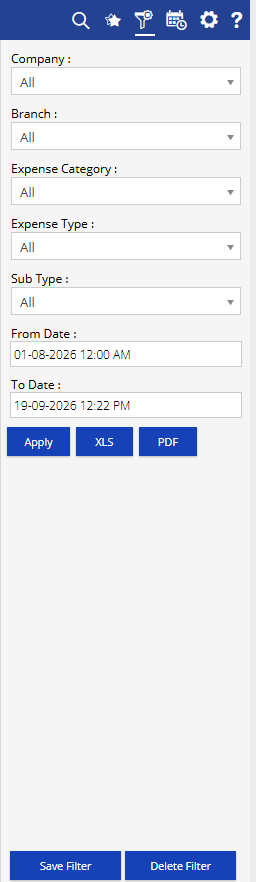
- Company: Select the required company.
- Branch: Select the required branch.
- Expense Category: Select the required expense category.
- Expense Type: Select the required expense type.
- Sub Type: Select the required expense sub type.
- From Date: Select the starting date and time for the expense period.
- To Date: Select the ending date and time for the expense period.
Additional options include Save Filter, Delete Filter, Apply, XLS, and PDF.
Report Layers
The Category Wise Expense Report has two levels of information:
Layer 1 – Category Wise Expense Summary
Provides a summary of expenses grouped by company, branch, expense category, expense type, and sub type.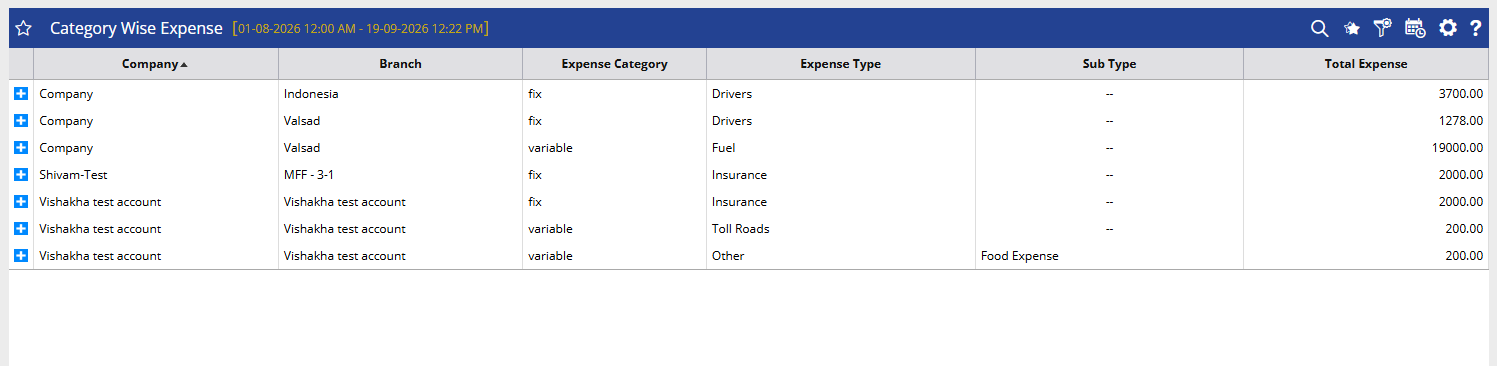
Layer 2 – Expense Details
The expand (+) option can be used to view the individual expense records associated with the selected summary entry.
How to Read
Category Wise Expense Summary
- Company identifies the company under which the expense is recorded.
- Branch shows the branch associated with the expense.
- Expense Category identifies whether the expense is classified as fixed or variable, or another configured category.
- Expense Type identifies the specific expense type, such as Drivers, Fuel, Insurance, Toll Roads, or Other.
- Sub Type provides additional classification for the selected expense type, where configured.
- Total Expense shows the total amount recorded for the selected company, branch, category, type, and sub type during the selected period.
Expense Details
- Object identifies the vehicle or tracking object associated with the expense.
- Fuel Source shows the fuel source associated with the expense, where applicable.
- Expense By identifies the user or account through which the expense was recorded.
- Expense From indicates the starting date and time of the expense period.
- Expense To indicates the ending date and time of the expense period.
- Currency Unit shows the currency used for the expense amount.
- Amount displays the individual expense amount.
- Reference Number shows the reference number entered for the expense, where available.
- Bill Attachment indicates whether supporting bill documentation is attached to the expense record.
Take Action
- Apply Company, Branch, Expense Category, Expense Type, and Sub Type filters to focus the report on specific expenses.
- Select the required date range to analyze expenses for a particular period.
- Compare Total Expense across different categories and expense types.
- Expand a summary record to review the associated individual expense entries.
- Check Amount, Reference Number, and Bill Attachment when verifying expense records.
- Export the report in XLS or PDF format for further analysis or sharing.
Important Notes
- The report displays expenses according to the selected date range and filters.
- Total Expense represents the combined expense amount for the corresponding category and classification within the selected period.
- Sub Type information is displayed when an additional subtype has been configured for the expense.
- Expense details such as Object and Fuel Source may vary depending on the type of expense recorded.
- Bill Attachment availability depends on whether supporting documentation was added to the expense record.