
The Rename Device Brand or Model screen allows users to customize the display names of existing device brands or device models without modifying the original device definitions. This feature is useful when organizations want to use internal naming conventions, standardized terminology, or more recognizable names for specific device brands or models.
Users can choose whether they want to rename a Device Brand or a Device Model, select the existing entry, and specify a new display name. Once saved, the renamed value is reflected across applicable screens where the device brand or model is displayed.
To Get Started
- Login to your account
- Go to Setting > Master > Utilities > Rename Device Brand or Model
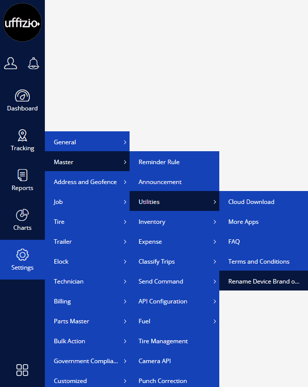
To Rename a Device Brand or Model
- Click on the + button
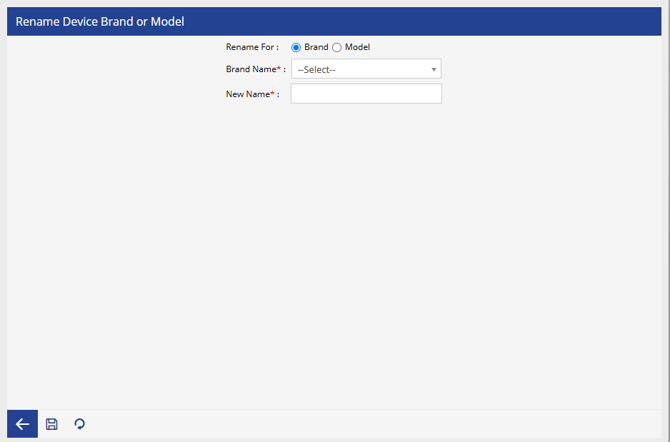
- Select whether you want to rename a Brand or a Model.
- Brand
- Choose the existing Brand Name
- Enter the New Name of that brand.
- Model
- Choose the existing Model Name
- Enter the New Name of that model.
- Brand
- Click the Save icon to apply the changes