
The PTO Active sensor configuration allows users to monitor and manage the status of the vehicle's Power Take-Off (PTO). By configuring the PTO Active sensor, the system can detect when the PTO is engaged or active, helping track equipment operation, vehicle utilization, and PTO-related activities. Additionally, users can configure alerts to receive notifications whenever the PTO status changes. PTO is also used in Advance Idle rule.
Before You Get Started
- Log in to your account.
- Go to Settings > General > Object > Object.
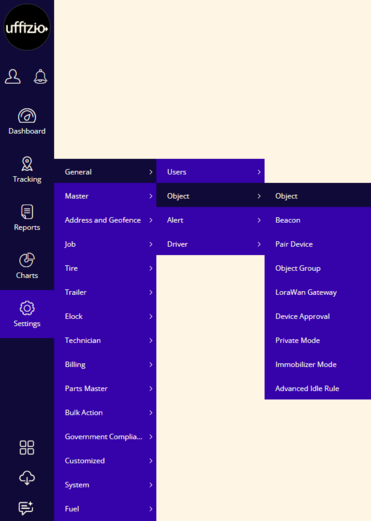
- Double-click on the vehicle/object record for which you want to configure the PTO Active sensor .
To Get Started
- Navigate to the Sensors tab.

- Activate the digital port connection type by clicking on the checkbox given in the Active column.
-
- User can select the Digital input port in the list.
- In connected Sensor, select PTO Active.

-
Reading Type: This setting determines how the received data is displayed in the system.
- Direct: The system displays the data exactly as it is received from the sensor.
- Inverse: The system displays the opposite of the received data (e.g., ON becomes OFF and OFF becomes ON).
Please Note: Select the appropriate option based on how you want the sensor data to be interpreted and shown in the system.
- Save the configuration by clicking on the Save 💾 icon.
Please Note: Users can configure alerts for PTO actions to stay informed of any activity.
To configure PTO Active alert, Click.