
The Fuel Price screen allows users to configure fuel prices for different fuel categories. These prices are used by Trakzee to calculate fuel expenses and generate accurate values in reports such as the Fuel Trip Cost Report.
Each fuel price configuration is associated with a specific Reseller and Company, enabling organizations to maintain different fuel prices based on their operational requirements. The configured prices remain effective from the selected validity date until a new price configuration is added.
To Get Started
- Login to your account
- Go to setting >master > Fuel price
To Configure Fuel Prices
- Click on the + button
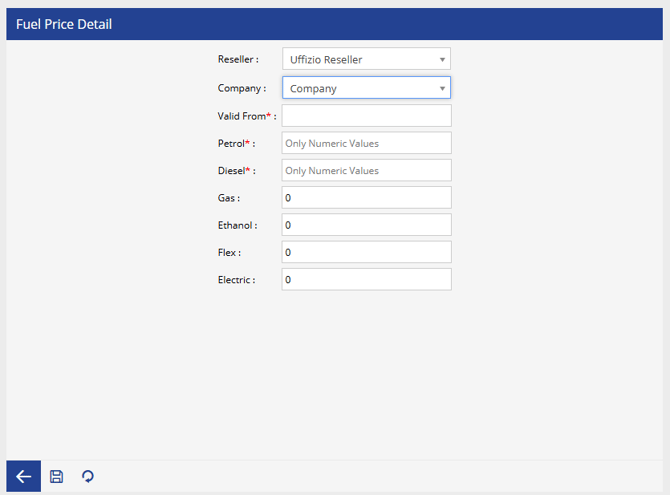
- Select the Reseller
- Select the Company
- Enter the date from which the configured fuel prices become effective
- Enter the price for standard petrol fuel.
- Enter the price per unit of diesel fuel.
- Enter the price for gas fuel, if applicable.
- Enter the price for ethanol fuel.
- Enter the price for flex fuel.
- Enter the electricity cost used for electric vehicles, if applicable.
- Click the Save icon to apply the configuration
- The selected fuel type of each object is matched with its corresponding configured price.
- The system automatically uses the appropriate fuel price while calculating fuel expenses.
- The configured price is reflected in the Fuel Trip Cost Report and other applicable fuel-related calculations.