
The Fuel Budget Plan is a feature that helps fleet managers define a fuel expense budget for a vehicle or fleet and monitor whether vehicles operate within that budget. Instead of only tracking fuel consumption, it allows organizations to compare planned fuel costs against actual usage for better cost control.
To Get Started
- Log in to your account
- Go to Setting > Master > Fuel Budget Plan
To add Budget
- Click on the ➕ button to add budget plan.

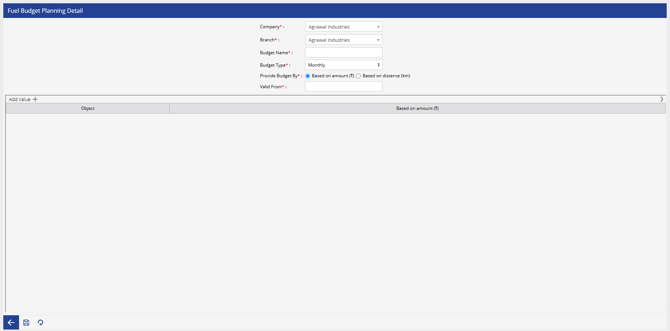
- Select the Company from the drop down for which the Fuel Budget plan needs to be created.
- Select the Branch from the drop down.
- Enter the name for Budget Name.
- Select the Budget Type for Monthly.
- Select the Provide Budget By:
- Selected Based on amount(₹)
- Enter the day from which this Budget plan will be Valid from.
- Click the Add button to add the budget.

- Select the Object from the drop down.
- Enter the Budget for the selected Object Based on Amount.
- Select Based on distance(km)
- Enter the day from which this Budget plan will be Valid from.
- Click the Add button to add the budget.

- Selected Based on amount(₹)
-
-
- Select the Object from the drop down.
- Enter the Budget for the selected Object Based on distance.
-
- Select the Save button to save the whole details.
Note: After configuring the fuel budget for an object in the Fuel Budget Plan, navigate to the Fuel Budget Summary Report to view the configured fuel budget details, monitor budget utilization, and compare the allocated budget with the actual fuel consumption or fuel expenses for each object.