
Issue Summary
A device may not show Live data on the platform when the device is unable to communicate correctly with the server. The issue can be related to an incorrect IMEI, SIM/GPRS connectivity, IP configuration, SIM whitelisting, or a closed communication port.
The following checks should be completed to identify the cause.
Example Questions
-
- Why is my device not getting Live?
- Why is my device not showing live data?
- Why is the device not communicating with the server?
- The device is installed, but no live data is received. What should I check?
- Why is the GPS device offline?
- Why is the device not sending data to the platform?
- How can I check whether the device is connected to the server?
Symptoms / How to Identify
- No live data is received from the device.
- The device does not update its current location.
- The device may appear Inactive/Offline on the platform.
- The device is installed and powered on but is not communicating with the server.
- Data packets are not being received by the platform.
Information Required Before Troubleshooting
Collect or verify the following information:
- Device IMEI number
- SIM details
- SIM/GPRS status
- Internet/data connectivity
- SIM whitelisting status, if applicable
- Current/new IP address, if the SIM is whitelisted
- Server IP and communication port configured in the device
- Port status
Troubleshooting Steps
1. Verify the IMEI Number
Check whether the IMEI number configured in the platform matches the IMEI of the physical device.
An incorrect IMEI can prevent the device data from being associated with the correct object.
2. Check SIM and GPRS Connectivity
Verify that the SIM inserted in the device:
- Is active.
- Has an active data/internet plan.
- Has working GPRS/mobile data connectivity.
- Can connect to the internet/network.
If the SIM is whitelisted, also verify that it is using the new/current IP address as required.
3. Check the Server IP and Port
Verify that the device is configured with the correct:
- Server IP
- Communication port
The device must be able to establish communication with the configured server and port.
4. Check Whether the Port Is Open
Verify that the configured communication port is accessible.
You can check the port status using:
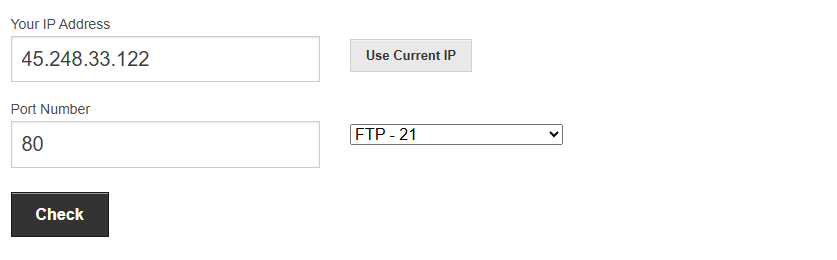
Enter the required port number and check whether the port is open.
Possible Cause
The device may not be getting Live data because:
- Incorrect IMEI is configured.
- SIM is inactive or does not have an active data plan.
- GPRS/mobile data is not working.
- Device does not have an active internet connection.
- A whitelisted SIM is still using an old IP address.
- Incorrect server IP is configured in the device.
- The communication port is closed or inaccessible.
- Device cannot establish a connection with the configured server.
Resolution / Action
- Confirm that the IMEI is correct.
- Ensure the SIM is active and has working internet/GPRS connectivity.
- If the SIM is whitelisted, verify that it is using the new/current IP address.
- Verify the server IP and communication port configured in the device.
- Check the communication port using Port Checker.
- If the port is closed, check the server/firewall/network configuration and ensure the required port is open.
- Once connectivity and port configuration are corrected, verify whether the device starts transmitting Live data to the platform.