
Fleet Performance provides a quick overview of fleet operations by bringing key vehicle performance information together in the Live Tracking screen.
It helps users understand vehicle behaviour, operational efficiency, safety-related events, and compliance with defined operational rules.
Note: Fleet Performance is available only on the Company's Live Tracking.
Where to Find Fleet Performance
The Fleet Performance section is available on the Company's Live Tracking Screen and provides four performance parameters:
- Safety
- Efficiency
- Risk
- Discipline
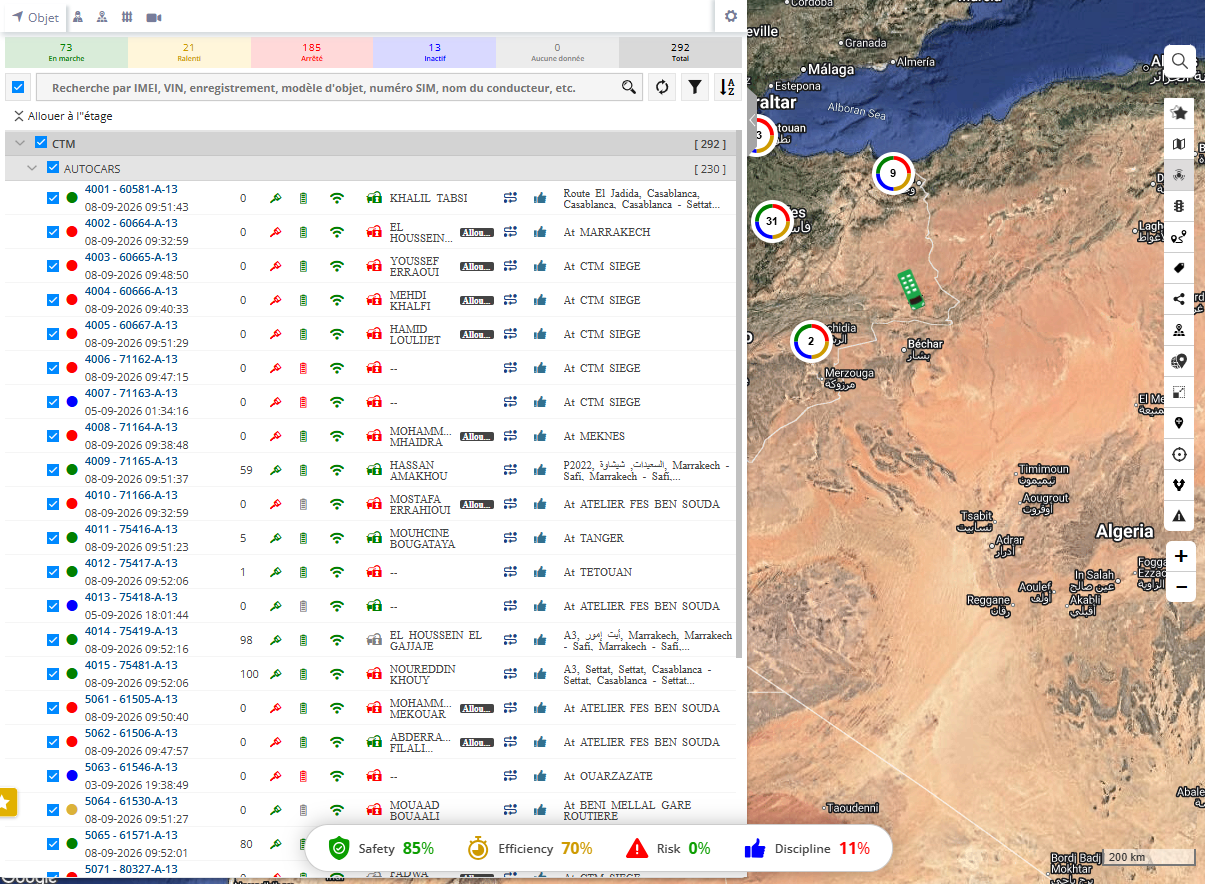
Users can select the relevant parameter to view more detailed information and identify the vehicles or events contributing to the fleet's performance.
-
Safety
-
The Safety parameter provides information about driving behaviour and safety-related vehicle events.
-
It considers events such as:
-
Overspeed
- Harsh Acceleration
-
Harsh Braking
-
Harsh Cornering
-
Fatigue Driving
- Eyes Closed
- Distracted Driving
- Driver On Call
- Seatbelt Not Fastened
- Smoking
-
Yawning
-
Drinking Water
-
Forward Collision Alarm
- Pedestrian Collision Alarm
- FCW
- HMW
- Lane Departure
- Frequent Lane Change
- Car Distance Too Near
- Road Sign Violation
- Low Speed Forward Collision
-
- This helps users identify vehicles experiencing frequent driving or driver-safety events.
-
- Efficiency
- The Efficiency parameter provides information about vehicle operating efficiency, with a focus on idle behaviour.
- The system considers the configured idle rule. The current parameter configuration uses:
- Idle threshold: 5 minutes
- This helps users identify vehicles that spend excessive time idling during operations.
- Risk
- The Risk parameter highlights events that may indicate safety, operational, or financial risk.
- It considers information such as:
- Fuel Drop
- Device Inactive
- Collision
- Forward Collision Warning
- Pedestrian Collision Warning
-
Fatigue
-
Eyes Closed
-
HMW
-
This helps fleet managers identify vehicles or activities that may require attention.
-
Discipline
-
The Discipline parameter provides information about how vehicles follow defined operational rules and schedules.
-
It considers:
- Route Deviation
- Late Start
- Unauthorized Stop
- Late End
- Off-Hour Movement
- Stay Away Zone
- Risk Zone
- Stop Rate
- Running Rate
-
Late Work Start
-
This helps users identify deviations from planned routes, schedules, zones, and operating practices.
-
How to Use Fleet Performance
Fleet managers can use Fleet Performance to:
- Get a quick overview of fleet operations from Live Tracking.
- Review Safety, Efficiency, Risk, and Discipline information.
- Identify vehicles requiring attention.
- Review the events or activities affecting vehicle performance.
- Take corrective or preventive action based on the identified issues.
Important Notes
- Fleet Performance is available only on the Company's Live Tracking Screen.
- The information displayed depends on the data received from the vehicle/device and the configured company rules.
- The parameters help users identify areas requiring attention without checking multiple reports separately.