
The Bulk Object Update feature allows users to update details of multiple vehicles at once by uploading a modified Excel file. Instead of editing each vehicle individually, users can download a sample file containing the existing vehicle information, make the required changes, and upload the same file to update the records in bulk.
To Get Started
- Log in to your account.
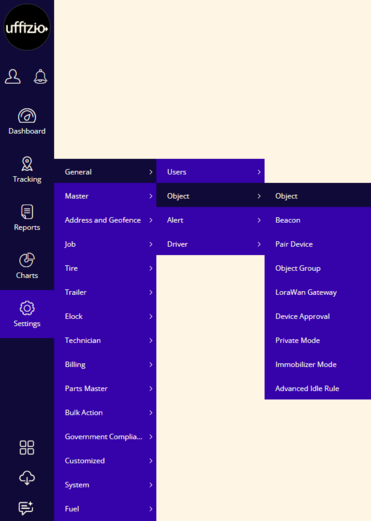
- Go to Settings > General > Object > Object.
To Edit Object Records
- Click on the
 button on the taskbar.
- Once the user click on the icon the following screen will open.
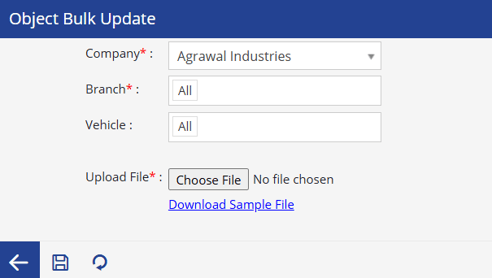
- Company: select the Company whose object details need to be updated.
- Branch: Select a specific branch or choose All to include objects from all branches.
- Vehicle: Select a specific object or choose All to include every object within the selected company or branch.
- Upload File: Upload the modified Excel file containing the updated object details.
- Download Sample File: Downloads an Excel file containing the current details of the selected objects. Edit and upload the same file to apply the updates
- Click on the Save 💾 icon to save the Bulk object edit.
To learn more about adding an object, click here