
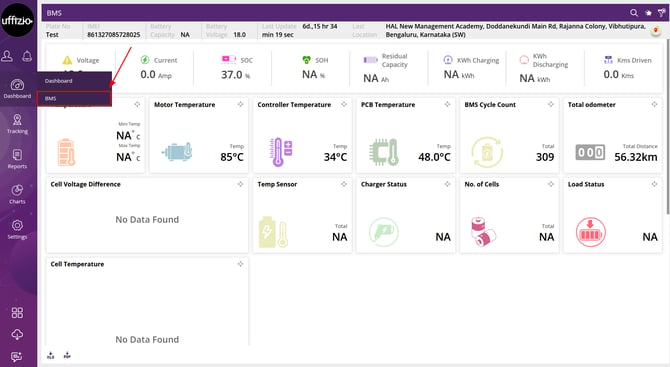
The BMS dashboard is the screen that allows users to view performance information and important data of the Electric vehicle (EV) in one place.
To open the dashboard, click on Menu > Dashboard > BMS in the application, as highlighted in the below given image.
-
In BMS, there is a single dashboard available for users. This dashboard is designed to display data for one vehicle at a time.
-
Users can select a particular vehicle, the data of which they want to view on the dashboard.
Search Bar
-
Users can search and access different screens and charts using the search icon available on the BMS dashboard.
-
Go to BMS Dashboard >
 icon on the top right corner.
 -
Search for whichever screen reports or chart you want to access.
Favourite Report
- Users can access any report marked as favourite from Favourite report icon.
- Tap on the icon to view the favourite reports.
- Select the required report, and the system will redirect the user to that report.
Please Note: To know more about favourite report, click here
Vehicle Filter
- Users can filter the data based on the selected vehicle.
-
Go to BMS Dashboard >
-png.png?width=15&height=15&name=filter%20(1)-png.png) to select the vehicle whose data is to be viewed on the dashboard.
to select the vehicle whose data is to be viewed on the dashboard.
Moveable Widget
-
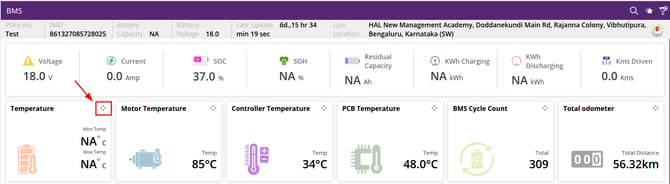
While observing the dashboard, the widgets can be moved by using the
icon and dragging the widget to the required place.
Please Note:
- The BMS dashboard displays data for only one vehicle at a time.
- Widget customization (enable/disable) is not available.
- Report access is not available on this dashboard.