
The State Border Crossing alert is used to notify users when a vehicle crosses from one state to another during a trip. This alert helps organizations monitor interstate movement, track vehicle travel across state boundaries, and maintain visibility of vehicle operations across different regions.
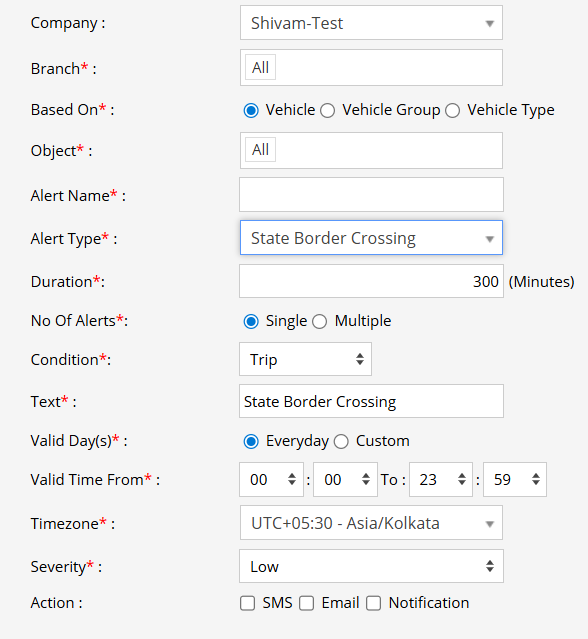
Parameters Considered (Prerequisites)
- State Boundary: The system must have the required state boundaries/maps available to identify when an object crosses from one state to another.
- Condition: The alert is configured based on Trip, as shown in the configuration screen.
How to Configure
- Select the correct Company and Branch for whom the alert is to be configured.
- Based On: Choose what you want to base the alert configuration on (Object, Object Group, Object Type).
- Object: Select individual vehicles for whom you want the alert to generate.
- Object Group: Select a group of vehicles for whom you want the alert to generate.
- Object Type: Select a vehicle or object type for whom you want the alert to generate.
- Select the Object based on the previous step selection.
- Set an Alert Name for identification of the alert.
- Select the Alert Type as State Border Crossing.
- Enter the Duration in minutes. This defines the duration considered by the system for generating the alert after the state border crossing condition is detected.
- Under No Of Alerts, select how many times the alert should be generated:
- Single: The alert will be generated only once for the configured condition.
- Multiple: The alert can be generated multiple times whenever the configured condition is met.
- From Condition, select Trip. The alert will be considered when the state border crossing occurs during a trip.
- In the Text field, enter the message that will be displayed when the alert is triggered.
- Select the Valid Day(s) as Everyday or Custom.
- Everyday: The alert will be triggered every day when the configured condition is met.
- Custom: Select the specific days on which you want this alert to be triggered.
- Enter the Valid Time From and To. The alert will be generated only within the selected time range.
- Select the required Timezone.
- Select the Severity of the alert (Low, Medium, or High).
- Under Action, select the medium through which the alert or notification should be sent (SMS, Email, Notification, Social Media API, or IVR).
- SMS: To receive the alert by SMS, enable the checkbox and enter the required phone numbers.
- Email: To receive the alert by email, enable the checkbox and enter the email recipients.
- Notification: To receive the alert as a system push notification, enable the checkbox and select the users who should receive it.
- Social Media API: To receive the alert through WhatsApp or Telegram, enable the checkbox and configure the required gateway and recipient details.
- IVR: To receive the alert through an automated voice call, enable the checkbox and enter the required phone numbers.
- Click the Save 💾 icon to save the alert configuration.
Please Note: To receive alerts through SMS, Email, Social Media API, or IVR, the respective API/gateway must be configured at the Admin, Reseller, or Company level.
Example
A vehicle starts a trip from Maharashtra and travels toward Gujarat. When the vehicle crosses the state boundary during the trip, the State Border Crossing alert is triggered. The configured user receives a notification, allowing them to monitor interstate vehicle movement and maintain visibility of the vehicle's route.