
The Off Route alert is triggered when a vehicle deviates from a predefined route saved from the Live Tracking → Playback screen. This alert helps fleet managers ensure route compliance, detect unauthorized detours, and maintain operational efficiency.
Parameters Considered (Prerequisites)
- From the Playback screen, save the route of the vehicle using the save path option on the playback bar.
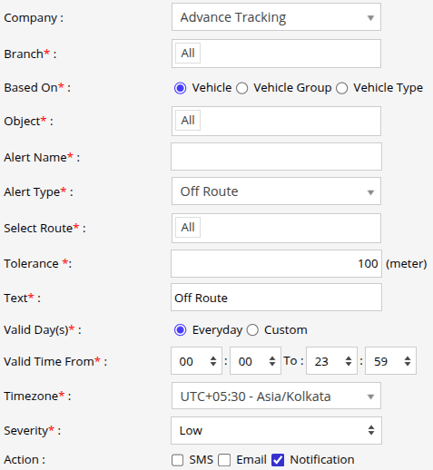
How to Configure
-
Select the correct Company and Branch for whom the alert is to be configured.
-
Based On: Choose on what you want to base the alert configuration (Object, Object Group, Object Type).
- Object: Select individual vehicles for whom you want the alert to generate.
- Object Group: Select a group of vehicles for whom you want the alert to generate.
- Object Type: Select vehicle or object type for whom you want the alert to generate.
-
Select the Object based on the previous step selection.
-
Set an Alert Name for identification of the alert.
-
Select the Alert Type as Off Route.
- From Select Route, you can choose one or multiple routes that were saved from the Playback screen.
- From Tolerance, specify the maximum allowed deviation( meters ) from the route. If the vehicle moves beyond this defined distance from the route, the Off Route alert will be triggered.
-
In the Text field, enter the message that will be displayed when the alert is triggered.
- Select the Valid Days, Everyday or Custom.
- Everyday: This alert will be triggered, everyday in case of a violation in accordance to these parameters set.
- Custom: Mark the checkboxes of the days, when you want this alert to be triggered for. (eg., Sun, Mon and Sat)

- Enter the Valid Time From and To. The alert will be generated inside the time range that you have selected.
- Select the Timezone.
- Select the Severity of the alert (Low, Medium, or High).
- Mark the checkboxes of the medium via which you want the Action or Notification to be sent. (eg., SMS, Email or Notification)
- SMS: To receive an alert by SMS, enable the checkbox, enter the phone numbers.
- Email: To receive an alert by Email, enable the checkbox, enter the recipients of the email.
- Notification: To receive an alert on the system Push Notification, enable checkbox.
- From Users, select the users that will receive the notification.
- From Notification Sound. Select the sound from the drop-down that will be played for this notification.
- Click in the Save 💾 icon.
Please Note: To Receive the alert on SMS & Email, the api should be configured either on Admin, Reseller or Company.
Example
If a predefined delivery route is selected with a tolerance of 200 meters, the Off Route alert will be triggered whenever a vehicle moves more than 200 meters away from the saved route during the configured days and time range. Once triggered, the system sends an SMS, email, or in-app notification with the configured message to the selected users, helping fleet managers quickly identify route deviations and take corrective action.