
The Camera Error Code alert is used to notify users when the connected vehicle camera system reports an error code. This alert helps fleet operators monitor the operational status of the camera system, identify camera-related issues, and take timely action to maintain uninterrupted video monitoring and recording. 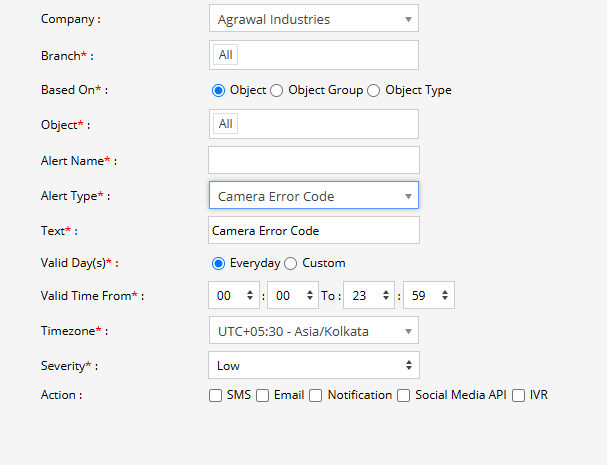
Parameters Considered (Prerequisites)
- Camera System: The selected vehicle must be equipped with a supported camera or video telematics system.
- Camera Error Data: The camera or connected video device must transmit the corresponding error code to the system.
- Error Code Event: The system must receive the camera error event for the alert to be triggered.
How to Configure
- Select the correct Company and Branch for whom the alert is to be configured.
- Based On: Choose what you want to base the alert configuration on (Object, Object Group, Object Type).
- Object: Select individual vehicles/objects for whom you want the alert to generate.
- Object Group: Select a group of vehicles/objects for whom you want the alert to generate.
- Object Type: Select a vehicle or object type for whom you want the alert to generate.
- Select the Object based on the previous step selection.
- Set an Alert Name for identification of the alert.
- Select the Alert Type as Camera Error Code.
- In the Text field, enter the message that will be displayed when the Camera Error Code alert is triggered.
- Select the Valid Day(s) as Everyday or Custom.
- Everyday: The alert will be triggered every day when a camera error code is received.
- Custom: Select the specific days on which you want this alert to be triggered.
- Enter the Valid Time From and To. The alert will be generated only within the selected time range.
- Select the required Timezone.
- Select the Severity of the alert (Low, Medium, or High).
- Under Action, select the medium through which the alert or notification should be sent (SMS, Email, Notification, Social Media API, or IVR).
- SMS: To receive the alert by SMS, enable the checkbox and enter the required phone numbers.
- Email: To receive the alert by email, enable the checkbox and enter the email recipients.
- Notification: To receive the alert as a system push notification, enable the checkbox and select the users who should receive it.
- Social Media API: To receive the alert through WhatsApp or Telegram, enable the checkbox and configure the required gateway and recipient details.
- IVR: To receive the alert through an automated voice call, enable the checkbox and enter the required phone numbers.
- Click the Save 💾 icon to save the alert configuration.
Please Note: To receive alerts through SMS, Email, Social Media API, or IVR, the respective API/gateway must be configured at the Admin, Reseller, or Company level.
Example
A vehicle is equipped with a camera system for video monitoring. If the camera detects an internal error and sends an error code to the platform, the Camera Error Code alert is triggered. The configured users receive a notification, allowing the fleet operator to identify the camera issue and arrange the necessary troubleshooting or maintenance.