
The system allows users to customize the timing for transitioning employee status from running to idle, and to inactive, enabling effective monitoring and management of vehicle activity. Admins can configure this timing as per the reseller's requirements.
The details fetched from these configurations will alert the fleet owners of rising costs so that fleet owners can cut down costs on fuel and maintenance.
To Get Started
- Login to the admin account
- Go to Settings > General > Reseller.
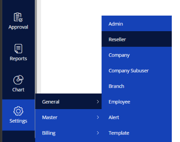
- Double-click on the reseller account for which you want to configure inactive time.
- Navigate to Rule. Click on Add New.

- A new window labeled Reseller Rule will open.

Configuring Employee Inactive Time
- The system marks an employee as Inactive if no data is received from the employee's device for the configured duration while the employee is On Duty.
- Inactive Time is configured to 60 minutes as default. However, admin have the flexibility to adjust this setting based on specific operational needs.
Configuring Stoppage Time
- This is not related to the taskeye this is related to the vehicle not the employees.
Configuring Employee Idle Time
- An employee is classified as Idle when there is no movement, the speed is 0 km/h, and the latitude and longitude coordinates remain unchanged for the configured duration.
You can use the reports to figure out what's causing the idling issues and what you or the driver can do to fix them.
-
- Idle Time is set to 0 minutes by default. The admin can modify the same according to the requirement.
- Click on the Save 💾 icon.
For the above configuration:
- The system will consider an employee as Idle immediately when the idle condition is met, i.e., the speed is 0 km/h, and there is no change in the latitude and longitude coordinates.
- The system will consider an employee as Inactive after 60 minutes if no data is received from the employee's device while the employee is On Duty.
- Stopped status is related to vehicle tracking and is not applicable to TaskEye employee tracking.