
The Vehicle Status screen provides a summarized, real-time view of all vehicles connected to the platform. It enables users to instantly monitor the live status, usage, and activity duration of each vehicle, helping in quick decision-making and fleet performance tracking.
This screen acts as the central monitoring point for vehicle movement, idle time, and inactivity insights, empowering managers to maintain operational efficiency and detect anomalies easily.
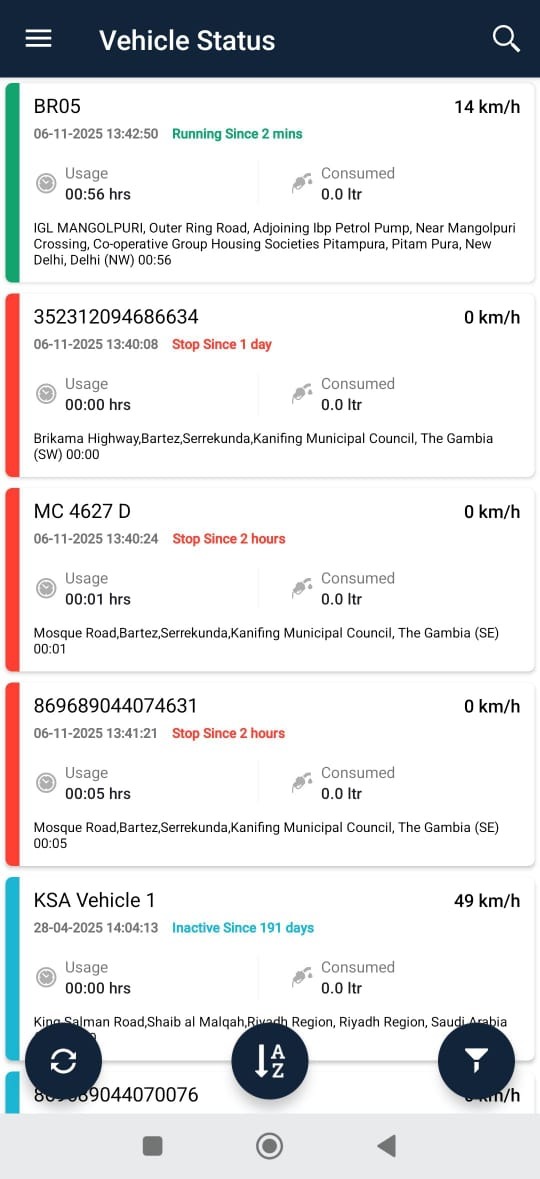
To Access
1.Dashboard select the status→Vehicle Status
- Menu→ Vehicle Status
Data Displayed on Card
- Vehicle Name / Number that is added in the system
- Color that defines the status of a vehicle
- Green denotes running
- Yellow denotes idle
- Red denotes stop
- Blue denotes inactive
- Grey denotes no data
- Speed of the vehicle is shown
- You can see when the last time the data was updated
- Usage duration denotes the engine usage hours
- Fuel consumed shows the fuel consumption based on mileage mentioned on vehicle
- The address is shown where the last data is received
Toolbar
The bottom toolbar provides options for:
- 🔄 Refresh: Update vehicle data in real-time.
- 🔤 Sort (A-Z): Sort vehicles alphabetically.
- 📋 Filter: Filter vehicles by running/stopped/inactive status.