
The Technician Task Summary report provides an overview of tasks assigned to technicians within a selected period. It helps administrators and supervisors monitor technician performance by displaying the number of completed, incomplete, and missed tasks along with the type of tasks allocated.
This report is useful for evaluating technician productivity, tracking task completion status, and identifying pending or missed maintenance activities.
This report is available in Trakzee Lite, Trakzee Standard, Trakzee Premium and Smart Waste management
Before you get started
Before using this report, ensure that:
- Technician tasks have been created in the system.
- Technicians are configured under the reseller.
- Maintenance and installation activities are being recorded regularly.
- You have access rights to view Hardware Maintenance reports.
To open Technician Task Summary
- Log in to your admin or reseller account.
- Go to Reports → Hardware maintenance → Technician Task Summary
Filter Explaination
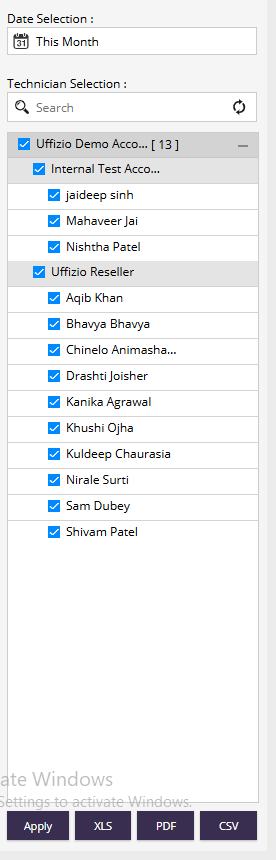
- Date Selection: Used to select the time period for which technician task data should be displayed.
- Example: Today, Yesterday, Last 7 Days, Custom Date Range, etc.
- Technician Selection : Allows users to select one or multiple technicians whose task summaries need to be viewed.
- Features:
- Search technicians using the search box.
- Select individual technicians.
- Select multiple technicians across different groups or departments.
- Expand or collapse technician groups for easier selection.
- Apply : Generates the report based on the selected filters.
- Export Options : The report can be exported in the following formats:
- XLS – Export data to Microsoft Excel format.
- PDF – Export data as a PDF document.
- CSV – Export data in CSV format.
Report Explaination
The report displays task statistics for each technician
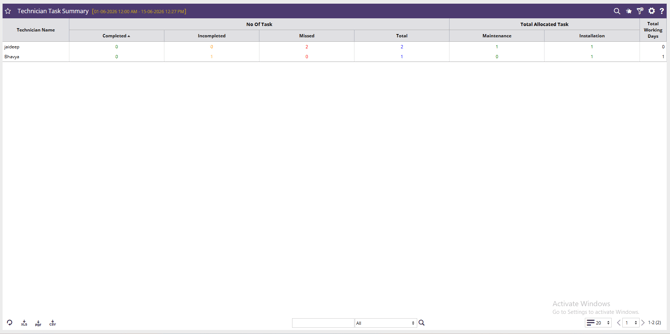
- Technician Name : Name of the technician assigned to maintenance tasks.
- Completed : Number of tasks successfully completed by the technician.
- Incomplete : Number of assigned tasks that remain unfinished.
- Missed : Number of tasks that were not completed within the scheduled time or were skipped.
- Total : Total number of tasks assigned to the technician during the selected period.
- Maintenance : Number of maintenance-related tasks allocated to the technician.
- Installation : Number of installation-related tasks allocated to the technician.
- Total Working Days : Total number of days the technician was active and assigned tasks during the selected period.