
By utilizing the Set Subuser feature, users can conveniently access and view only the vehicles associated with a specific subuser, all without the need to log into that subuser's account.
For example, if a user has a subuser named ABC and wants to view only the vehicles assigned to ABC, they can simply select ABC from the list in the Select Subuser menu.
To Set Subuser:
- Log in to your account.
- On the Left-side Panel below the logo, find User.
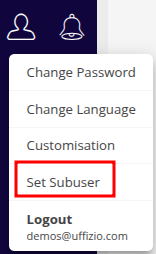
- Click on User > Set Subuser.
-
- To view as a specific user:
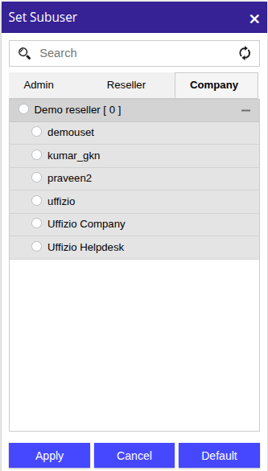
- Select the user from the list.
- Click on the Apply button.
- To view as a specific user:
Please Note: based on Your level you will se the user listing of Admin, Reseller & Company.
-
- To return to the default view for the logged-in user and reset the subuser selection:
- Click on the Default button.
- To return to the default view for the logged-in user and reset the subuser selection: