
The Payment feature allows users to conveniently process online payments for the renewal of vehicle licenses in alignment with the configured tariff plan.
To Get Started
- Log in to your account.
- Go to Profile > Payment.
When you click on Payment, you will be taken to the Payment Overview page.
Here, you can view all your previous payments in one place.
- To make subscription payment click on the
 icon,
icon,
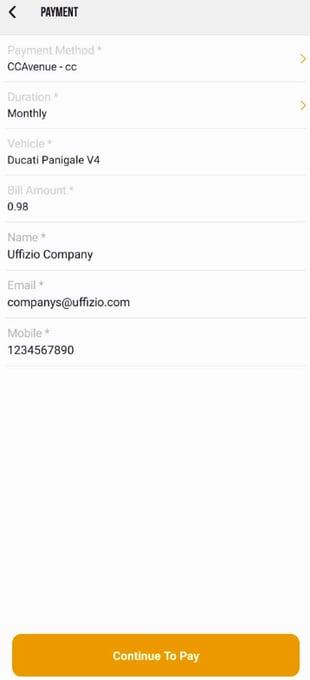
- The following Sscreen will open, you can now renew your subscription.
-
Choose Payment Method: Select the payment gateway you want to use.
-
Select Duration: Pick your preferred subscription plan.
The bill amount will update automatically based on the duration. -
Vehicle: Select the vehicle that you want to recharge.
-
Review Your Details
-
Name: Pre-filled. Edit if needed.
-
Email: Pre-filled. Edit if needed.
-
Mobile Number: Pre-filled. Edit if needed.
-
-
Continue to Pay: Tap Continue to Pay. You will be redirected to the payment gateway to complete the transaction.
- Once the Payment Process is Completed it will be reflected on the Payment Overview Screen.
Please Note: Once the payment is successfully completed, your subscription will be renewed automatically.The new vehicle expiry date will be updated and visible in the app.