
The Warehouse Detail Screen is used to register and manage warehouse or yard locations under the WASL Towing Cars integration.
This screen captures complete operational yard information including location coordinates, land boundaries, licensing details, and contact information. The registered warehouse defines where towing vehicles are stationed or where towed vehicles are stored, ensuring compliance with WASL regulations.
Accurate warehouse information is mandatory for successful API activation and regulatory approval.
To get started
- Log in to your admin account.
- Go to Setting→WASL→Warehouse
- Click on the ➕ icon on the taskbar below.
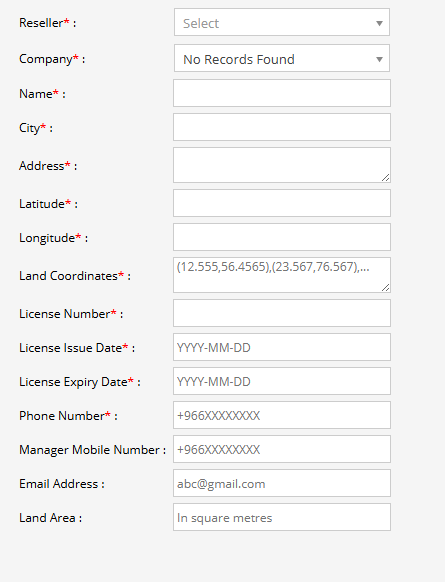
To create a Warehouse
- Select the associated reseller managing the account.
- Choose the company under which the warehouse is being registered.
- Enter the warehouse or yard name.
- Specify the city where the warehouse is located.
- Provide the complete physical address of the warehouse.
- Enter the exact latitude of the warehouse location.
- Enter the exact longitude of the warehouse location.
- Provide the boundary coordinates of the warehouse land in the required format.
- Enter the official warehouse or operational license number.
- Provide the license issuance date (Format: YYYY-MM-DD).
- Enter the license expiration date (Format: YYYY-MM-DD).
- Enter the warehouse contact number (Saudi format: +966XXXXXXXXX).
- Provide the authorized manager’s mobile number.
- Enter the official email for warehouse communication.
- Enter the total land area in square meters.
- Click on the Save 💾 icon.