
The Vehicle Location screen allows you to view and verify the real-time location of vehicles synchronized with the WASL system.
This feature ensures that registered vehicles are actively transmitting data and operating within regulatory guidelines. It helps monitor live movement, validate GPS connectivity, and maintain compliance with WASL tracking requirements.
Only vehicles that are properly registered and device-mapped will appear in this section.
To get started
- Log in to your admin account.
- Go to Setting→WASL→Vehicle Location
- Click on the ➕ icon on the taskbar below.
To add a Vehicle Location
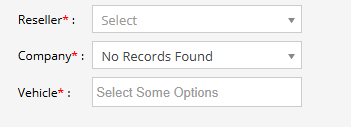
- Select the reseller managing the WASL account.
- Choose the company whose vehicles you want to monitor.
- Select one or multiple registered vehicles from the dropdown list.
- Click on the Save 💾 icon.
What This Module Does
- Displays real-time vehicle location
- Verifies GPS device connectivity
- Confirms successful WASL synchronization
- Supports compliance monitoring
- Helps identify inactive or offline vehicles