
The Inventory is used to register and manage storage units within a warehouse under the WASL module.
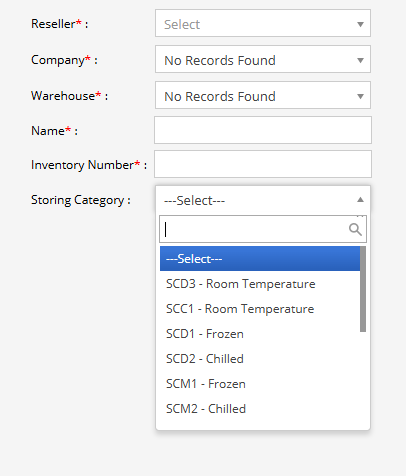
This screen allows users to define inventory sections, assign unique inventory numbers, and configure storage categories such as room temperature, chilled, or frozen. It ensures proper classification and structured storage management within the warehouse.
This configuration helps maintain organized storage operations and regulatory compliance.
To get started
- Log in to your admin account.
- Go to Setting→WASL→Inventory
- Click on the ➕ icon on the taskbar below.
To create a Add inventory
- Select the reseller managing the account.
- Choose the company under which the warehouse and inventory are registered.
- Select the warehouse where the inventory unit will be created.
- Enter the name of the inventory or storage section.
Note:Provide a unique identification number for the inventory unit.This helps in tracking and managing storage sections systematically.
- Select the appropriate storage type from the dropdown list.
- Click on the Save 💾 icon.