
The Driver Registration screen allows you to register and manage driver information within the WASL system.
This module captures essential driver details — including identity information, contact details, and date of birth — which are required for linking drivers with company vehicles. Proper driver registration ensures compliance with WASL regulations and enables accurate driver-to-vehicle mapping.
Only registered drivers can be assigned to vehicles under WASL integration.
To get started
- Log in to your admin account.
- Go to Setting→WASL→Driver
- Click on the ➕ icon on the taskbar below.
To add a Driver
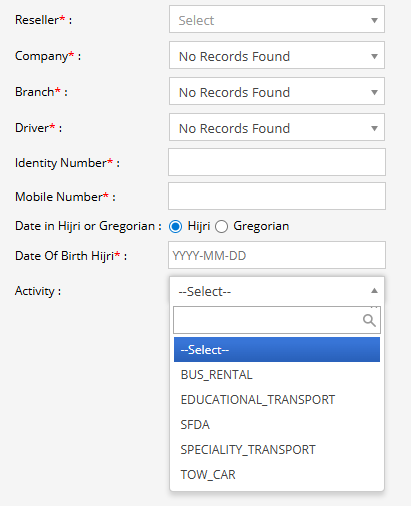
- Select the reseller managing the account.
- Choose the company under which the driver will be registered.
- Select the relevant branch of the company.
- If updating an existing record, select the driver from the dropdown.To create a new driver, enter the required details.
- Enter the driver’s official identification number (National ID or Iqama number as applicable).
- Provide the driver’s active mobile number.
- Select the applicable activity type, if required for operational classification.
- Choose the preferred date format:
- Hijri
- Gregorian
- Enter the driver’s date of birth in the selected format (YYYY-MM-DD).
- Select the domain under Activity based on the API type admin has.
- Click on the Save 💾 icon.