
Company allows you to configure and register company details required for WASL integration — including reseller, branch, commercial information, and manager contacts — ensuring automatic data synchronization with the WASL portal.
To get started
- Log in to your admin account.
- Go to Setting→WASL→Company
- Click on the ➕ icon on the taskbar below.
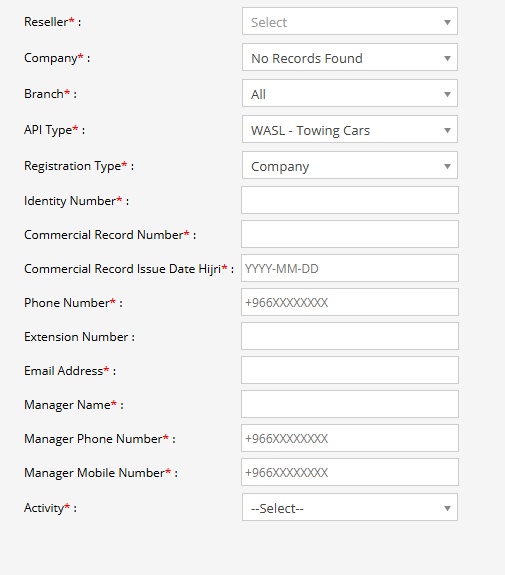
To create a Company
- Select the Reseller from the drop down.
- Select the Company and Branch from the drop down.
- Based on the API added under Authorization Admin select the API Type.
- Select if this Registration type is for individual or a company bsis.
- Enter the Identity number.
- Enter the Commercial Record Number.
- Enter the Commercial Record issue date Hijri.
- Enter the Phone Number of the company.
- Mention the Extension date for the company.
- Enter email address of the company
- Enter the Manager Name.
- Enter contact details of Manager like; Manager Phone number and Manager Mobile Number.
- Select 4 domains under Activity.
- Click on the Save 💾 icon.