
Path
Reports → Log → System Log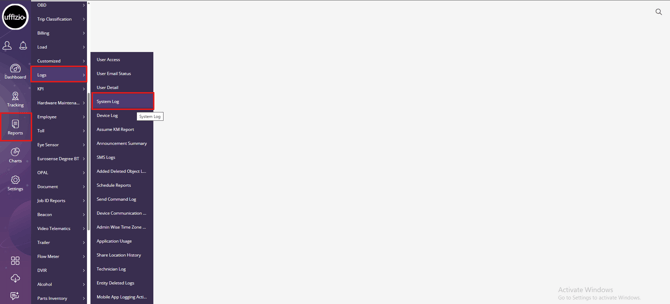
Report Type
Summary + Details
This report contains two layers:
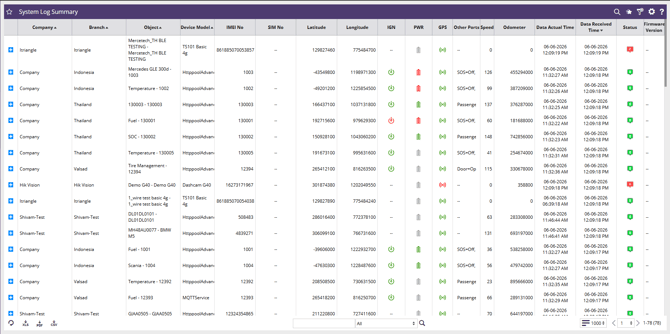
- System Log Summary (Main Layer)
- System Log Detail (Drill-Down Layer)
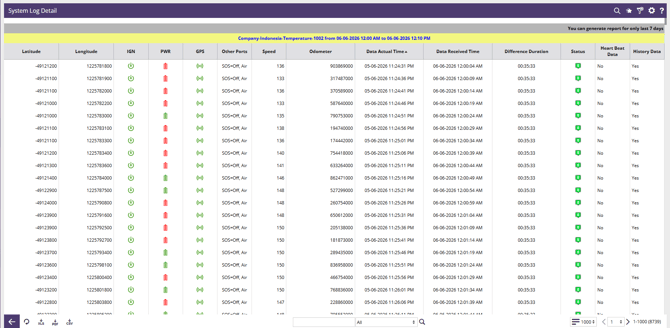
Users can expand a record from the Summary layer using the "+" icon to view detailed log records for a selected device/object.
Purpose
The System Log Report provides visibility into the latest communication and operational status of all tracking devices within the system.
It is used to:
- Monitor device connectivity and communication health.
- Verify GPS and sensor data reception.
- Track the latest vehicle/device position.
- Review ignition, power, GPS, and digital input statuses.
- Detect delayed or missing data transmissions.
- Troubleshoot device communication issues.
- Analyze historical records received from devices.
The report allows users to quickly identify devices that are offline, delayed, improperly configured, or experiencing communication problems.
Data View
Layer 1: System Log Summary
Displays the latest available record for each device/object.
Each row represents the most recent status of a specific device.
Users can expand a record to access the System Log Detail layer.
Summary Layer Information Includes
- Device identification
- Location coordinates
- Device status indicators
- Speed and odometer readings
- Latest actual device timestamp
- Data reception timestamp
- Firmware information
Layer 2: System Log Detail
Displays all log packets received for the selected device within the selected date range.
This layer provides packet-level history showing:
- Device movement
- Sensor states
- Communication timing
- Historical data uploads
- GPS updates
- Status changes over time
Note: As displayed on the screen:
Report can be generated only for the last 7 days.
This limitation exists because the report stores detailed communication logs and historical packet data.
Field Explanation
System Log Summary Fields
Company : Name of the company to which the device/object belongs.
Branch : Branch or organizational unit associated with the device.
Object : Vehicle, asset, equipment, or tracked object name.
Device Model : Model of the installed tracking device.
IMEI No : Unique hardware identifier of the tracking device.
SIM No : SIM card number installed in the tracking device.
Latitude : Latest latitude received from the device.
Longitude : Latest longitude received from the device.
IGN : Ignition status of the vehicle/device.
Possible values:
-
-
ON
-
OFF
-
Not Available
-
PWR : External power supply status of the device.
Possible values:
-
-
Power Connected
-
Power Disconnected
-
Not Available
-
GPS : GPS signal availability status.
Possible values:
-
-
GPS Available
-
GPS Lost
-
Not Available
-
Other Ports : Displays additional sensor/input statuses configured in the device.
Examples:
-
-
SOS
-
Door
-
Air Conditioner
-
Passenger Sensor
-
Fuel Sensor
-
Temperature Sensor
-
Digital Inputs/Outputs
-
Values displayed depend on device configuration.
Speed : Current speed received from the device.
Unit: km/h
Odometer : Accumulated distance reported by the device.
Unit: Based on system configuration (typically meters or kilometers).
Data Actual Time : Timestamp generated by the device when the event occurred.Represents the actual event time.
Data Received Time : Timestamp when the server received the record. Represents communication reception time.
Status : Communication health indicator of the device.
Typical meanings:
-
-
Green (0) = Device communicating normally
-
Red / Other values = Communication issue or exception
-
Actual status definitions may vary by implementation.
Firmware Version : Firmware version currently reported by the device. Used for device maintenance and upgrade verification.
System Log Detail Fields
Latitude : Latitude of the logged record.
Longitude : Longitude of the logged record.
IGN : Ignition status at the time of the record.
PWR : Power supply status at the time of the record.
GPS : GPS status at the time of the record.
Other Ports : Additional sensor/input statuses captured in that packet.
Examples:
-
-
SOS
-
Door
-
Air
-
Passenger
-
Fuel
-
Temperature
-
Other digital inputs
-
Speed : Vehicle speed recorded in the log.
Odometer : Distance value reported in the packet.
Data Actual Time : Actual timestamp generated by the device.
Data Received Time : Server timestamp when the packet was received.
Difference Duration : Difference between:
Data Received Time – Data Actual Time
Used to identify communication delays, network issues, or buffered data uploads.
Status : Communication status associated with the record.
Heart Beat Data : Indicates whether the received packet is a heartbeat packet.
Possible values:
-
-
Yes
-
No
-
Heartbeat packets confirm device connectivity without significant event data.
History Data : Indicates whether the packet was historical/backfilled data.
Possible values:
-
-
Yes
-
No
-
Historical data typically occurs when:
-
Device loses network connectivity.
-
Data is stored in device memory.
-
Buffered data is transmitted later when connectivity returns.
Benefits of the Report
-
Device Health Monitoring : Provides a real-time overview of device communication status and operational health.
-
Communication Delay Analysis : Allows users to compare actual event time versus received time to identify network or transmission delays.
-
Troubleshooting Support : Helps diagnose:
-
GPS issues
-
Power failures
-
Ignition detection problems
-
Sensor communication failures
-
Delayed data transmission
-
-
Historical Data Verification: Enables users to determine whether records are live data or historical uploads from device memory.
-
Operational Visibility : Provides a complete audit trail of device activity within the selected period.
-
Fleet Monitoring : Allows fleet managers to verify:
-
Vehicle movement
-
Device connectivity
-
Sensor activity
-
Location updates
-
-
Maintenance and Firmware Tracking : Supports device maintenance activities through firmware version visibility and communication diagnostics.