
The RTA Management screen is used to register and manage vehicle information that will be synchronized with the external Roads and Transport Authority (RTA) Registration Management System (RMS). It allows users to map vehicle details with the required RTA fields and manage the registration status of each vehicle.
This module works in conjunction with RTA Configure. Once the RMS connection has been configured, users can use the RTA Management screen to submit, update, and maintain vehicle registration information.
To Get Started
-
Login to your account
- Go to setting >RTA RMS > Manage
To Configure RTA Management
-
Click on + button to add entry
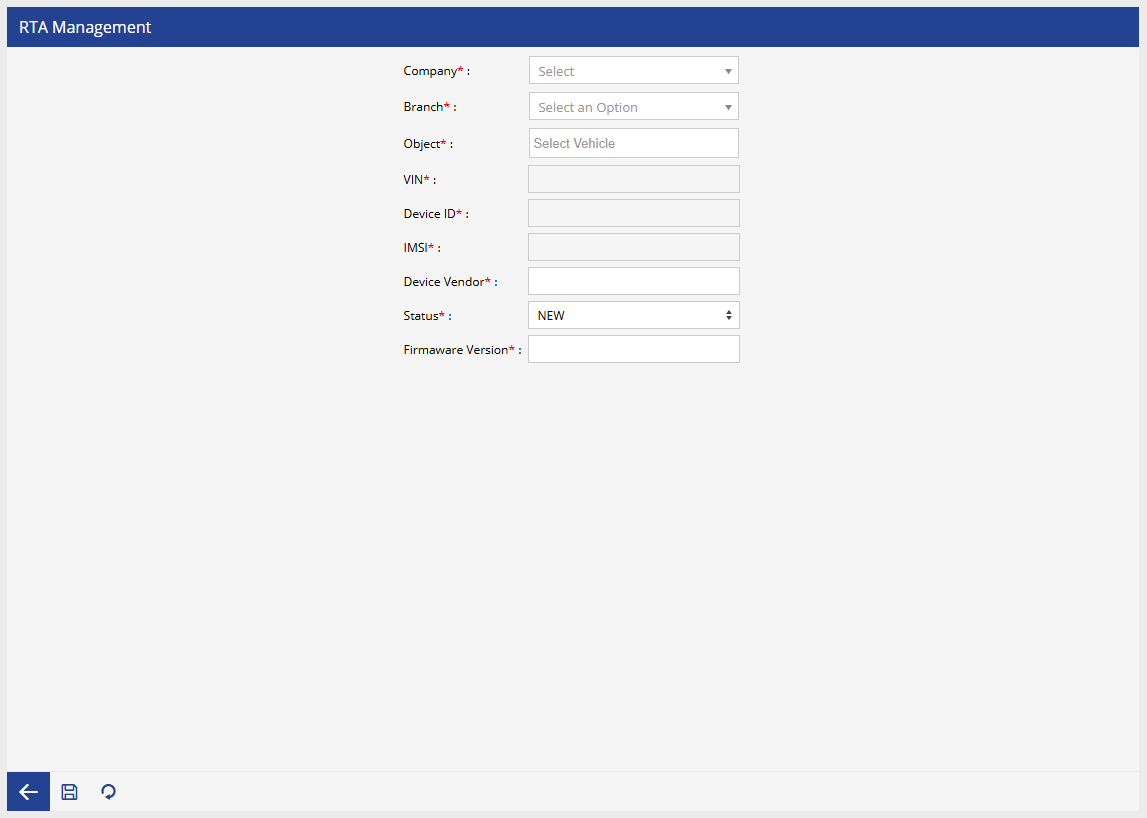
- Select the Company and Branch.
- Select the Object (Vehicle).
- The required objectand device information will be fetched automatically based on the above selected object.
- Select the appropriate Status.
- Enter the Firmware Version, if applicable.
- Click Save to register or update the vehicle information.
Notes
- The RTA Configure module must be configured before using the RTA Management screen.
- Only users with the appropriate permissions can create or modify RTA vehicle records.
- The information entered on this screen is used for communication and synchronization with the external RMS platform.
- The available status values may vary depending on the integration workflow implemented for the RMS system.