
The Alert Summary Report provides a consolidated view of alerts generated for selected vehicles during the selected period.
It helps you quickly understand which alerts occurred, how many times they were generated, and which vehicles or branches require attention without reviewing each alert individually.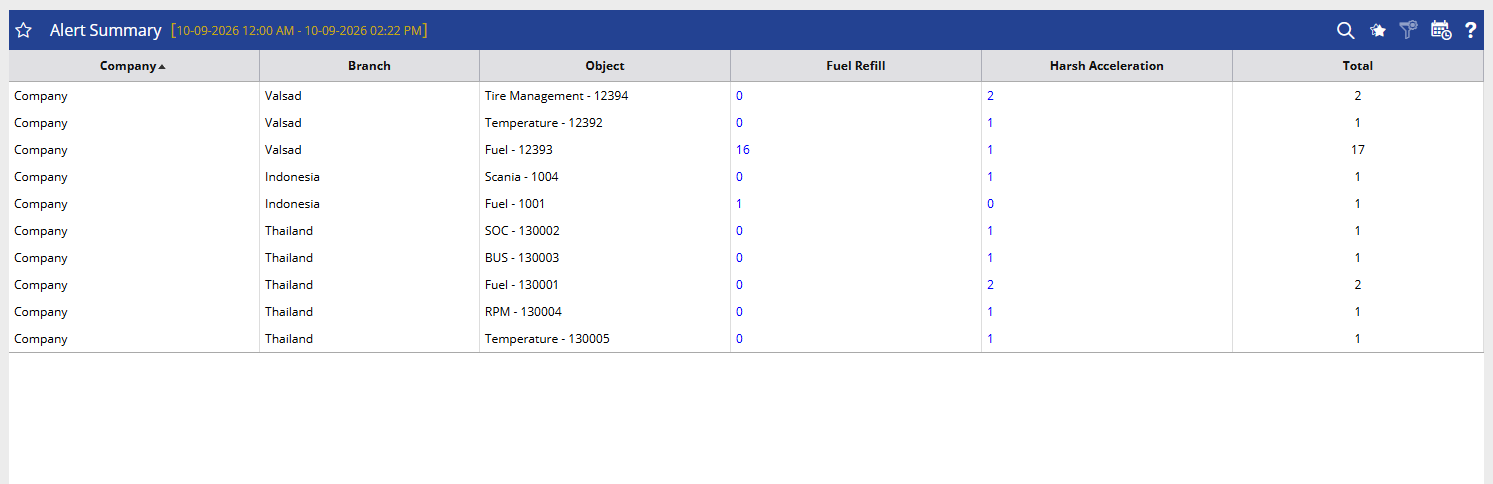
Benefits
- Get a quick summary of alerts generated across the fleet.
- Identify vehicles with frequent alerts for further investigation.
- Compare alert occurrences across vehicles and branches.
- Focus on specific alert types that require attention.
- Support faster operational and safety follow-up.
How to Access
Path:Reports → Alert → Alert Summary
Filters
Use the available filters to generate the report:
- Company: Select the required company.
- Branch: Select the required branch.
- Alert Type: Select one or more alert types to include in the report.
- Date Selection: Select the required date or reporting period.
- Time Range: Enable this option when alerts need to be reviewed for a specific time period.
- Object Selection: Select one or more vehicles/objects.
Click Apply to generate the report.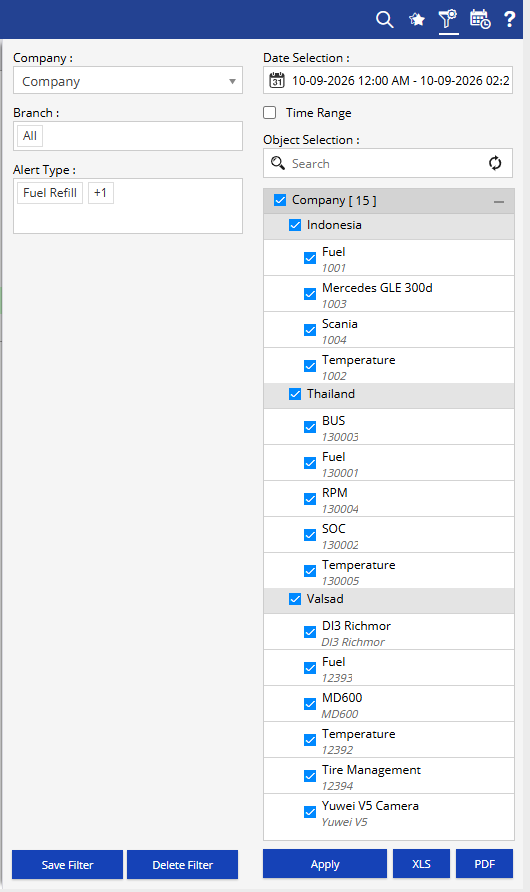
Additional options:
- Save Filter: Save the selected filter combination for future use.
- Delete Filter: Delete the saved filter.
- XLS: Export the report to Excel.
- PDF: Export the report to PDF.
How to Read
Read the report from Vehicle → Alert Type → Total Alerts.
- Company & Branch: Identify where the alerts were generated.
- Object: Identify the vehicle/object associated with the alerts.
- Alert Type Columns: Check how many times each selected alert type was generated for the vehicle.
- Total: Shows the combined number of alerts for that vehicle across the displayed alert types.
Example:
If a vehicle shows 16 Fuel Refill alerts and 1 Harsh Acceleration alert, with a Total of 17, the team can quickly identify that Fuel Refill is the primary alert requiring review for that vehicle.
Take Action
- Focus on vehicles with a high number of alerts.
- Identify which alert type is occurring most frequently.
- Investigate repeated alerts to determine whether corrective action is required.
- Compare alert patterns across branches or vehicles.
- Use the summary to decide whether a detailed Alert Status report needs to be reviewed.
Important Notes
- The report provides an alert-level summary rather than individual alert event details.
- The alert columns displayed depend on the Alert Type selected in the filter.
- Total represents the combined alert count shown for the selected alert types.
- For individual alert details such as alert time, location, severity, duration, closure information, reason, comments, and SOP, refer to the Alert Status report.