
Issue Summary
Alert notifications and alert sounds may not be received if the required Notification settings are not enabled for the applicable user account.
Note: Alerts are available for Admin Subuser, Reseller Subuser, Company, and Company Subuser accounts. Admin and Reseller parent accounts do not receive alerts.
Example Questions
-
- Why am I not receiving alert notifications?
- Why is the alert sound not working?
- Why is my newly created subuser not receiving alerts?
- Where can I enable alert notifications?
- How can I enable alert sound for a user?
- Why does the Company receive alerts but the Admin does not?
- Does the Admin or Reseller account receive alerts?
Symptoms / How to Identify
- Alert notifications are not received by the user.
- Alert sound/audio is not played.
- A newly created subuser does not receive alerts.
- Alerts work for one user but not another.
- An Admin or Reseller parent account is expected to receive an alert.
Information Required Before Troubleshooting
Verify:
- User account type.
- Whether the account is:
- Admin
- Admin Subuser
- Reseller
- Reseller Subuser
- Company
- Company Subuser
- Notification settings for the affected user.
- Company-->User Setting-->Notification
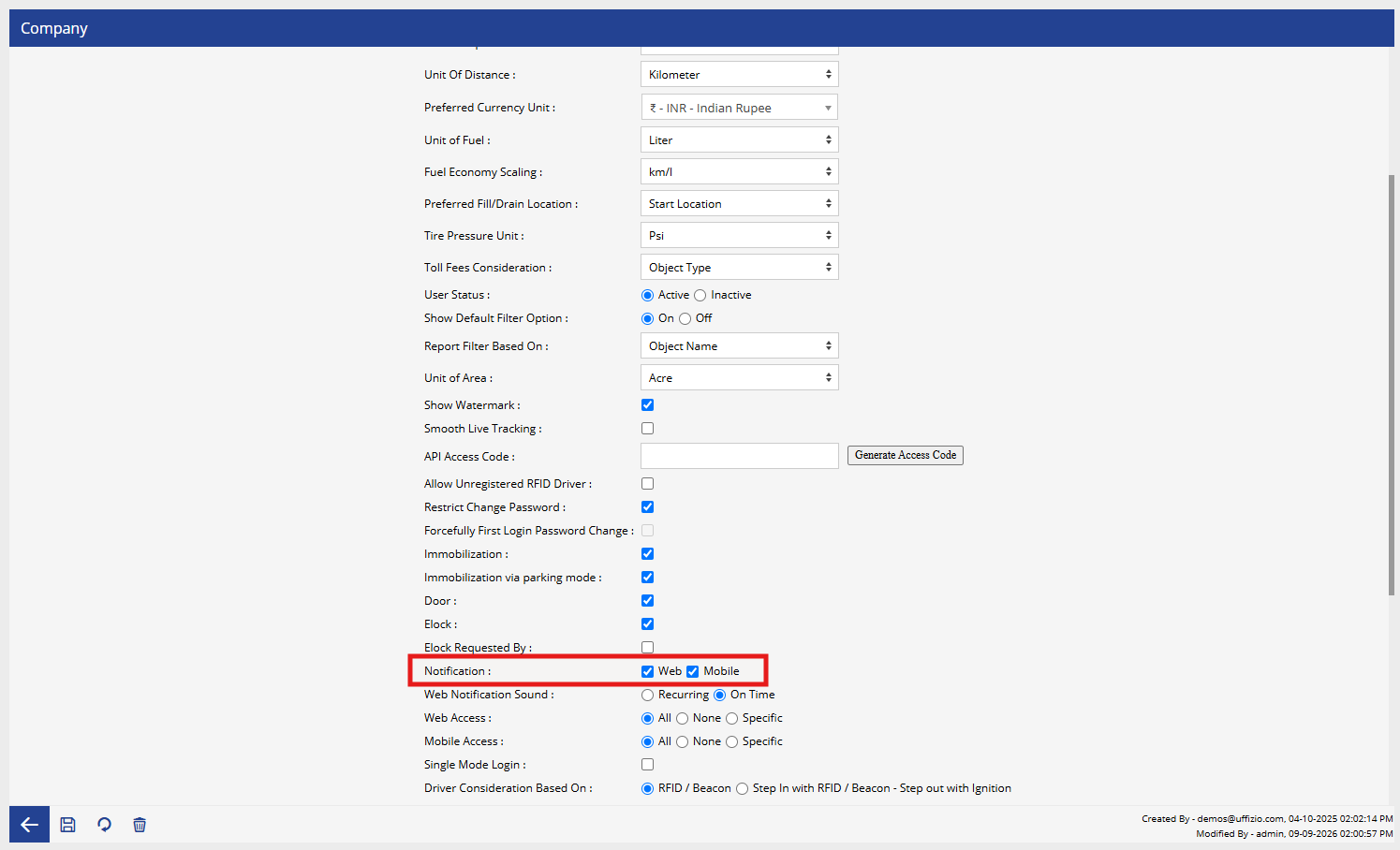
- Company-->User Setting-->Notification
- Required permissions/access.
- Whether the issue occurs with all alerts or only specific alert types.
Troubleshooting Steps
- Identify the account type of the affected user.
- Confirm that the user is eligible to receive alerts:
- Admin Subuser – Alerts supported
- Reseller Subuser – Alerts supported
- Company – Alerts supported
- Company Subuser – Alerts supported
- Admin – Does not receive alerts
- Reseller – Does not receive alerts
- For an eligible user, navigate to:Settings → General → Users
- Select the relevant Admin Subuser, Reseller Subuser, Company, or Company Subuser.
- Navigate to User Settings.
- Check the Notifications section.
- Ensure the required notification options are enabled.
- Save the changes.
- Log in to the respective user account, if required.
- Test the alert and verify whether the notification and alert sound are received.
- If the notification is still not received, check the applicable parent account settings and permissions.
Possible Cause
The issue may occur because:
- Notification settings are disabled for the eligible user.
- Required permissions are not assigned.
- The user was newly created and notification settings were not enabled.
- The account is an Admin or Reseller parent account, which does not receive alerts.
- Required settings are not enabled at the applicable parent-account level.
Resolution / Action
For Admin Subuser, Reseller Subuser, Company, and Company Subuser accounts, enable the required notification options from:
Settings → General → Users → Select User → User Settings → Notifications
Save the changes and test the alert again.
Note: Admin and Reseller parent accounts do not receive alerts. If alerts are required, they should be configured for the applicable Admin Subuser, Reseller Subuser, Company, or Company Subuser account.