---
title: Edit Admin Account
description: The Admin oversees the platform's functionality, which includes creating users, assigning roles, and managing permissions. Admin account will be created by the super admin and transferred to the designated user.
---
[Skip to content](https://helpdesk.uffizio.com/knowledge/trakzee/edit-admin-account#main-content)
- [English](https://helpdesk.uffizio.com/knowledge/trakzee/edit-admin-account)
- [Español](https://helpdesk.uffizio.com/es/knowledge/editar-cuenta-de-administrador)
- [Français](https://helpdesk.uffizio.com/fr/knowledge/modifier-le-compte-administrateur)
- [Português - Brasil](https://helpdesk.uffizio.com/pt-br/knowledge/editar-conta-de-administrador)
English
Show submenu for translations
[Customer portal](https://helpdesk.uffizio.com/tickets?hsLang=en)

- [Tickets](https://helpdesk.uffizio.com/tickets)
- [Knowledge Base](https://helpdesk.uffizio.com/knowledge)
- [Sign Out](https://helpdesk.uffizio.com/_hcms/mem/logout)
Open main navigation
Close main navigation
- [Tickets](https://helpdesk.uffizio.com/tickets)
- [Knowledge Base](https://helpdesk.uffizio.com/knowledge)
- [Sign Out](https://helpdesk.uffizio.com/_hcms/mem/logout)
- - [English](https://helpdesk.uffizio.com/knowledge/trakzee/edit-admin-account)
- [Español](https://helpdesk.uffizio.com/es/knowledge/editar-cuenta-de-administrador)
- [Français](https://helpdesk.uffizio.com/fr/knowledge/modifier-le-compte-administrateur)
- [Português - Brasil](https://helpdesk.uffizio.com/pt-br/knowledge/editar-conta-de-administrador)
English
Show submenu for translations
- [Customer portal](https://helpdesk.uffizio.com/tickets)
- www.uffizio.com
www.uffizio.com
Platform User Guide
- There are no suggestions because the search field is empty.
1. [Knowledge Base](https://helpdesk.uffizio.com/knowledge?hsLang=en)
2. [Trakzee](https://helpdesk.uffizio.com/knowledge/trakzee?hsLang=en)
3. [Admin](https://helpdesk.uffizio.com/knowledge/trakzee?hsLang=en#admin)
# Edit Admin Account
The Admin oversees the platform's functionality, which includes creating users, assigning roles, and managing permissions.
Admin account will be created by the super admin and transferred to the designated user. Once in possession of the account, users will have the ability to modify and update the admin account specifications to suit their specific requirements.
**Watch :** Admin - My Account details.
### To Get Started
- Log in to your **Admin** account.
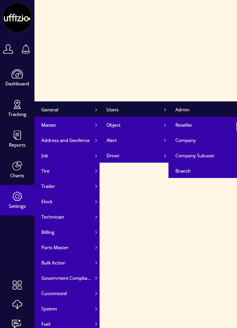
- Go to **Settings \> General \> Users \>Admin.
**
- Double-click on the account you want to configure.
- You will land on the Admin page.
### To Edit an Admin Account
#### Navigate to **My Account**
- You can edit the **Country** and **State** from the drop-down menu.
- **Short Name** and **Username** will be provided by the super admin.
- If you wish to [**Change Password**](https://helpdesk.uffizio.com/knowledge/change-admin-password?hsLang=en)of your admin account, then click on the link given.
- If you wish to set a**[Security Pin](https://helpdesk.uffizio.com/knowledge/security-pin?hsLang=en)**, click on the checkbox.
**Please Note:** The security pin, once created, cannot be altered or viewed again. Therefore, it is essential to remember this pin for future reference.
- You can easily upload your [**Logo**](https://helpdesk.uffizio.com/knowledge/upload-logo?hsLang=en).
- Enter the **Password Recovery Email** address on which the password reset link will be sent while performing **[Reset password.](https://helpdesk.uffizio.com/knowledge/reset-forgot-password?hsLang=en)**
- Enter your **Address** details like **City, Zip code, Street1, Street2** etc.
- Enter your [**Helpdesk Details.**](https://helpdesk.uffizio.com/knowledge/configuring-helpdesk-details?hsLang=en)
- Enter your **Fax Number.**
- Enter a **Welcome Message** that will be displayed on the startup screen upon user login.
- Enter **GSTIN** number of your organization. ( For Indian Server Only )
- Enter **PAN No** number of your organization. ( For Indian Server Only )
- **Data Storage** will be provisioned for your account by default**.** This period determines the number of days the admin can access and analyze data on the platform. For example, if set to 90 days, the user will have access to analytics for the past 90 days.
**Please Note:** Data Storage will be for 90 days by default. If you need to increase the number of days, please contact us.
**Watch :** How to Configure Admin User Setting.
#### **Navigate to User Settings**
The User Settings section in the Admin account enables users to customize their preferences according to their specific needs for various platform features.
- You can change the **Time Zone** from the predefined options. This selected timezone will be used to display analytics in the application.
- You can edit [**Date and Time**](https://helpdesk.uffizio.com/knowledge/change-date-and-time-format?hsLang=en)Format, which will be used to show analytics in the entire application.
- Select the **Week Start Day.** The application will produce weekly reports based on the start day of the week that has been configured on your admin account.
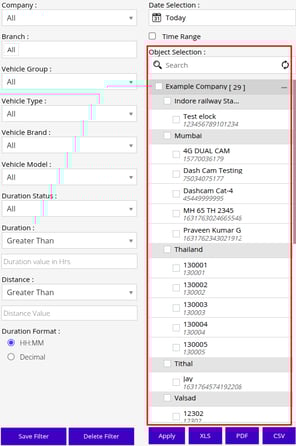
- **Report Filter based on:** You can configure if the Object selection list in filter should load based on Object Name or IMEI or VIN/Chassis No.
- **Show Watermark:** Select the checkbox if you wish to display a watermark on the reports when exporting them in the provided formats.
- **Smooth Live Tracking:** Select the checkbox if you wish to provide the smooth live tracking feature.
- Generate [**API Access Code**](https://helpdesk.uffizio.com/knowledge/api-access-code?hsLang=en) and add it.
- **Allow Unregistered RFID Driver**: If this option is enabled value for unregistered RFID will be displayed in the system.
- Setup **[Immobilization](https://helpdesk.uffizio.com/knowledge/set-up-immobilization-for-vehicles?hsLang=en)**if required.
- **Immobilization via parking mode**: If this option is enabled, the vehicle will be immobilized if an unauthorized person attempts to move it while it is in parking mode. (Note: The Immobilization sensor port must be configured on the object.)
- **Password Change Policy:** When this option is activated, the system will prompt the user to change their password after a defined period of time.
- **Password History:** If this option is activated, the system will prevent you from reusing any of your last three passwords.
- **Show Password:** If this option is enabled, the user can see the password when they hover the mouse pointer on the eye  button.
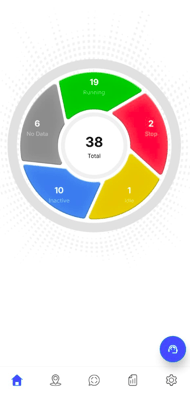
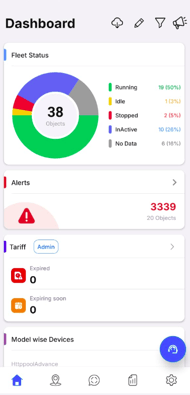
- **Mobile Dashboard Type:** You can select how the Mobile dashboard should look like from standard or Advance.
- **Standard Dashboard:**
- **Advance Dashboard:**
- **Coordinate Type:** Users can select the coordinate format they want to view.
- **Latitude/Longitude:** Displays the location using standard geographic coordinates (latitude and longitude).
- **MGRS:** Displays the location using the Military Grid Reference System (MGRS) coordinate format.
- **Company Onboarding Announcement:** If this option is enabled, the admin will receive a notification whenever a new company account is created.
- **Send Weekly Activity Email:** If this option is selected the user will receive a report for object addition & deletion for the entire week.
**Please Note:**
- The Admin username will be used as the email address for sending notifications.
- The email will be sent at 9:00 AM based on the user's configured time zone.
- **Video Playback File Duration:** The user must specify the duration (in minutes) for splitting the video playback files (File List) into separate segments.
- **Private Mode Emergency Tracking:** Vehicle tracking will become visible only when an emergency alert is triggered.
Please Note: The Vehicle will be visible when any of the following alert is generated SOS, Crash, Rollover, LTE Jamming, GPS Jamming.
#### Navigate to Map
Setting up the map as per the requirement can provide a great experience for tracking the fleets live.
Learn how to [**Setup Map Configuration.**](https://helpdesk.uffizio.com/knowledge/trakzee/set-up-map-configuration-for-admin-account?hsLang=en)
#### Navigate to Email
Email configuration can be done to send alerts as emails from the software.
Learn how to [**Setup Email Configuration.**](https://helpdesk.uffizio.com/knowledge/trakzee/email-service-configuration-admin?hsLang=en)
#### Navigate to SMS
SMS configuration needs to be done when the user wants to connect SMS-sending software to the application to send automated alert messages.
Learn how to[**Setup SMS Configuration.**](https://helpdesk.uffizio.com/knowledge/sms-service-configuration?hsLang=en)
#### Navigate to Payment Gateway
A payment gateway serves as a portal to facilitate transaction flow between customers and merchants.
Learn how to [**Add Payment Gateway.**](https://helpdesk.uffizio.com/knowledge/payment-gateway-for-admin?hsLang=en)
#### Navigate to Admin SubUser
Admin can create a new user and tailor their rights and permissions. Sub-users' rights are limited to their roles and responsibilities.
- Learn how to [**Add a New SubUser.**](https://helpdesk.uffizio.com/knowledge/setup-account-for-admin-subuser?hsLang=en)
- Learn how to [**Provide Data Access.**](https://helpdesk.uffizio.com/knowledge/trakzee/configure-data-access-for-admin-sub-user?hsLang=en)
- Learn how to [**Provide Screen Access.**](https://helpdesk.uffizio.com/knowledge/screen-access-for-admin-subuser?hsLang=en)
- Learn how to **[Provide User Settings.](https://helpdesk.uffizio.com/knowledge/setup-user-settings-for-admin-sub-user?hsLang=en)**
- Learn how to manage **[Authentication](https://helpdesk.uffizio.com/knowledge/manage-authentication-for-admin-subuser?hsLang=en)** for sub-users.
#### Navigate to IVR
Interactive Voice Response (IVR) service provides the user with the facility to send alert via calls.
Learn how to configure**[IVR Service](https://helpdesk.uffizio.com/knowledge/configure-ivr-service?hsLang=en)**
#### Navigate to ChatBot
A ChatBot is a digital assistant that is used to initiate online chat conversations. ChatBots are used to answer questions and escalate problems to human agents when necessary.
Learn how to configure **[ChatBot](https://helpdesk.uffizio.com/knowledge/configure-a-chatbot?hsLang=en)**
#### Navigate to Social Media API
Social Media API (Application Programming Interface) is integrated into the software so that the user can receive alerts, reports, or announcements via the set social media platform.
Learn how to configure a [**Social Media API**](https://helpdesk.uffizio.com/knowledge/setup-social-media-api-all?hsLang=en)
#### Navigate to Documents
Documents are included in the software so that the admin can upload the necessary documents on the platform and can easily access them from the platform itself.
Learn how to configure a [**Documents**](https://helpdesk.uffizio.com/knowledge/manage-admin-documents?hsLang=en)
#### Navigate to Authentication
The authentication tab in the software is to enhance security and ensure that critical actions, such as making announcements, are performed only by authorized users.
Learn how to configure **[Authentication](https://helpdesk.uffizio.com/knowledge/manage-authentication-for-admin?hsLang=en)**
#### Navigate to SSO (Single Sign On)
The SSO functionality will allow users to authenticate using their existing credentials from a third-party identity provider, such as Google, Microsoft, or other supported SSO systems.
Learn how to configure **[SSO](https://helpdesk.uffizio.com/knowledge/trakzee/single-sign-on?hsLang=en)**
- Click on the **Save 💾** icon.
- [Trakzee](https://helpdesk.uffizio.com/knowledge/trakzee?hsLang=en#main-content)
- [User Hierarchy](https://helpdesk.uffizio.com/knowledge/trakzee?hsLang=en#user-hierarchy)
- [Admin](https://helpdesk.uffizio.com/knowledge/trakzee?hsLang=en#admin)
- [Reseller](https://helpdesk.uffizio.com/knowledge/trakzee?hsLang=en#reseller)
- [Company](https://helpdesk.uffizio.com/knowledge/trakzee?hsLang=en#company)
- [Branch](https://helpdesk.uffizio.com/knowledge/trakzee?hsLang=en#branch)
- [Object](https://helpdesk.uffizio.com/knowledge/trakzee?hsLang=en#object)
- [Driver](https://helpdesk.uffizio.com/knowledge/trakzee?hsLang=en#driver)
- [Alert](https://helpdesk.uffizio.com/knowledge/trakzee?hsLang=en#alert)
- [Reminder Rule](https://helpdesk.uffizio.com/knowledge/trakzee?hsLang=en#reminder-rule)
- [Smart Trip](https://helpdesk.uffizio.com/knowledge/trakzee?hsLang=en#smart-trip)
- [Expense](https://helpdesk.uffizio.com/knowledge/trakzee?hsLang=en#expense)
- [Job](https://helpdesk.uffizio.com/knowledge/trakzee?hsLang=en#job)
- [Route Optimization](https://helpdesk.uffizio.com/knowledge/trakzee?hsLang=en#route-optimization)
- [Eco Drving/Driver Rating](https://helpdesk.uffizio.com/knowledge/trakzee?hsLang=en#eco-drving-driver-rating)
- [Object Group](https://helpdesk.uffizio.com/knowledge/trakzee?hsLang=en#object-group)
- [Classify Trips](https://helpdesk.uffizio.com/knowledge/trakzee?hsLang=en#classify-trips)
- [Send Command](https://helpdesk.uffizio.com/knowledge/trakzee?hsLang=en#send-command)
- [Announcements](https://helpdesk.uffizio.com/knowledge/trakzee?hsLang=en#announcements)
- [Base Location Configuration](https://helpdesk.uffizio.com/knowledge/trakzee?hsLang=en#base-location-configuration)
- [Address](https://helpdesk.uffizio.com/knowledge/trakzee?hsLang=en#address)
- [Geofence](https://helpdesk.uffizio.com/knowledge/trakzee?hsLang=en#geofence)
- [Tire Management](https://helpdesk.uffizio.com/knowledge/trakzee?hsLang=en#tire-management)
- [Technician](https://helpdesk.uffizio.com/knowledge/trakzee?hsLang=en#technician)
- [Billing](https://helpdesk.uffizio.com/knowledge/trakzee?hsLang=en#billing)
- [Trailer](https://helpdesk.uffizio.com/knowledge/trakzee?hsLang=en#trailer)
- [eLock](https://helpdesk.uffizio.com/knowledge/trakzee?hsLang=en#elock)
- [Manage your Account](https://helpdesk.uffizio.com/knowledge/trakzee?hsLang=en#manage-your-account)
- [Fuel Management](https://helpdesk.uffizio.com/knowledge/trakzee?hsLang=en#fuel-management)
- [Video Telematics](https://helpdesk.uffizio.com/knowledge/trakzee?hsLang=en#video-telematics)
- [Live tracking](https://helpdesk.uffizio.com/knowledge/trakzee?hsLang=en#live-tracking)
- [Dashboard](https://helpdesk.uffizio.com/knowledge/trakzee?hsLang=en#dashboard)
- [Reports](https://helpdesk.uffizio.com/knowledge/trakzee?hsLang=en#reports)
- [Charts](https://helpdesk.uffizio.com/knowledge/trakzee?hsLang=en#charts)
- [Mobile Application](https://helpdesk.uffizio.com/knowledge/trakzee?hsLang=en#mobile-application)
- [White Label](https://helpdesk.uffizio.com/knowledge/trakzee?hsLang=en#white-label)
- [FAQs](https://helpdesk.uffizio.com/knowledge/trakzee?hsLang=en#faqs)
- [Support](https://helpdesk.uffizio.com/knowledge/trakzee?hsLang=en#support)
- [Inventory](https://helpdesk.uffizio.com/knowledge/trakzee?hsLang=en#inventory)
- [Driver Application](https://helpdesk.uffizio.com/knowledge/trakzee?hsLang=en#driver-application)
- [Technician Application](https://helpdesk.uffizio.com/knowledge/trakzee?hsLang=en#technician-application)
- [Beacon](https://helpdesk.uffizio.com/knowledge/trakzee?hsLang=en#beacon)
- [Schedule Trip Classification.](https://helpdesk.uffizio.com/knowledge/trakzee?hsLang=en#schedule-trip-classification)
- [Manage DVIR](https://helpdesk.uffizio.com/knowledge/trakzee?hsLang=en#manage-dvir)
- [SOP Definition](https://helpdesk.uffizio.com/knowledge/trakzee?hsLang=en#sop-definition)
- [Template](https://helpdesk.uffizio.com/knowledge/trakzee?hsLang=en#template)
- [Google Map](https://helpdesk.uffizio.com/knowledge/trakzee?hsLang=en#google-map)
- [Machinary](https://helpdesk.uffizio.com/knowledge/trakzee?hsLang=en#machinary)
- [R.A.G](https://helpdesk.uffizio.com/knowledge/trakzee?hsLang=en#r-a-g)
- [Parking Location](https://helpdesk.uffizio.com/knowledge/trakzee?hsLang=en#parking-location)
- [User Customise API](https://helpdesk.uffizio.com/knowledge/trakzee?hsLang=en#user-customise-api)
- [More Apps](https://helpdesk.uffizio.com/knowledge/trakzee?hsLang=en#more-apps)
- [WASL](https://helpdesk.uffizio.com/knowledge/trakzee?hsLang=en#wasl)
- [Private Mode](https://helpdesk.uffizio.com/knowledge/trakzee?hsLang=en#private-mode)
- [Form](https://helpdesk.uffizio.com/knowledge/trakzee?hsLang=en#form)
- [Terms and Conditions](https://helpdesk.uffizio.com/knowledge/trakzee?hsLang=en#terms-and-conditions)
- [Parts Master](https://helpdesk.uffizio.com/knowledge/trakzee?hsLang=en#parts-master)
- [Advance Idle Rule](https://helpdesk.uffizio.com/knowledge/trakzee?hsLang=en#advance-idle-rule)
- [Bulk Action](https://helpdesk.uffizio.com/knowledge/trakzee?hsLang=en#bulk-action)
- [QR Tracking](https://helpdesk.uffizio.com/knowledge/trakzee?hsLang=en#qr-tracking)
- [Image Overlay](https://helpdesk.uffizio.com/knowledge/trakzee?hsLang=en#image-overlay)
- [IP Camera](https://helpdesk.uffizio.com/knowledge/trakzee?hsLang=en#ip-camera)
- [Transport Regulation](https://helpdesk.uffizio.com/knowledge/trakzee?hsLang=en#transport-regulation)
- [Path Management](https://helpdesk.uffizio.com/knowledge/trakzee?hsLang=en#path-management)
- [Vendor](https://helpdesk.uffizio.com/knowledge/trakzee?hsLang=en#vendor)
- [RTA RMS Overview](https://helpdesk.uffizio.com/knowledge/trakzee?hsLang=en#rta-rms-overview)
- [Social Media API](https://helpdesk.uffizio.com/knowledge/trakzee?hsLang=en#social-media-api)
- [Utilities](https://helpdesk.uffizio.com/knowledge/trakzee?hsLang=en#utilities)
- [SmartBus](https://helpdesk.uffizio.com/knowledge/smartbus?hsLang=en#main-content)
- [Admin](https://helpdesk.uffizio.com/knowledge/smartbus?hsLang=en#admin)
- [Reseller](https://helpdesk.uffizio.com/knowledge/smartbus?hsLang=en#reseller)
- [School](https://helpdesk.uffizio.com/knowledge/smartbus?hsLang=en#school)
- [Object](https://helpdesk.uffizio.com/knowledge/smartbus?hsLang=en#object)
- [Reminder Rule](https://helpdesk.uffizio.com/knowledge/smartbus?hsLang=en#reminder-rule)
- [Driver](https://helpdesk.uffizio.com/knowledge/smartbus?hsLang=en#driver)
- [Student](https://helpdesk.uffizio.com/knowledge/smartbus?hsLang=en#student)
- [Create Trip](https://helpdesk.uffizio.com/knowledge/smartbus?hsLang=en#create-trip)
- [Expense](https://helpdesk.uffizio.com/knowledge/smartbus?hsLang=en#expense)
- [Object Group](https://helpdesk.uffizio.com/knowledge/smartbus?hsLang=en#object-group)
- [Beacon](https://helpdesk.uffizio.com/knowledge/smartbus?hsLang=en#beacon)
- [Class](https://helpdesk.uffizio.com/knowledge/smartbus?hsLang=en#class)
- [Division](https://helpdesk.uffizio.com/knowledge/smartbus?hsLang=en#division)
- [Academic Year](https://helpdesk.uffizio.com/knowledge/smartbus?hsLang=en#academic-year)
- [UHF Reader](https://helpdesk.uffizio.com/knowledge/smartbus?hsLang=en#uhf-reader)
- [Holiday](https://helpdesk.uffizio.com/knowledge/smartbus?hsLang=en#holiday)
- [Smartwaste](https://helpdesk.uffizio.com/knowledge/smartwaste?hsLang=en#main-content)
- [Hierarchy](https://helpdesk.uffizio.com/knowledge/smartwaste?hsLang=en#hierarchy)
- [Admin](https://helpdesk.uffizio.com/knowledge/smartwaste?hsLang=en#admin)
- [Reseller](https://helpdesk.uffizio.com/knowledge/smartwaste?hsLang=en#reseller)
- [Company](https://helpdesk.uffizio.com/knowledge/smartwaste?hsLang=en#company)
- [Branch](https://helpdesk.uffizio.com/knowledge/smartwaste?hsLang=en#branch)
- [Object](https://helpdesk.uffizio.com/knowledge/smartwaste?hsLang=en#object)
- [Support](https://helpdesk.uffizio.com/knowledge/smartwaste?hsLang=en#support)
- [Address](https://helpdesk.uffizio.com/knowledge/smartwaste?hsLang=en#address)
- [Manage Your Account](https://helpdesk.uffizio.com/knowledge/smartwaste?hsLang=en#manage-your-account)
- [Fuel](https://helpdesk.uffizio.com/knowledge/smartwaste?hsLang=en#fuel)
- [Temperature](https://helpdesk.uffizio.com/knowledge/smartwaste?hsLang=en#temperature)
- [Load Sensor](https://helpdesk.uffizio.com/knowledge/smartwaste?hsLang=en#load-sensor)
- [Collector](https://helpdesk.uffizio.com/knowledge/smartwaste?hsLang=en#collector)
- [Driver](https://helpdesk.uffizio.com/knowledge/smartwaste?hsLang=en#driver)
- [Alert](https://helpdesk.uffizio.com/knowledge/smartwaste?hsLang=en#alert)
- [Reminder Rule](https://helpdesk.uffizio.com/knowledge/smartwaste?hsLang=en#reminder-rule)
- [Incident](https://helpdesk.uffizio.com/knowledge/smartwaste?hsLang=en#incident)
- [Google Map](https://helpdesk.uffizio.com/knowledge/smartwaste?hsLang=en#google-map)
- [Town](https://helpdesk.uffizio.com/knowledge/smartwaste?hsLang=en#town)
- [Zone](https://helpdesk.uffizio.com/knowledge/smartwaste?hsLang=en#zone)
- [Ward](https://helpdesk.uffizio.com/knowledge/smartwaste?hsLang=en#ward)
- [Tire](https://helpdesk.uffizio.com/knowledge/smartwaste?hsLang=en#tire)
- [Dashboard](https://helpdesk.uffizio.com/knowledge/smartwaste?hsLang=en#dashboard)
- [Technician](https://helpdesk.uffizio.com/knowledge/smartwaste?hsLang=en#technician)
- [Technician Mobile Application](https://helpdesk.uffizio.com/knowledge/smartwaste?hsLang=en#technician-mobile-application)
- [Expense](https://helpdesk.uffizio.com/knowledge/smartwaste?hsLang=en#expense)
- [Surveyor](https://helpdesk.uffizio.com/knowledge/smartwaste?hsLang=en#surveyor)
- [Live Tracking](https://helpdesk.uffizio.com/knowledge/smartwaste?hsLang=en#live-tracking)
- [Geofence](https://helpdesk.uffizio.com/knowledge/smartwaste?hsLang=en#geofence)
- [FAQS](https://helpdesk.uffizio.com/knowledge/smartwaste?hsLang=en#faqs)
- [Trakzee Mini](https://helpdesk.uffizio.com/knowledge/trakzee-mini?hsLang=en#main-content)
- [Admin](https://helpdesk.uffizio.com/knowledge/trakzee-mini?hsLang=en#admin)
- [Reseller](https://helpdesk.uffizio.com/knowledge/trakzee-mini?hsLang=en#reseller)
- [Consumer](https://helpdesk.uffizio.com/knowledge/trakzee-mini?hsLang=en#consumer)
- [Vehicle](https://helpdesk.uffizio.com/knowledge/trakzee-mini?hsLang=en#vehicle)
- [Alert](https://helpdesk.uffizio.com/knowledge/trakzee-mini?hsLang=en#alert)
- [Reminder Rule](https://helpdesk.uffizio.com/knowledge/trakzee-mini?hsLang=en#reminder-rule)
- [Inventory](https://helpdesk.uffizio.com/knowledge/trakzee-mini?hsLang=en#inventory)
- [Address](https://helpdesk.uffizio.com/knowledge/trakzee-mini?hsLang=en#address)
- [Geofence](https://helpdesk.uffizio.com/knowledge/trakzee-mini?hsLang=en#geofence)
- [Send Command](https://helpdesk.uffizio.com/knowledge/trakzee-mini?hsLang=en#send-command)
- [Technician](https://helpdesk.uffizio.com/knowledge/trakzee-mini?hsLang=en#technician)
- [Billing](https://helpdesk.uffizio.com/knowledge/trakzee-mini?hsLang=en#billing)
- [Reports](https://helpdesk.uffizio.com/knowledge/trakzee-mini?hsLang=en#reports)
- [Live Tracking](https://helpdesk.uffizio.com/knowledge/trakzee-mini?hsLang=en#live-tracking)
- [Dashboard](https://helpdesk.uffizio.com/knowledge/trakzee-mini?hsLang=en#dashboard)
- [Support](https://helpdesk.uffizio.com/knowledge/trakzee-mini?hsLang=en#support)
- [Mobile Application](https://helpdesk.uffizio.com/knowledge/trakzee-mini?hsLang=en#mobile-application)
- [Manage Your Account.](https://helpdesk.uffizio.com/knowledge/trakzee-mini?hsLang=en#manage-your-account)
- [Technician Application](https://helpdesk.uffizio.com/knowledge/trakzee-mini?hsLang=en#technician-application)
- [Petzee](https://helpdesk.uffizio.com/knowledge/petzee?hsLang=en#main-content)
- [Admin](https://helpdesk.uffizio.com/knowledge/petzee?hsLang=en#admin)
- [Reseller](https://helpdesk.uffizio.com/knowledge/petzee?hsLang=en#reseller)
- [Company](https://helpdesk.uffizio.com/knowledge/petzee?hsLang=en#company)
- [Inventory](https://helpdesk.uffizio.com/knowledge/petzee?hsLang=en#inventory)
- [Pet](https://helpdesk.uffizio.com/knowledge/petzee?hsLang=en#pet)
- [Alert](https://helpdesk.uffizio.com/knowledge/petzee?hsLang=en#alert)
- [Pet Group](https://helpdesk.uffizio.com/knowledge/petzee?hsLang=en#pet-group)
- [Live Tracking](https://helpdesk.uffizio.com/knowledge/petzee?hsLang=en#live-tracking)
- [Reports](https://helpdesk.uffizio.com/knowledge/petzee?hsLang=en#reports)
- [Support](https://helpdesk.uffizio.com/knowledge/petzee?hsLang=en#support)
- [Mobile Application](https://helpdesk.uffizio.com/knowledge/petzee?hsLang=en#mobile-application)
- [Manage Your Account](https://helpdesk.uffizio.com/knowledge/petzee?hsLang=en#manage-your-account)
- [Startup](https://helpdesk.uffizio.com/knowledge/startup?hsLang=en#main-content)
- [Introduction](https://helpdesk.uffizio.com/knowledge/startup?hsLang=en#introduction)
- [Organization & User Hierarchy](https://helpdesk.uffizio.com/knowledge/startup?hsLang=en#organization-user-hierarchy)
- [User & Rights Management](https://helpdesk.uffizio.com/knowledge/startup?hsLang=en#user-rights-management)
- [Vehicle and Device Management](https://helpdesk.uffizio.com/knowledge/startup?hsLang=en#vehicle-and-device-management)
- [Billing & Payment Management](https://helpdesk.uffizio.com/knowledge/startup?hsLang=en#billing-payment-management)
- [Additional Functionality](https://helpdesk.uffizio.com/knowledge/startup?hsLang=en#additional-functionality)
- [Analytics Visibility](https://helpdesk.uffizio.com/knowledge/startup?hsLang=en#analytics-visibility)
- [Mobile app](https://helpdesk.uffizio.com/knowledge/startup?hsLang=en#mobile-app)
- [Alerts](https://helpdesk.uffizio.com/knowledge/startup?hsLang=en#alerts)
- [Gridzee](https://helpdesk.uffizio.com/knowledge/gridzee?hsLang=en#main-content)
- [Admin](https://helpdesk.uffizio.com/knowledge/gridzee?hsLang=en#admin)
- [Reseller](https://helpdesk.uffizio.com/knowledge/gridzee?hsLang=en#reseller)
- [Company](https://helpdesk.uffizio.com/knowledge/gridzee?hsLang=en#company)
- [Company Subuser](https://helpdesk.uffizio.com/knowledge/gridzee?hsLang=en#company-subuser)
- [Branch](https://helpdesk.uffizio.com/knowledge/gridzee?hsLang=en#branch)
- [Object](https://helpdesk.uffizio.com/knowledge/gridzee?hsLang=en#object)
- [Alert](https://helpdesk.uffizio.com/knowledge/gridzee?hsLang=en#alert)
- [Announcement](https://helpdesk.uffizio.com/knowledge/gridzee?hsLang=en#announcement)
- [Object Group](https://helpdesk.uffizio.com/knowledge/gridzee?hsLang=en#object-group)
- [Location](https://helpdesk.uffizio.com/knowledge/gridzee?hsLang=en#location)
- [Layers](https://helpdesk.uffizio.com/knowledge/gridzee?hsLang=en#layers)
- [Attendance](https://helpdesk.uffizio.com/knowledge/gridzee?hsLang=en#attendance)
- [POI](https://helpdesk.uffizio.com/knowledge/gridzee?hsLang=en#poi)
- [Dashboard](https://helpdesk.uffizio.com/knowledge/gridzee?hsLang=en#dashboard)
- [Live Tracking](https://helpdesk.uffizio.com/knowledge/gridzee?hsLang=en#live-tracking)
- [Reports](https://helpdesk.uffizio.com/knowledge/gridzee?hsLang=en#reports)
- [Support](https://helpdesk.uffizio.com/knowledge/gridzee?hsLang=en#support)
- [Manage Your Account](https://helpdesk.uffizio.com/knowledge/gridzee?hsLang=en#manage-your-account)
- [AIS140](https://helpdesk.uffizio.com/knowledge/ais140?hsLang=en#main-content)
- [Manufacturer](https://helpdesk.uffizio.com/knowledge/ais140?hsLang=en#manufacturer)
- [Dealer](https://helpdesk.uffizio.com/knowledge/ais140?hsLang=en#dealer)
- [Vehicle Owner](https://helpdesk.uffizio.com/knowledge/ais140?hsLang=en#vehicle-owner)
- [Live Tracking Screen](https://helpdesk.uffizio.com/knowledge/ais140?hsLang=en#live-tracking-screen)
- [Vehicle Activity](https://helpdesk.uffizio.com/knowledge/ais140?hsLang=en#vehicle-activity)
- [Charts](https://helpdesk.uffizio.com/knowledge/ais140?hsLang=en#charts)
- [Reports](https://helpdesk.uffizio.com/knowledge/ais140?hsLang=en#reports)
- [Dashboard](https://helpdesk.uffizio.com/knowledge/ais140?hsLang=en#dashboard)
- [Billing Module](https://helpdesk.uffizio.com/knowledge/ais140?hsLang=en#billing-module)
- [Send Command](https://helpdesk.uffizio.com/knowledge/ais140?hsLang=en#send-command)
- [Address](https://helpdesk.uffizio.com/knowledge/ais140?hsLang=en#address)
- [Announcement](https://helpdesk.uffizio.com/knowledge/ais140?hsLang=en#announcement)
- [Alert](https://helpdesk.uffizio.com/knowledge/ais140?hsLang=en#alert)
- [geofence](https://helpdesk.uffizio.com/knowledge/ais140?hsLang=en#geofence)
- [Manage Account](https://helpdesk.uffizio.com/knowledge/ais140?hsLang=en#manage-account)
- [Support](https://helpdesk.uffizio.com/knowledge/ais140?hsLang=en#support)
- [Reports](https://helpdesk.uffizio.com/knowledge/reports?hsLang=en#main-content)
- [Activity](https://helpdesk.uffizio.com/knowledge/reports?hsLang=en#activity)
- [Logs](https://helpdesk.uffizio.com/knowledge/reports?hsLang=en#logs)
- [Hardware Maintenance](https://helpdesk.uffizio.com/knowledge/reports?hsLang=en#hardware-maintenance)
- [Alert](https://helpdesk.uffizio.com/knowledge/reports?hsLang=en#alert)
- [Temperature](https://helpdesk.uffizio.com/knowledge/reports?hsLang=en#temperature)
- [Tickets](https://helpdesk.uffizio.com/tickets)
- [Knowledge Base](https://helpdesk.uffizio.com/knowledge)
- [Sign Out](https://helpdesk.uffizio.com/_hcms/mem/logout)
Copyright © 2026, Uffizio Technologies Pvt. Ltd.