---
title: Tire
description: The system allows users to efficiently manage their tire inventory by enabling the addition of tire records directly onto the platform. Users have the flexibility to upload records either individually or in bulk.
---
[Skip to content](https://helpdesk.uffizio.com/knowledge/trakzee/define-tire#main-content)
- [English](https://helpdesk.uffizio.com/knowledge/trakzee/define-tire)
- [Bahasa Indonesia](https://helpdesk.uffizio.com/knowledge-id/trakzee/ban)
- [Español](https://helpdesk.uffizio.com/es/knowledge/trakzee/definir-neumático)
- [Français](https://helpdesk.uffizio.com/fr/knowledge/charger-et-télécharger-les-détails-des-pneus)
- [Português - Brasil](https://helpdesk.uffizio.com/pt-br/knowledge/carregar-e-baixar-detalhes-do-pneu)
English
Show submenu for translations
[Customer portal](https://helpdesk.uffizio.com/tickets?hsLang=en)

- [Tickets](https://helpdesk.uffizio.com/tickets)
- [Knowledge Base](https://helpdesk.uffizio.com/knowledge)
- [Sign Out](https://helpdesk.uffizio.com/_hcms/mem/logout)
Open main navigation
Close main navigation
- [Tickets](https://helpdesk.uffizio.com/tickets)
- [Knowledge Base](https://helpdesk.uffizio.com/knowledge)
- [Sign Out](https://helpdesk.uffizio.com/_hcms/mem/logout)
- - [English](https://helpdesk.uffizio.com/knowledge/trakzee/define-tire)
- [Bahasa Indonesia](https://helpdesk.uffizio.com/knowledge-id/trakzee/ban)
- [Español](https://helpdesk.uffizio.com/es/knowledge/trakzee/definir-neumático)
- [Français](https://helpdesk.uffizio.com/fr/knowledge/charger-et-télécharger-les-détails-des-pneus)
- [Português - Brasil](https://helpdesk.uffizio.com/pt-br/knowledge/carregar-e-baixar-detalhes-do-pneu)
English
Show submenu for translations
- [Customer portal](https://helpdesk.uffizio.com/tickets)
- www.uffizio.com
www.uffizio.com
Platform User Guide
- There are no suggestions because the search field is empty.
1. [Knowledge Base](https://helpdesk.uffizio.com/knowledge?hsLang=en)
2. [Trakzee](https://helpdesk.uffizio.com/knowledge/trakzee?hsLang=en)
3. [Tire Management](https://helpdesk.uffizio.com/knowledge/trakzee?hsLang=en#tire-management)
# Tire
The system empowers users to effectively oversee their tire inventory by facilitating the direct addition of tire records onto the platform. A tire must be entered into the system before it can be assigned to a vehicle.
Users have the flexibility to upload records either individually or in bulk. Transitioning from traditional manual record-keeping to a digital format significantly enhances the ability to swiftly access, organize, and manage tire data.
Users can also download these tire details.
### **To Get Started**
- Log in to your account.
- Go to **Settings \> Tire \> Tire.**
Upon clicking on the **Tire** option, you will be directed to the **Tire Overview** page, where you can view all your tire records.
**Watch :** How to add tire in inventory.
### **To Add Tire Individually**
- **Click** on the **➕** button on the taskbar.
-png.png)
- Choose the appropriate **Company** and **Branch** from the dropdown list to designate where you would like to add the Tire record.
- Select the **Tire Brand** from the drop-down list.
- Select the **Tire Model** from the drop-down list.
- To add New model, click on the, Add New option.
- In **Model Name,** enter the name for the tire model.

- Enter the **Tire serial number**.
- Enter the **RFID Tag** number, if necessary.
.png?width=491&height=529&name=Frame%20654%20(57).png)
- - Select the **Manufacture Date** of the tire from the date picker.
- Specify the **Size** of the tire.
- Provide the details of the **Tread Pattern.**
- Select the **Tire Purchase Date** from the date picker.
- Specify the **Price** of the tire.
- Thread pattern are not listed by default, user needs to add them.
- Click on **Add New** option to add the thread pattern.
- In **Tread pattern,** enter the name of the pattern.

- Select the **Tire Purchase date** from the calender.
- Specify the **Price** for the tire.
- - Provide the measurement for the **Tread Depth(mm).**
- In **Tire Predicted distance,** Enter the estimated or anticipated Distance the tire is expected to travel.
- Select the **Tire Condition** from the checkboxes that state the current condition of the tire and help in the records.
- Select **New,** for newly purchsed tire.
- Select **Retreaded,** if the tread of the tire has been remade or replaced.
- Select **Repaired,** if repairs were made on damaged tire.
- Select **Re-grooved,** if the tire grooves have been deepened or cut again to extend the tire’s usable life
- In **Tire Distance,** spedify the distance that the tire has already travelled.
- From **Upload Image,** use can upload the tire image.
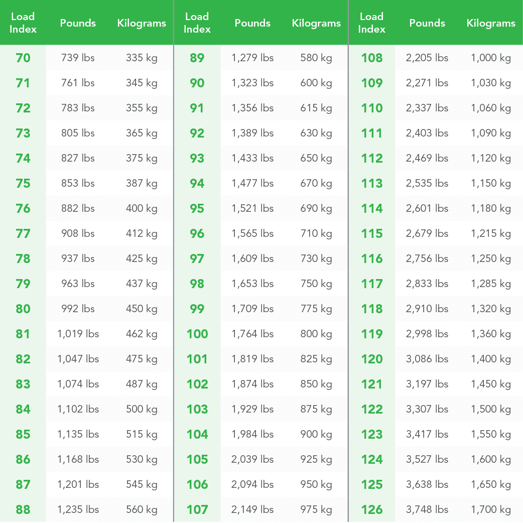
- In **Load Index,** Mention the numeric code that represents the maximum weight a tire can carry when properly inflated.
**Load Index For Reference.
**
- In **Ply Rating,** enter the value that indicates the strength and load-carrying capacity of a tire
- **Examples:**
- **4 PR** – Light-duty vehicles
- **6 PR** – Medium load capacity
- **8 PR / 10 PR** – Heavy-duty vehicles such as trucks and buses
- - Click on the **Save 💾 icon.**
**Watch :** Howto bulk upload tire inventory.
### **To Upload Tire in Bulk**
- Click on the upload button on the taskbar. A new tire bulk upload window opens.
- - Choose the appropriate **Company** and **Branch** from the drop-down list under which you would like to add the Tire record.
- Select the **Tire Brand** from the drop-down list.
- Select the **Tire Model** from the drop-down list or add a new model.
- To add New model, click on the, Add New option.
- In **Model Name,** enter the name for the tire model.

- - **Download the sample file** from the link given. The file will hold the basic information about the tire, such as Serial number, Manufacture Date, RFID Tag, Tire Size, Tread Pattern, Tread Depth, etc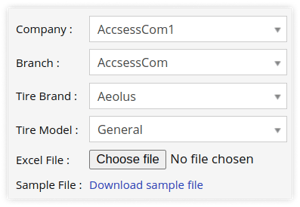
- - Once you have completed filling in the required details, proceed to **Upload** the file with **Choose file** option.
- Click on the **Save 💾 icon.**
### **To Download Tire Records**
- Click on the Download button on the taskbar.
- A file with an **XLS** extension gets downloaded.

- You can share this file with others or utilize it as needed for your specific requirements.
- [Trakzee](https://helpdesk.uffizio.com/knowledge/trakzee?hsLang=en#main-content)
- [User Hierarchy](https://helpdesk.uffizio.com/knowledge/trakzee?hsLang=en#user-hierarchy)
- [Admin](https://helpdesk.uffizio.com/knowledge/trakzee?hsLang=en#admin)
- [Reseller](https://helpdesk.uffizio.com/knowledge/trakzee?hsLang=en#reseller)
- [Company](https://helpdesk.uffizio.com/knowledge/trakzee?hsLang=en#company)
- [Branch](https://helpdesk.uffizio.com/knowledge/trakzee?hsLang=en#branch)
- [Object](https://helpdesk.uffizio.com/knowledge/trakzee?hsLang=en#object)
- [Driver](https://helpdesk.uffizio.com/knowledge/trakzee?hsLang=en#driver)
- [Alert](https://helpdesk.uffizio.com/knowledge/trakzee?hsLang=en#alert)
- [Reminder Rule](https://helpdesk.uffizio.com/knowledge/trakzee?hsLang=en#reminder-rule)
- [Smart Trip](https://helpdesk.uffizio.com/knowledge/trakzee?hsLang=en#smart-trip)
- [Expense](https://helpdesk.uffizio.com/knowledge/trakzee?hsLang=en#expense)
- [Job](https://helpdesk.uffizio.com/knowledge/trakzee?hsLang=en#job)
- [Route Optimization](https://helpdesk.uffizio.com/knowledge/trakzee?hsLang=en#route-optimization)
- [Eco Drving/Driver Rating](https://helpdesk.uffizio.com/knowledge/trakzee?hsLang=en#eco-drving-driver-rating)
- [Object Group](https://helpdesk.uffizio.com/knowledge/trakzee?hsLang=en#object-group)
- [Classify Trips](https://helpdesk.uffizio.com/knowledge/trakzee?hsLang=en#classify-trips)
- [Send Command](https://helpdesk.uffizio.com/knowledge/trakzee?hsLang=en#send-command)
- [Announcements](https://helpdesk.uffizio.com/knowledge/trakzee?hsLang=en#announcements)
- [Base Location Configuration](https://helpdesk.uffizio.com/knowledge/trakzee?hsLang=en#base-location-configuration)
- [Address](https://helpdesk.uffizio.com/knowledge/trakzee?hsLang=en#address)
- [Geofence](https://helpdesk.uffizio.com/knowledge/trakzee?hsLang=en#geofence)
- [Tire Management](https://helpdesk.uffizio.com/knowledge/trakzee?hsLang=en#tire-management)
- [Technician](https://helpdesk.uffizio.com/knowledge/trakzee?hsLang=en#technician)
- [Billing](https://helpdesk.uffizio.com/knowledge/trakzee?hsLang=en#billing)
- [Trailer](https://helpdesk.uffizio.com/knowledge/trakzee?hsLang=en#trailer)
- [eLock](https://helpdesk.uffizio.com/knowledge/trakzee?hsLang=en#elock)
- [Manage your Account](https://helpdesk.uffizio.com/knowledge/trakzee?hsLang=en#manage-your-account)
- [Fuel Management](https://helpdesk.uffizio.com/knowledge/trakzee?hsLang=en#fuel-management)
- [Video Telematics](https://helpdesk.uffizio.com/knowledge/trakzee?hsLang=en#video-telematics)
- [Live tracking](https://helpdesk.uffizio.com/knowledge/trakzee?hsLang=en#live-tracking)
- [Dashboard](https://helpdesk.uffizio.com/knowledge/trakzee?hsLang=en#dashboard)
- [Reports](https://helpdesk.uffizio.com/knowledge/trakzee?hsLang=en#reports)
- [Charts](https://helpdesk.uffizio.com/knowledge/trakzee?hsLang=en#charts)
- [Mobile Application](https://helpdesk.uffizio.com/knowledge/trakzee?hsLang=en#mobile-application)
- [White Label](https://helpdesk.uffizio.com/knowledge/trakzee?hsLang=en#white-label)
- [FAQs](https://helpdesk.uffizio.com/knowledge/trakzee?hsLang=en#faqs)
- [Support](https://helpdesk.uffizio.com/knowledge/trakzee?hsLang=en#support)
- [Inventory](https://helpdesk.uffizio.com/knowledge/trakzee?hsLang=en#inventory)
- [Driver Application](https://helpdesk.uffizio.com/knowledge/trakzee?hsLang=en#driver-application)
- [Technician Application](https://helpdesk.uffizio.com/knowledge/trakzee?hsLang=en#technician-application)
- [Beacon](https://helpdesk.uffizio.com/knowledge/trakzee?hsLang=en#beacon)
- [Schedule Trip Classification.](https://helpdesk.uffizio.com/knowledge/trakzee?hsLang=en#schedule-trip-classification)
- [Manage DVIR](https://helpdesk.uffizio.com/knowledge/trakzee?hsLang=en#manage-dvir)
- [SOP Definition](https://helpdesk.uffizio.com/knowledge/trakzee?hsLang=en#sop-definition)
- [Template](https://helpdesk.uffizio.com/knowledge/trakzee?hsLang=en#template)
- [Google Map](https://helpdesk.uffizio.com/knowledge/trakzee?hsLang=en#google-map)
- [Machinary](https://helpdesk.uffizio.com/knowledge/trakzee?hsLang=en#machinary)
- [R.A.G](https://helpdesk.uffizio.com/knowledge/trakzee?hsLang=en#r-a-g)
- [Parking Location](https://helpdesk.uffizio.com/knowledge/trakzee?hsLang=en#parking-location)
- [User Customise API](https://helpdesk.uffizio.com/knowledge/trakzee?hsLang=en#user-customise-api)
- [More Apps](https://helpdesk.uffizio.com/knowledge/trakzee?hsLang=en#more-apps)
- [WASL](https://helpdesk.uffizio.com/knowledge/trakzee?hsLang=en#wasl)
- [Private Mode](https://helpdesk.uffizio.com/knowledge/trakzee?hsLang=en#private-mode)
- [Form](https://helpdesk.uffizio.com/knowledge/trakzee?hsLang=en#form)
- [Terms and Conditions](https://helpdesk.uffizio.com/knowledge/trakzee?hsLang=en#terms-and-conditions)
- [Parts Master](https://helpdesk.uffizio.com/knowledge/trakzee?hsLang=en#parts-master)
- [Advance Idle Rule](https://helpdesk.uffizio.com/knowledge/trakzee?hsLang=en#advance-idle-rule)
- [Bulk Action](https://helpdesk.uffizio.com/knowledge/trakzee?hsLang=en#bulk-action)
- [QR Tracking](https://helpdesk.uffizio.com/knowledge/trakzee?hsLang=en#qr-tracking)
- [Image Overlay](https://helpdesk.uffizio.com/knowledge/trakzee?hsLang=en#image-overlay)
- [IP Camera](https://helpdesk.uffizio.com/knowledge/trakzee?hsLang=en#ip-camera)
- [Transport Regulation](https://helpdesk.uffizio.com/knowledge/trakzee?hsLang=en#transport-regulation)
- [Path Management](https://helpdesk.uffizio.com/knowledge/trakzee?hsLang=en#path-management)
- [Vendor](https://helpdesk.uffizio.com/knowledge/trakzee?hsLang=en#vendor)
- [RTA RMS Overview](https://helpdesk.uffizio.com/knowledge/trakzee?hsLang=en#rta-rms-overview)
- [Social Media API](https://helpdesk.uffizio.com/knowledge/trakzee?hsLang=en#social-media-api)
- [Utilities](https://helpdesk.uffizio.com/knowledge/trakzee?hsLang=en#utilities)
- [SmartBus](https://helpdesk.uffizio.com/knowledge/smartbus?hsLang=en#main-content)
- [Admin](https://helpdesk.uffizio.com/knowledge/smartbus?hsLang=en#admin)
- [Reseller](https://helpdesk.uffizio.com/knowledge/smartbus?hsLang=en#reseller)
- [School](https://helpdesk.uffizio.com/knowledge/smartbus?hsLang=en#school)
- [Object](https://helpdesk.uffizio.com/knowledge/smartbus?hsLang=en#object)
- [Reminder Rule](https://helpdesk.uffizio.com/knowledge/smartbus?hsLang=en#reminder-rule)
- [Driver](https://helpdesk.uffizio.com/knowledge/smartbus?hsLang=en#driver)
- [Student](https://helpdesk.uffizio.com/knowledge/smartbus?hsLang=en#student)
- [Create Trip](https://helpdesk.uffizio.com/knowledge/smartbus?hsLang=en#create-trip)
- [Expense](https://helpdesk.uffizio.com/knowledge/smartbus?hsLang=en#expense)
- [Object Group](https://helpdesk.uffizio.com/knowledge/smartbus?hsLang=en#object-group)
- [Beacon](https://helpdesk.uffizio.com/knowledge/smartbus?hsLang=en#beacon)
- [Class](https://helpdesk.uffizio.com/knowledge/smartbus?hsLang=en#class)
- [Division](https://helpdesk.uffizio.com/knowledge/smartbus?hsLang=en#division)
- [Academic Year](https://helpdesk.uffizio.com/knowledge/smartbus?hsLang=en#academic-year)
- [UHF Reader](https://helpdesk.uffizio.com/knowledge/smartbus?hsLang=en#uhf-reader)
- [Holiday](https://helpdesk.uffizio.com/knowledge/smartbus?hsLang=en#holiday)
- [Smartwaste](https://helpdesk.uffizio.com/knowledge/smartwaste?hsLang=en#main-content)
- [Hierarchy](https://helpdesk.uffizio.com/knowledge/smartwaste?hsLang=en#hierarchy)
- [Admin](https://helpdesk.uffizio.com/knowledge/smartwaste?hsLang=en#admin)
- [Reseller](https://helpdesk.uffizio.com/knowledge/smartwaste?hsLang=en#reseller)
- [Company](https://helpdesk.uffizio.com/knowledge/smartwaste?hsLang=en#company)
- [Branch](https://helpdesk.uffizio.com/knowledge/smartwaste?hsLang=en#branch)
- [Object](https://helpdesk.uffizio.com/knowledge/smartwaste?hsLang=en#object)
- [Support](https://helpdesk.uffizio.com/knowledge/smartwaste?hsLang=en#support)
- [Address](https://helpdesk.uffizio.com/knowledge/smartwaste?hsLang=en#address)
- [Manage Your Account](https://helpdesk.uffizio.com/knowledge/smartwaste?hsLang=en#manage-your-account)
- [Fuel](https://helpdesk.uffizio.com/knowledge/smartwaste?hsLang=en#fuel)
- [Temperature](https://helpdesk.uffizio.com/knowledge/smartwaste?hsLang=en#temperature)
- [Load Sensor](https://helpdesk.uffizio.com/knowledge/smartwaste?hsLang=en#load-sensor)
- [Collector](https://helpdesk.uffizio.com/knowledge/smartwaste?hsLang=en#collector)
- [Driver](https://helpdesk.uffizio.com/knowledge/smartwaste?hsLang=en#driver)
- [Alert](https://helpdesk.uffizio.com/knowledge/smartwaste?hsLang=en#alert)
- [Reminder Rule](https://helpdesk.uffizio.com/knowledge/smartwaste?hsLang=en#reminder-rule)
- [Incident](https://helpdesk.uffizio.com/knowledge/smartwaste?hsLang=en#incident)
- [Google Map](https://helpdesk.uffizio.com/knowledge/smartwaste?hsLang=en#google-map)
- [Town](https://helpdesk.uffizio.com/knowledge/smartwaste?hsLang=en#town)
- [Zone](https://helpdesk.uffizio.com/knowledge/smartwaste?hsLang=en#zone)
- [Ward](https://helpdesk.uffizio.com/knowledge/smartwaste?hsLang=en#ward)
- [Tire](https://helpdesk.uffizio.com/knowledge/smartwaste?hsLang=en#tire)
- [Dashboard](https://helpdesk.uffizio.com/knowledge/smartwaste?hsLang=en#dashboard)
- [Technician](https://helpdesk.uffizio.com/knowledge/smartwaste?hsLang=en#technician)
- [Technician Mobile Application](https://helpdesk.uffizio.com/knowledge/smartwaste?hsLang=en#technician-mobile-application)
- [Expense](https://helpdesk.uffizio.com/knowledge/smartwaste?hsLang=en#expense)
- [Surveyor](https://helpdesk.uffizio.com/knowledge/smartwaste?hsLang=en#surveyor)
- [Live Tracking](https://helpdesk.uffizio.com/knowledge/smartwaste?hsLang=en#live-tracking)
- [Geofence](https://helpdesk.uffizio.com/knowledge/smartwaste?hsLang=en#geofence)
- [FAQS](https://helpdesk.uffizio.com/knowledge/smartwaste?hsLang=en#faqs)
- [Trakzee Mini](https://helpdesk.uffizio.com/knowledge/trakzee-mini?hsLang=en#main-content)
- [Admin](https://helpdesk.uffizio.com/knowledge/trakzee-mini?hsLang=en#admin)
- [Reseller](https://helpdesk.uffizio.com/knowledge/trakzee-mini?hsLang=en#reseller)
- [Consumer](https://helpdesk.uffizio.com/knowledge/trakzee-mini?hsLang=en#consumer)
- [Vehicle](https://helpdesk.uffizio.com/knowledge/trakzee-mini?hsLang=en#vehicle)
- [Alert](https://helpdesk.uffizio.com/knowledge/trakzee-mini?hsLang=en#alert)
- [Reminder Rule](https://helpdesk.uffizio.com/knowledge/trakzee-mini?hsLang=en#reminder-rule)
- [Inventory](https://helpdesk.uffizio.com/knowledge/trakzee-mini?hsLang=en#inventory)
- [Address](https://helpdesk.uffizio.com/knowledge/trakzee-mini?hsLang=en#address)
- [Geofence](https://helpdesk.uffizio.com/knowledge/trakzee-mini?hsLang=en#geofence)
- [Send Command](https://helpdesk.uffizio.com/knowledge/trakzee-mini?hsLang=en#send-command)
- [Technician](https://helpdesk.uffizio.com/knowledge/trakzee-mini?hsLang=en#technician)
- [Billing](https://helpdesk.uffizio.com/knowledge/trakzee-mini?hsLang=en#billing)
- [Reports](https://helpdesk.uffizio.com/knowledge/trakzee-mini?hsLang=en#reports)
- [Live Tracking](https://helpdesk.uffizio.com/knowledge/trakzee-mini?hsLang=en#live-tracking)
- [Dashboard](https://helpdesk.uffizio.com/knowledge/trakzee-mini?hsLang=en#dashboard)
- [Support](https://helpdesk.uffizio.com/knowledge/trakzee-mini?hsLang=en#support)
- [Mobile Application](https://helpdesk.uffizio.com/knowledge/trakzee-mini?hsLang=en#mobile-application)
- [Manage Your Account.](https://helpdesk.uffizio.com/knowledge/trakzee-mini?hsLang=en#manage-your-account)
- [Technician Application](https://helpdesk.uffizio.com/knowledge/trakzee-mini?hsLang=en#technician-application)
- [Petzee](https://helpdesk.uffizio.com/knowledge/petzee?hsLang=en#main-content)
- [Admin](https://helpdesk.uffizio.com/knowledge/petzee?hsLang=en#admin)
- [Reseller](https://helpdesk.uffizio.com/knowledge/petzee?hsLang=en#reseller)
- [Company](https://helpdesk.uffizio.com/knowledge/petzee?hsLang=en#company)
- [Inventory](https://helpdesk.uffizio.com/knowledge/petzee?hsLang=en#inventory)
- [Pet](https://helpdesk.uffizio.com/knowledge/petzee?hsLang=en#pet)
- [Alert](https://helpdesk.uffizio.com/knowledge/petzee?hsLang=en#alert)
- [Pet Group](https://helpdesk.uffizio.com/knowledge/petzee?hsLang=en#pet-group)
- [Live Tracking](https://helpdesk.uffizio.com/knowledge/petzee?hsLang=en#live-tracking)
- [Reports](https://helpdesk.uffizio.com/knowledge/petzee?hsLang=en#reports)
- [Support](https://helpdesk.uffizio.com/knowledge/petzee?hsLang=en#support)
- [Mobile Application](https://helpdesk.uffizio.com/knowledge/petzee?hsLang=en#mobile-application)
- [Manage Your Account](https://helpdesk.uffizio.com/knowledge/petzee?hsLang=en#manage-your-account)
- [Startup](https://helpdesk.uffizio.com/knowledge/startup?hsLang=en#main-content)
- [Introduction](https://helpdesk.uffizio.com/knowledge/startup?hsLang=en#introduction)
- [Organization & User Hierarchy](https://helpdesk.uffizio.com/knowledge/startup?hsLang=en#organization-user-hierarchy)
- [User & Rights Management](https://helpdesk.uffizio.com/knowledge/startup?hsLang=en#user-rights-management)
- [Vehicle and Device Management](https://helpdesk.uffizio.com/knowledge/startup?hsLang=en#vehicle-and-device-management)
- [Billing & Payment Management](https://helpdesk.uffizio.com/knowledge/startup?hsLang=en#billing-payment-management)
- [Additional Functionality](https://helpdesk.uffizio.com/knowledge/startup?hsLang=en#additional-functionality)
- [Analytics Visibility](https://helpdesk.uffizio.com/knowledge/startup?hsLang=en#analytics-visibility)
- [Mobile app](https://helpdesk.uffizio.com/knowledge/startup?hsLang=en#mobile-app)
- [Alerts](https://helpdesk.uffizio.com/knowledge/startup?hsLang=en#alerts)
- [Gridzee](https://helpdesk.uffizio.com/knowledge/gridzee?hsLang=en#main-content)
- [Admin](https://helpdesk.uffizio.com/knowledge/gridzee?hsLang=en#admin)
- [Reseller](https://helpdesk.uffizio.com/knowledge/gridzee?hsLang=en#reseller)
- [Company](https://helpdesk.uffizio.com/knowledge/gridzee?hsLang=en#company)
- [Company Subuser](https://helpdesk.uffizio.com/knowledge/gridzee?hsLang=en#company-subuser)
- [Branch](https://helpdesk.uffizio.com/knowledge/gridzee?hsLang=en#branch)
- [Object](https://helpdesk.uffizio.com/knowledge/gridzee?hsLang=en#object)
- [Alert](https://helpdesk.uffizio.com/knowledge/gridzee?hsLang=en#alert)
- [Announcement](https://helpdesk.uffizio.com/knowledge/gridzee?hsLang=en#announcement)
- [Object Group](https://helpdesk.uffizio.com/knowledge/gridzee?hsLang=en#object-group)
- [Location](https://helpdesk.uffizio.com/knowledge/gridzee?hsLang=en#location)
- [Layers](https://helpdesk.uffizio.com/knowledge/gridzee?hsLang=en#layers)
- [Attendance](https://helpdesk.uffizio.com/knowledge/gridzee?hsLang=en#attendance)
- [POI](https://helpdesk.uffizio.com/knowledge/gridzee?hsLang=en#poi)
- [Dashboard](https://helpdesk.uffizio.com/knowledge/gridzee?hsLang=en#dashboard)
- [Live Tracking](https://helpdesk.uffizio.com/knowledge/gridzee?hsLang=en#live-tracking)
- [Reports](https://helpdesk.uffizio.com/knowledge/gridzee?hsLang=en#reports)
- [Support](https://helpdesk.uffizio.com/knowledge/gridzee?hsLang=en#support)
- [Manage Your Account](https://helpdesk.uffizio.com/knowledge/gridzee?hsLang=en#manage-your-account)
- [AIS140](https://helpdesk.uffizio.com/knowledge/ais140?hsLang=en#main-content)
- [Manufacturer](https://helpdesk.uffizio.com/knowledge/ais140?hsLang=en#manufacturer)
- [Dealer](https://helpdesk.uffizio.com/knowledge/ais140?hsLang=en#dealer)
- [Vehicle Owner](https://helpdesk.uffizio.com/knowledge/ais140?hsLang=en#vehicle-owner)
- [Live Tracking Screen](https://helpdesk.uffizio.com/knowledge/ais140?hsLang=en#live-tracking-screen)
- [Vehicle Activity](https://helpdesk.uffizio.com/knowledge/ais140?hsLang=en#vehicle-activity)
- [Charts](https://helpdesk.uffizio.com/knowledge/ais140?hsLang=en#charts)
- [Reports](https://helpdesk.uffizio.com/knowledge/ais140?hsLang=en#reports)
- [Dashboard](https://helpdesk.uffizio.com/knowledge/ais140?hsLang=en#dashboard)
- [Billing Module](https://helpdesk.uffizio.com/knowledge/ais140?hsLang=en#billing-module)
- [Send Command](https://helpdesk.uffizio.com/knowledge/ais140?hsLang=en#send-command)
- [Address](https://helpdesk.uffizio.com/knowledge/ais140?hsLang=en#address)
- [Announcement](https://helpdesk.uffizio.com/knowledge/ais140?hsLang=en#announcement)
- [Alert](https://helpdesk.uffizio.com/knowledge/ais140?hsLang=en#alert)
- [geofence](https://helpdesk.uffizio.com/knowledge/ais140?hsLang=en#geofence)
- [Manage Account](https://helpdesk.uffizio.com/knowledge/ais140?hsLang=en#manage-account)
- [Support](https://helpdesk.uffizio.com/knowledge/ais140?hsLang=en#support)
- [Reports](https://helpdesk.uffizio.com/knowledge/reports?hsLang=en#main-content)
- [Activity](https://helpdesk.uffizio.com/knowledge/reports?hsLang=en#activity)
- [Logs](https://helpdesk.uffizio.com/knowledge/reports?hsLang=en#logs)
- [Hardware Maintenance](https://helpdesk.uffizio.com/knowledge/reports?hsLang=en#hardware-maintenance)
- [Alert](https://helpdesk.uffizio.com/knowledge/reports?hsLang=en#alert)
- [Temperature](https://helpdesk.uffizio.com/knowledge/reports?hsLang=en#temperature)
- [Tickets](https://helpdesk.uffizio.com/tickets)
- [Knowledge Base](https://helpdesk.uffizio.com/knowledge)
- [Sign Out](https://helpdesk.uffizio.com/_hcms/mem/logout)
Copyright © 2026, Uffizio Technologies Pvt. Ltd.