
The Object Bulk Update screen allows users to modify multiple object (vehicle) settings from a single interface instead of editing each object individually. This feature saves time and ensures consistency when updating common object configurations across multiple vehicles.
To Get Started
- Log in to your account.
- Go to setting > Bulk Action > Object Bulk Action
Upon clicking on Object Bulk Action, users will be taken to the Object bulk action page, where company and vehicles list with parameters are visible.
To updates object details
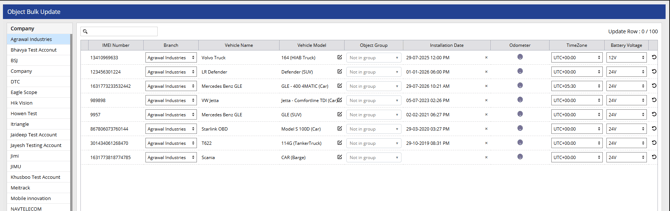
Select a company from the list on the left to view its vehicles on the right-hand side.
From this screen, you can update multiple vehicle details at once, including Vehicle Number, Branch, Vehicle Name, Vehicle Model, Object Group, Installation Date, Odometer, Timezone, and Battery Voltage.
This feature helps you make bulk changes quickly and accurately across many vehicles.