
The Collision Alarm Alert is a device-specific alert triggered when a potential risk of collision or accident is detected. This alert helps fleet managers take immediate preventive action to enhance driver safety and protect the vehicle.
Parameters Considered (Prerequisites)
- Enable Collision detection on device : This is a device specific feature, so user needs to enable this option on the device it self.
How to Configure
-
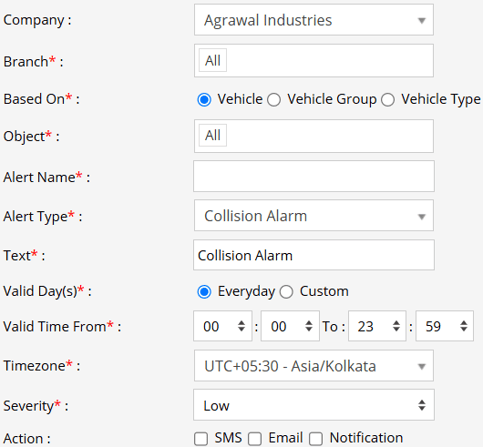
Select the correct Company and Branch for whom the alert is to be configured.
-
Based On: Choose on what you want to base the alert configuration (Object, Object Group, Object Type).
- Object: Select individual vehicles for whom you want the alert to generate.
- Object Group: Select a group of vehicles for whom you want the alert to generate.
- Object Type: Select vehicle or object type for whom you want the alert to generate.
-
Select the Object based on the previous step selection.
-
Set an Alert Name for identification of the alert.
-
Select the Alert Type as Collision Alarm.
-
In the Text field, enter the message that will be displayed when the alert is triggered.
- Select the Valid Days, Everyday or Custom.
- Everyday: This alert will be triggered, everyday in case of a violation in accordance to these parameters set.
- Custom: Mark the checkboxes of the days, when you want this alert to be triggered for. (eg., Sun, Mon and Sat)

- Enter the Valid Time From and To. The alert will be generated inside the time range that you have selected.
- Select the Timezone.
- Select the Severity of the alert (Low, Medium, or High).
- Mark the checkboxes of the medium via which you want the Action or Notification to be sent. (eg., SMS, Email or Notification)
- SMS: To receive an alert by SMS, enable the checkbox, enter the phone numbers.
- Email: To receive an alert by Email, enable the checkbox, enter the recipients of the email.
- Notification: To receive an alert on the system Push Notification, enable checkbox.
- From Users, select the users that will receive the notification.
- From Notification Sound. Select the sound from the drop-down that will be played for this notification.
- Click Save 💾 icon. to save the alert configuration.
Please Note: To Receive the alert on SMS & Email, the api should be configured either on Admin, Reseller or Company.
Example
A Collision Alarm Alert is triggered when a potential collision scenario is detected, such as sudden braking, obstacle detection, or risk of impact. Notifications are sent via SMS, Email, or In-App Notification, enabling fleet managers to respond immediately and take preventive measures to avoid accidents.