
Definition / Description
The Humidity alert is triggered when the humidity sensor detects levels beyond the configured range. This alert helps fleet managers or operators monitor environmental conditions and take preventive actions to protect sensitive cargo, equipment, or vehicle components.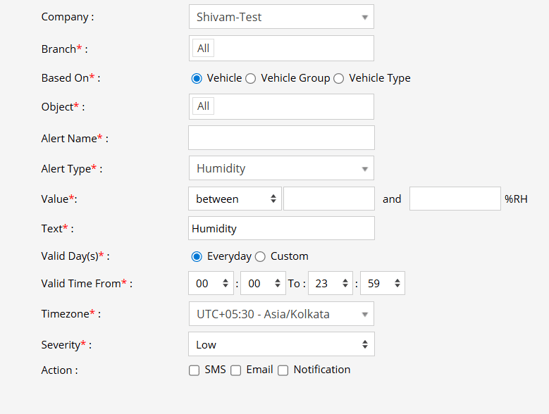
Parameters Considered (Prerequisites)
- Humidity: A connection type must be established with the list of Sensors Connected with Humidity while adding an object.
How to Configure
- Select the correct Company and Branch.
- From the Alert Type dropdown, choose Humidity.
- Enter an Alert Name, as your preference.
- Configure the Value (range of humidity levels).
- Select Based On: Object, Object Group, or Object Type, and then select the specific object(s) as applicable.
- Enter a description in the Text field (e.g., “Humidity level exceeded configured range”).
- Configure Valid Days and Valid Time From / To.
- Choose the appropriate TimeZone.
- Set the Severity Level (Low / Medium / High).
- Select the notification method: SMS, Email, or In-App Notification.
- Click Save.
Use Case
A Humidity alert is triggered when the sensor detects levels beyond the configured thresholds for a specific object, object group, or object type. Notifications are sent via SMS, Email, or In-App Notification, enabling fleet managers or operators to take corrective actions and maintain safe environmental conditions.
When Based On: Object, Object Group or Object Type
- When you select Object only a dropdown with all the objects will appear. You can select specific vehicles if you want to create the alert specifically for them.
- When you select Object Group, a dropdown with a list of all Object groups will appear. When you select a specific Object Group , a list of Objects present in that object group will appear below it. If you want the alert to be triggered for specific objects of that specific Object group. (e.g., Object Group and Object)
- When you select Object Type, a dropdown with a list of all Object groups will appear. When you select a specific Object Type , a list of Objects present in that object type will appear below it. If you want the alert to be triggered for specific objects of that specific Object type. (e.g., Object type and Object)