
Introduction
The AC Misuse alert is designed to notify fleet managers when a vehicle's air conditioning (AC) system is running while the vehicle is idle for an extended period. This alert helps prevent unnecessary fuel consumption and ensures the AC is only used when the vehicle is in motion, improving fuel efficiency and reducing operational costs.
Parameters Considered (Prerequisites)
- AC Usage: The system monitors if the AC is turned on.
Note: It is mandatory to configure the AC port under the Sensor section of the object configuration.
- Vehicle Movement: The system checks whether the vehicle is stationary.
- Idle Duration: If the vehicle remains idle for longer than the set value (e.g., 15 minutes), the alert is triggered.
- Device Communication: The system gathers data from the vehicle’s onboard device about AC usage and movement.
- Notification: Once triggered, a notification is sent as configured (SMS, Email, or In-App).
How to Configure
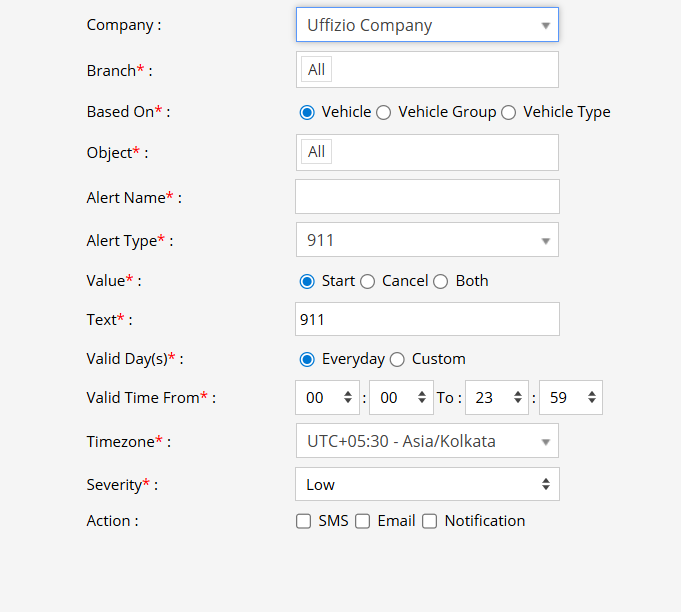
- Select the correct Company and Branch to apply the alert.
- From the Alert Type dropdown, choose AC Misuse.
- In the Value field, enter the idle time threshold (e.g., 15 minutes).
- Add a short description (e.g., "AC Misuse") in the Text field.
- Set Valid Days and Valid Time:
- Choose Everyday for all-time monitoring, or select specific days/times.
- Choose the appropriate Time Zone (e.g., UTC+05:30 - Asia/Kolkata).
- Set the Severity Level: Low / Medium / High.
- Select the Notification Method: SMS, Email, or In-App Notification.
Example Scenario
A vehicle is parked in a depot, and the driver leaves the air conditioning running while the vehicle is idle. After 20 minutes of idling, the vehicle’s AC is still on. If the threshold is set to greater than 15 minutes, the AC Misuse Alert will trigger.