---
title: Add Reminder Rule
description: A reminder rule is a feature that allows users to set up reminders for maintenance and renewal activities of the assets. Reminders can be set up for vehicle maintenance, driver license renewal, insura
---
[Skip to content](https://helpdesk.uffizio.com/knowledge/swm/add-reminder-rule#main-content)
English
Show submenu for translations
[Customer portal](https://helpdesk.uffizio.com/tickets?hsLang=en)

- [Tickets](https://helpdesk.uffizio.com/tickets)
- [Knowledge Base](https://helpdesk.uffizio.com/knowledge)
- [Sign Out](https://helpdesk.uffizio.com/_hcms/mem/logout)
Open main navigation
Close main navigation
- [Tickets](https://helpdesk.uffizio.com/tickets)
- [Knowledge Base](https://helpdesk.uffizio.com/knowledge)
- [Sign Out](https://helpdesk.uffizio.com/_hcms/mem/logout)
- English
Show submenu for translations
- [Customer portal](https://helpdesk.uffizio.com/tickets)
- www.uffizio.com
www.uffizio.com
Platform User Guide
- There are no suggestions because the search field is empty.
1. [Knowledge Base](https://helpdesk.uffizio.com/knowledge?hsLang=en)
2. [Smartwaste](https://helpdesk.uffizio.com/knowledge/smartwaste?hsLang=en)
3. [Reminder Rule](https://helpdesk.uffizio.com/knowledge/smartwaste?hsLang=en#reminder-rule)
# Add Reminder Rule
A reminder rule is a feature that allows users to set up reminders for maintenance and renewal activities of the assets. Reminders can be set up for vehicle maintenance, driver license renewal, insurance renewal, and more.
Users have the ability to create personalized reminder rules according to their unique requirements and can specify their desired timings for these reminders.
Reminders can be categorized into three distinct types: Time-based Reminders, Distance-based Reminders, and Work Hour-based Reminders.
**Time-based Reminders** are the reminders that are set on the basis of time period. For example, a user can set a reminder rule to notify them when a state permit is due for renewal every year.
**Distance-based Reminders** are the reminders that are set on the basis of distance travelled. For example, a user can set a reminder to notify them when a vehicle is due for a service after travelling every 1500 kilometers.
**Work Hour-based Reminders** are the reminders that are set on the basis of engine hours. For example, a user can set a reminder to notify them when an object is due for an oil change after every 200 engine hours.
**Please Note:** Reminder Rule is included only in **Standard** and **Premium** versions of the platform.
**Watch :** How to configure Reminder.
### To Get Started
- Log in to your account.
- Go to **Settings \> General \> Reminder Rule.**
### To Set Reminder
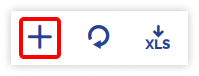
- Click on the **➕** button on the taskbar.
- Choose the **Reseller** and **Company** from the drop-down menu.
- Please provide a **Name** for the **Reminder** **Rule** to help you easily identify it later.
**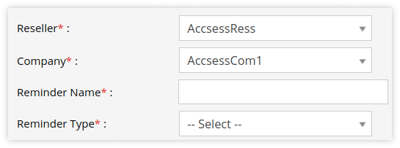**
- - You can **Add a New Reminder Type** or **Select** **the existing** **Reminder Type** from the dropdown list. The new reminder type created will get added under others.
- Select the **Schedule** type for the reminder: Recurring or One Time.
- **Remind every (x) month:** Specify the number of months in thisfield to receive reminders on a monthly basis.
- **Notify Before (x) Days:** To receive a notification several days prior to the end of the month, please enter the desired number of days in this field.
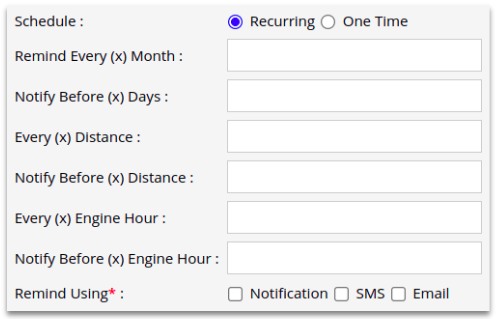
- - **Every (x) Distance:** Please specify the distance at which you would like to receive a notification when your vehicle reaches a specified number of kilometers.
- **Notify Before Every (x) Distance:** Please specify the distance at which you would like to be notified prior to your vehicle reaching the designated kilometer mark.
- **Every (x) Engine Hour:** Please specify the preferred time in hours to receive notifications when your vehicle reaches a specified number of engine hours.
- **Notify Before Every (x) Engine Hour:** Please specify the number of hours at which you would like to be notified prior to your vehicle reaches the desired engine hour.
- Select the method you want to get reminded from the **Remind Using** field.
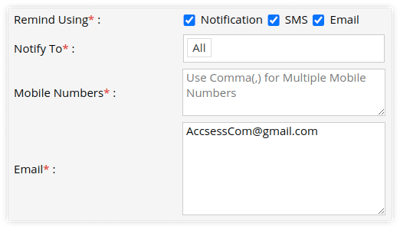
- **Notification:** Select Notification to notify subusers.
- **Notify To:** Select users from the dropdown list to whom you want to send reminder notifications.
- **SMS:** Add the mobile number in the provided text box on which you want to send the reminder. Use a comma (,) as a separator if you are adding multiple mobile numbers.
**Please Note: [SMS configuration](https://helpdesk.uffizio.com/knowledge/sms-service-configuration-company?hsLang=en)** is necessary.
- - - **Email:** Add the email address to which you want to send the reminder. Use a comma (,) as a separator if you are adding multiple email addresses.
**Please Note: [Email configuration](https://helpdesk.uffizio.com/knowledge/email-service-configuration-company?hsLang=en)** is necessary.
- - Define the below parameters for each object in the table located next to these reminder configuration fields to start the **Reminder** based on the specific date requirement. .png?width=688&height=222&name=Frame%20659%20(1).png)
The fields displayed in the table may vary based on the Reminder type you select.
- - - Choose the specific **Objects** for which you would like to apply the reminder rule.
- Specify the **Reminder Start Date** to initiate the reminder and trigger the notification as scheduled.
- **Distance Before Reminder Start Date:** Specify the distance travelled by the object prior to the reminder start date when utilizing Distance-based Reminders.
- **Engine Hour Before Reminder Start Date:** Specify the engine hours that the object should have accumulated prior to the reminder start date when setting up Work Hour-based Reminders.
- **Issue Date:** Specify the Issue Date of thedocument.
- **Expiry Date:** Specify the Expiry Date of thedocument.
- Click on the **Save 💾** icon to save the reminder rule.
### **To Add Reminder from Live tracking Screen**
Reminders can also be conveniently added through the Tooltip widget on the Live Tracking screen, allowing users to set reminders for specific objects with ease.
- Log in to your account.
- Go to **Tracking \> Click on Object \> Reminder Widget on Tooltip.**
**.png?width=238&height=243&name=Frame%20659%20(4).png)**
- **Click** on the **➕** icon.
- Enter the details.
- Click on **Save 💾**.
**Watch :** How to Acknowledge reminder.
### To Acknowledge the Reminder
The system provides users with the ability to **Acknowledge reminders**, helping them stay updated on important tasks and deadlines while confirming their receipt of these notifications.
- Log in to your account.
- Go to **Tracking \> Object List**
- Click on **Reminder** icon
.png?width=423&height=59&name=Frame%20659%20(6).png)
- A pop-up window containing the reminders will open..png?width=688&height=130&name=Frame%20659%20(5).png)
- Enter the **Acknowledge date** and, if necessary, a brief **Description**, then proceed to save the record.
To add reminders from the mobile application, click **[here](https://helpdesk.uffizio.com/knowledge/add-reminder-rule-from-trakzee-mobile-app?hsLang=en)**.
To download the reminders from the mobile application, click **[here](https://helpdesk.uffizio.com/knowledge/download-address-details-from-trakzee-mobile-app-1?hsLang=en)**.
- [Trakzee](https://helpdesk.uffizio.com/knowledge/trakzee?hsLang=en#main-content)
- [User Hierarchy](https://helpdesk.uffizio.com/knowledge/trakzee?hsLang=en#user-hierarchy)
- [Admin](https://helpdesk.uffizio.com/knowledge/trakzee?hsLang=en#admin)
- [Reseller](https://helpdesk.uffizio.com/knowledge/trakzee?hsLang=en#reseller)
- [Company](https://helpdesk.uffizio.com/knowledge/trakzee?hsLang=en#company)
- [Branch](https://helpdesk.uffizio.com/knowledge/trakzee?hsLang=en#branch)
- [Object](https://helpdesk.uffizio.com/knowledge/trakzee?hsLang=en#object)
- [Driver](https://helpdesk.uffizio.com/knowledge/trakzee?hsLang=en#driver)
- [Alert](https://helpdesk.uffizio.com/knowledge/trakzee?hsLang=en#alert)
- [Reminder Rule](https://helpdesk.uffizio.com/knowledge/trakzee?hsLang=en#reminder-rule)
- [Smart Trip](https://helpdesk.uffizio.com/knowledge/trakzee?hsLang=en#smart-trip)
- [Expense](https://helpdesk.uffizio.com/knowledge/trakzee?hsLang=en#expense)
- [Job](https://helpdesk.uffizio.com/knowledge/trakzee?hsLang=en#job)
- [Route Optimization](https://helpdesk.uffizio.com/knowledge/trakzee?hsLang=en#route-optimization)
- [Eco Drving/Driver Rating](https://helpdesk.uffizio.com/knowledge/trakzee?hsLang=en#eco-drving-driver-rating)
- [Object Group](https://helpdesk.uffizio.com/knowledge/trakzee?hsLang=en#object-group)
- [Classify Trips](https://helpdesk.uffizio.com/knowledge/trakzee?hsLang=en#classify-trips)
- [Send Command](https://helpdesk.uffizio.com/knowledge/trakzee?hsLang=en#send-command)
- [Announcements](https://helpdesk.uffizio.com/knowledge/trakzee?hsLang=en#announcements)
- [Base Location Configuration](https://helpdesk.uffizio.com/knowledge/trakzee?hsLang=en#base-location-configuration)
- [Address](https://helpdesk.uffizio.com/knowledge/trakzee?hsLang=en#address)
- [Geofence](https://helpdesk.uffizio.com/knowledge/trakzee?hsLang=en#geofence)
- [Tire Management](https://helpdesk.uffizio.com/knowledge/trakzee?hsLang=en#tire-management)
- [Technician](https://helpdesk.uffizio.com/knowledge/trakzee?hsLang=en#technician)
- [Billing](https://helpdesk.uffizio.com/knowledge/trakzee?hsLang=en#billing)
- [Trailer](https://helpdesk.uffizio.com/knowledge/trakzee?hsLang=en#trailer)
- [eLock](https://helpdesk.uffizio.com/knowledge/trakzee?hsLang=en#elock)
- [Manage your Account](https://helpdesk.uffizio.com/knowledge/trakzee?hsLang=en#manage-your-account)
- [Fuel Management](https://helpdesk.uffizio.com/knowledge/trakzee?hsLang=en#fuel-management)
- [Video Telematics](https://helpdesk.uffizio.com/knowledge/trakzee?hsLang=en#video-telematics)
- [Live tracking](https://helpdesk.uffizio.com/knowledge/trakzee?hsLang=en#live-tracking)
- [Dashboard](https://helpdesk.uffizio.com/knowledge/trakzee?hsLang=en#dashboard)
- [Reports](https://helpdesk.uffizio.com/knowledge/trakzee?hsLang=en#reports)
- [Charts](https://helpdesk.uffizio.com/knowledge/trakzee?hsLang=en#charts)
- [Mobile Application](https://helpdesk.uffizio.com/knowledge/trakzee?hsLang=en#mobile-application)
- [White Label](https://helpdesk.uffizio.com/knowledge/trakzee?hsLang=en#white-label)
- [FAQs](https://helpdesk.uffizio.com/knowledge/trakzee?hsLang=en#faqs)
- [Support](https://helpdesk.uffizio.com/knowledge/trakzee?hsLang=en#support)
- [Inventory](https://helpdesk.uffizio.com/knowledge/trakzee?hsLang=en#inventory)
- [Driver Application](https://helpdesk.uffizio.com/knowledge/trakzee?hsLang=en#driver-application)
- [Technician Application](https://helpdesk.uffizio.com/knowledge/trakzee?hsLang=en#technician-application)
- [Beacon](https://helpdesk.uffizio.com/knowledge/trakzee?hsLang=en#beacon)
- [Schedule Trip Classification.](https://helpdesk.uffizio.com/knowledge/trakzee?hsLang=en#schedule-trip-classification)
- [Manage DVIR](https://helpdesk.uffizio.com/knowledge/trakzee?hsLang=en#manage-dvir)
- [SOP Definition](https://helpdesk.uffizio.com/knowledge/trakzee?hsLang=en#sop-definition)
- [Template](https://helpdesk.uffizio.com/knowledge/trakzee?hsLang=en#template)
- [Google Map](https://helpdesk.uffizio.com/knowledge/trakzee?hsLang=en#google-map)
- [Machinary](https://helpdesk.uffizio.com/knowledge/trakzee?hsLang=en#machinary)
- [R.A.G](https://helpdesk.uffizio.com/knowledge/trakzee?hsLang=en#r-a-g)
- [Parking Location](https://helpdesk.uffizio.com/knowledge/trakzee?hsLang=en#parking-location)
- [User Customise API](https://helpdesk.uffizio.com/knowledge/trakzee?hsLang=en#user-customise-api)
- [More Apps](https://helpdesk.uffizio.com/knowledge/trakzee?hsLang=en#more-apps)
- [WASL](https://helpdesk.uffizio.com/knowledge/trakzee?hsLang=en#wasl)
- [Private Mode](https://helpdesk.uffizio.com/knowledge/trakzee?hsLang=en#private-mode)
- [Form](https://helpdesk.uffizio.com/knowledge/trakzee?hsLang=en#form)
- [Terms and Conditions](https://helpdesk.uffizio.com/knowledge/trakzee?hsLang=en#terms-and-conditions)
- [Parts Master](https://helpdesk.uffizio.com/knowledge/trakzee?hsLang=en#parts-master)
- [Advance Idle Rule](https://helpdesk.uffizio.com/knowledge/trakzee?hsLang=en#advance-idle-rule)
- [Bulk Action](https://helpdesk.uffizio.com/knowledge/trakzee?hsLang=en#bulk-action)
- [QR Tracking](https://helpdesk.uffizio.com/knowledge/trakzee?hsLang=en#qr-tracking)
- [Image Overlay](https://helpdesk.uffizio.com/knowledge/trakzee?hsLang=en#image-overlay)
- [IP Camera](https://helpdesk.uffizio.com/knowledge/trakzee?hsLang=en#ip-camera)
- [Transport Regulation](https://helpdesk.uffizio.com/knowledge/trakzee?hsLang=en#transport-regulation)
- [Path Management](https://helpdesk.uffizio.com/knowledge/trakzee?hsLang=en#path-management)
- [Vendor](https://helpdesk.uffizio.com/knowledge/trakzee?hsLang=en#vendor)
- [RTA RMS Overview](https://helpdesk.uffizio.com/knowledge/trakzee?hsLang=en#rta-rms-overview)
- [Social Media API](https://helpdesk.uffizio.com/knowledge/trakzee?hsLang=en#social-media-api)
- [Utilities](https://helpdesk.uffizio.com/knowledge/trakzee?hsLang=en#utilities)
- [SmartBus](https://helpdesk.uffizio.com/knowledge/smartbus?hsLang=en#main-content)
- [Admin](https://helpdesk.uffizio.com/knowledge/smartbus?hsLang=en#admin)
- [Reseller](https://helpdesk.uffizio.com/knowledge/smartbus?hsLang=en#reseller)
- [School](https://helpdesk.uffizio.com/knowledge/smartbus?hsLang=en#school)
- [Object](https://helpdesk.uffizio.com/knowledge/smartbus?hsLang=en#object)
- [Reminder Rule](https://helpdesk.uffizio.com/knowledge/smartbus?hsLang=en#reminder-rule)
- [Driver](https://helpdesk.uffizio.com/knowledge/smartbus?hsLang=en#driver)
- [Student](https://helpdesk.uffizio.com/knowledge/smartbus?hsLang=en#student)
- [Create Trip](https://helpdesk.uffizio.com/knowledge/smartbus?hsLang=en#create-trip)
- [Expense](https://helpdesk.uffizio.com/knowledge/smartbus?hsLang=en#expense)
- [Object Group](https://helpdesk.uffizio.com/knowledge/smartbus?hsLang=en#object-group)
- [Beacon](https://helpdesk.uffizio.com/knowledge/smartbus?hsLang=en#beacon)
- [Class](https://helpdesk.uffizio.com/knowledge/smartbus?hsLang=en#class)
- [Division](https://helpdesk.uffizio.com/knowledge/smartbus?hsLang=en#division)
- [Academic Year](https://helpdesk.uffizio.com/knowledge/smartbus?hsLang=en#academic-year)
- [UHF Reader](https://helpdesk.uffizio.com/knowledge/smartbus?hsLang=en#uhf-reader)
- [Holiday](https://helpdesk.uffizio.com/knowledge/smartbus?hsLang=en#holiday)
- [Smartwaste](https://helpdesk.uffizio.com/knowledge/smartwaste?hsLang=en#main-content)
- [Hierarchy](https://helpdesk.uffizio.com/knowledge/smartwaste?hsLang=en#hierarchy)
- [Admin](https://helpdesk.uffizio.com/knowledge/smartwaste?hsLang=en#admin)
- [Reseller](https://helpdesk.uffizio.com/knowledge/smartwaste?hsLang=en#reseller)
- [Company](https://helpdesk.uffizio.com/knowledge/smartwaste?hsLang=en#company)
- [Branch](https://helpdesk.uffizio.com/knowledge/smartwaste?hsLang=en#branch)
- [Object](https://helpdesk.uffizio.com/knowledge/smartwaste?hsLang=en#object)
- [Support](https://helpdesk.uffizio.com/knowledge/smartwaste?hsLang=en#support)
- [Address](https://helpdesk.uffizio.com/knowledge/smartwaste?hsLang=en#address)
- [Manage Your Account](https://helpdesk.uffizio.com/knowledge/smartwaste?hsLang=en#manage-your-account)
- [Fuel](https://helpdesk.uffizio.com/knowledge/smartwaste?hsLang=en#fuel)
- [Temperature](https://helpdesk.uffizio.com/knowledge/smartwaste?hsLang=en#temperature)
- [Load Sensor](https://helpdesk.uffizio.com/knowledge/smartwaste?hsLang=en#load-sensor)
- [Collector](https://helpdesk.uffizio.com/knowledge/smartwaste?hsLang=en#collector)
- [Driver](https://helpdesk.uffizio.com/knowledge/smartwaste?hsLang=en#driver)
- [Alert](https://helpdesk.uffizio.com/knowledge/smartwaste?hsLang=en#alert)
- [Reminder Rule](https://helpdesk.uffizio.com/knowledge/smartwaste?hsLang=en#reminder-rule)
- [Incident](https://helpdesk.uffizio.com/knowledge/smartwaste?hsLang=en#incident)
- [Google Map](https://helpdesk.uffizio.com/knowledge/smartwaste?hsLang=en#google-map)
- [Town](https://helpdesk.uffizio.com/knowledge/smartwaste?hsLang=en#town)
- [Zone](https://helpdesk.uffizio.com/knowledge/smartwaste?hsLang=en#zone)
- [Ward](https://helpdesk.uffizio.com/knowledge/smartwaste?hsLang=en#ward)
- [Tire](https://helpdesk.uffizio.com/knowledge/smartwaste?hsLang=en#tire)
- [Dashboard](https://helpdesk.uffizio.com/knowledge/smartwaste?hsLang=en#dashboard)
- [Technician](https://helpdesk.uffizio.com/knowledge/smartwaste?hsLang=en#technician)
- [Technician Mobile Application](https://helpdesk.uffizio.com/knowledge/smartwaste?hsLang=en#technician-mobile-application)
- [Expense](https://helpdesk.uffizio.com/knowledge/smartwaste?hsLang=en#expense)
- [Surveyor](https://helpdesk.uffizio.com/knowledge/smartwaste?hsLang=en#surveyor)
- [Live Tracking](https://helpdesk.uffizio.com/knowledge/smartwaste?hsLang=en#live-tracking)
- [Geofence](https://helpdesk.uffizio.com/knowledge/smartwaste?hsLang=en#geofence)
- [FAQS](https://helpdesk.uffizio.com/knowledge/smartwaste?hsLang=en#faqs)
- [Trakzee Mini](https://helpdesk.uffizio.com/knowledge/trakzee-mini?hsLang=en#main-content)
- [Admin](https://helpdesk.uffizio.com/knowledge/trakzee-mini?hsLang=en#admin)
- [Reseller](https://helpdesk.uffizio.com/knowledge/trakzee-mini?hsLang=en#reseller)
- [Consumer](https://helpdesk.uffizio.com/knowledge/trakzee-mini?hsLang=en#consumer)
- [Vehicle](https://helpdesk.uffizio.com/knowledge/trakzee-mini?hsLang=en#vehicle)
- [Alert](https://helpdesk.uffizio.com/knowledge/trakzee-mini?hsLang=en#alert)
- [Reminder Rule](https://helpdesk.uffizio.com/knowledge/trakzee-mini?hsLang=en#reminder-rule)
- [Inventory](https://helpdesk.uffizio.com/knowledge/trakzee-mini?hsLang=en#inventory)
- [Address](https://helpdesk.uffizio.com/knowledge/trakzee-mini?hsLang=en#address)
- [Geofence](https://helpdesk.uffizio.com/knowledge/trakzee-mini?hsLang=en#geofence)
- [Send Command](https://helpdesk.uffizio.com/knowledge/trakzee-mini?hsLang=en#send-command)
- [Technician](https://helpdesk.uffizio.com/knowledge/trakzee-mini?hsLang=en#technician)
- [Billing](https://helpdesk.uffizio.com/knowledge/trakzee-mini?hsLang=en#billing)
- [Reports](https://helpdesk.uffizio.com/knowledge/trakzee-mini?hsLang=en#reports)
- [Live Tracking](https://helpdesk.uffizio.com/knowledge/trakzee-mini?hsLang=en#live-tracking)
- [Dashboard](https://helpdesk.uffizio.com/knowledge/trakzee-mini?hsLang=en#dashboard)
- [Support](https://helpdesk.uffizio.com/knowledge/trakzee-mini?hsLang=en#support)
- [Mobile Application](https://helpdesk.uffizio.com/knowledge/trakzee-mini?hsLang=en#mobile-application)
- [Manage Your Account.](https://helpdesk.uffizio.com/knowledge/trakzee-mini?hsLang=en#manage-your-account)
- [Technician Application](https://helpdesk.uffizio.com/knowledge/trakzee-mini?hsLang=en#technician-application)
- [Petzee](https://helpdesk.uffizio.com/knowledge/petzee?hsLang=en#main-content)
- [Admin](https://helpdesk.uffizio.com/knowledge/petzee?hsLang=en#admin)
- [Reseller](https://helpdesk.uffizio.com/knowledge/petzee?hsLang=en#reseller)
- [Company](https://helpdesk.uffizio.com/knowledge/petzee?hsLang=en#company)
- [Inventory](https://helpdesk.uffizio.com/knowledge/petzee?hsLang=en#inventory)
- [Pet](https://helpdesk.uffizio.com/knowledge/petzee?hsLang=en#pet)
- [Alert](https://helpdesk.uffizio.com/knowledge/petzee?hsLang=en#alert)
- [Pet Group](https://helpdesk.uffizio.com/knowledge/petzee?hsLang=en#pet-group)
- [Live Tracking](https://helpdesk.uffizio.com/knowledge/petzee?hsLang=en#live-tracking)
- [Reports](https://helpdesk.uffizio.com/knowledge/petzee?hsLang=en#reports)
- [Support](https://helpdesk.uffizio.com/knowledge/petzee?hsLang=en#support)
- [Mobile Application](https://helpdesk.uffizio.com/knowledge/petzee?hsLang=en#mobile-application)
- [Manage Your Account](https://helpdesk.uffizio.com/knowledge/petzee?hsLang=en#manage-your-account)
- [Startup](https://helpdesk.uffizio.com/knowledge/startup?hsLang=en#main-content)
- [Introduction](https://helpdesk.uffizio.com/knowledge/startup?hsLang=en#introduction)
- [Organization & User Hierarchy](https://helpdesk.uffizio.com/knowledge/startup?hsLang=en#organization-user-hierarchy)
- [User & Rights Management](https://helpdesk.uffizio.com/knowledge/startup?hsLang=en#user-rights-management)
- [Vehicle and Device Management](https://helpdesk.uffizio.com/knowledge/startup?hsLang=en#vehicle-and-device-management)
- [Billing & Payment Management](https://helpdesk.uffizio.com/knowledge/startup?hsLang=en#billing-payment-management)
- [Additional Functionality](https://helpdesk.uffizio.com/knowledge/startup?hsLang=en#additional-functionality)
- [Analytics Visibility](https://helpdesk.uffizio.com/knowledge/startup?hsLang=en#analytics-visibility)
- [Mobile app](https://helpdesk.uffizio.com/knowledge/startup?hsLang=en#mobile-app)
- [Alerts](https://helpdesk.uffizio.com/knowledge/startup?hsLang=en#alerts)
- [Gridzee](https://helpdesk.uffizio.com/knowledge/gridzee?hsLang=en#main-content)
- [Admin](https://helpdesk.uffizio.com/knowledge/gridzee?hsLang=en#admin)
- [Reseller](https://helpdesk.uffizio.com/knowledge/gridzee?hsLang=en#reseller)
- [Company](https://helpdesk.uffizio.com/knowledge/gridzee?hsLang=en#company)
- [Company Subuser](https://helpdesk.uffizio.com/knowledge/gridzee?hsLang=en#company-subuser)
- [Branch](https://helpdesk.uffizio.com/knowledge/gridzee?hsLang=en#branch)
- [Object](https://helpdesk.uffizio.com/knowledge/gridzee?hsLang=en#object)
- [Alert](https://helpdesk.uffizio.com/knowledge/gridzee?hsLang=en#alert)
- [Announcement](https://helpdesk.uffizio.com/knowledge/gridzee?hsLang=en#announcement)
- [Object Group](https://helpdesk.uffizio.com/knowledge/gridzee?hsLang=en#object-group)
- [Location](https://helpdesk.uffizio.com/knowledge/gridzee?hsLang=en#location)
- [Layers](https://helpdesk.uffizio.com/knowledge/gridzee?hsLang=en#layers)
- [Attendance](https://helpdesk.uffizio.com/knowledge/gridzee?hsLang=en#attendance)
- [POI](https://helpdesk.uffizio.com/knowledge/gridzee?hsLang=en#poi)
- [Dashboard](https://helpdesk.uffizio.com/knowledge/gridzee?hsLang=en#dashboard)
- [Live Tracking](https://helpdesk.uffizio.com/knowledge/gridzee?hsLang=en#live-tracking)
- [Reports](https://helpdesk.uffizio.com/knowledge/gridzee?hsLang=en#reports)
- [Support](https://helpdesk.uffizio.com/knowledge/gridzee?hsLang=en#support)
- [Manage Your Account](https://helpdesk.uffizio.com/knowledge/gridzee?hsLang=en#manage-your-account)
- [AIS140](https://helpdesk.uffizio.com/knowledge/ais140?hsLang=en#main-content)
- [Manufacturer](https://helpdesk.uffizio.com/knowledge/ais140?hsLang=en#manufacturer)
- [Dealer](https://helpdesk.uffizio.com/knowledge/ais140?hsLang=en#dealer)
- [Vehicle Owner](https://helpdesk.uffizio.com/knowledge/ais140?hsLang=en#vehicle-owner)
- [Live Tracking Screen](https://helpdesk.uffizio.com/knowledge/ais140?hsLang=en#live-tracking-screen)
- [Vehicle Activity](https://helpdesk.uffizio.com/knowledge/ais140?hsLang=en#vehicle-activity)
- [Charts](https://helpdesk.uffizio.com/knowledge/ais140?hsLang=en#charts)
- [Reports](https://helpdesk.uffizio.com/knowledge/ais140?hsLang=en#reports)
- [Dashboard](https://helpdesk.uffizio.com/knowledge/ais140?hsLang=en#dashboard)
- [Billing Module](https://helpdesk.uffizio.com/knowledge/ais140?hsLang=en#billing-module)
- [Send Command](https://helpdesk.uffizio.com/knowledge/ais140?hsLang=en#send-command)
- [Address](https://helpdesk.uffizio.com/knowledge/ais140?hsLang=en#address)
- [Announcement](https://helpdesk.uffizio.com/knowledge/ais140?hsLang=en#announcement)
- [Alert](https://helpdesk.uffizio.com/knowledge/ais140?hsLang=en#alert)
- [geofence](https://helpdesk.uffizio.com/knowledge/ais140?hsLang=en#geofence)
- [Manage Account](https://helpdesk.uffizio.com/knowledge/ais140?hsLang=en#manage-account)
- [Support](https://helpdesk.uffizio.com/knowledge/ais140?hsLang=en#support)
- [Reports](https://helpdesk.uffizio.com/knowledge/reports?hsLang=en#main-content)
- [Activity](https://helpdesk.uffizio.com/knowledge/reports?hsLang=en#activity)
- [Logs](https://helpdesk.uffizio.com/knowledge/reports?hsLang=en#logs)
- [Hardware Maintenance](https://helpdesk.uffizio.com/knowledge/reports?hsLang=en#hardware-maintenance)
- [Alert](https://helpdesk.uffizio.com/knowledge/reports?hsLang=en#alert)
- [Temperature](https://helpdesk.uffizio.com/knowledge/reports?hsLang=en#temperature)
- [Tickets](https://helpdesk.uffizio.com/tickets)
- [Knowledge Base](https://helpdesk.uffizio.com/knowledge)
- [Sign Out](https://helpdesk.uffizio.com/_hcms/mem/logout)
Copyright © 2026, Uffizio Technologies Pvt. Ltd.