
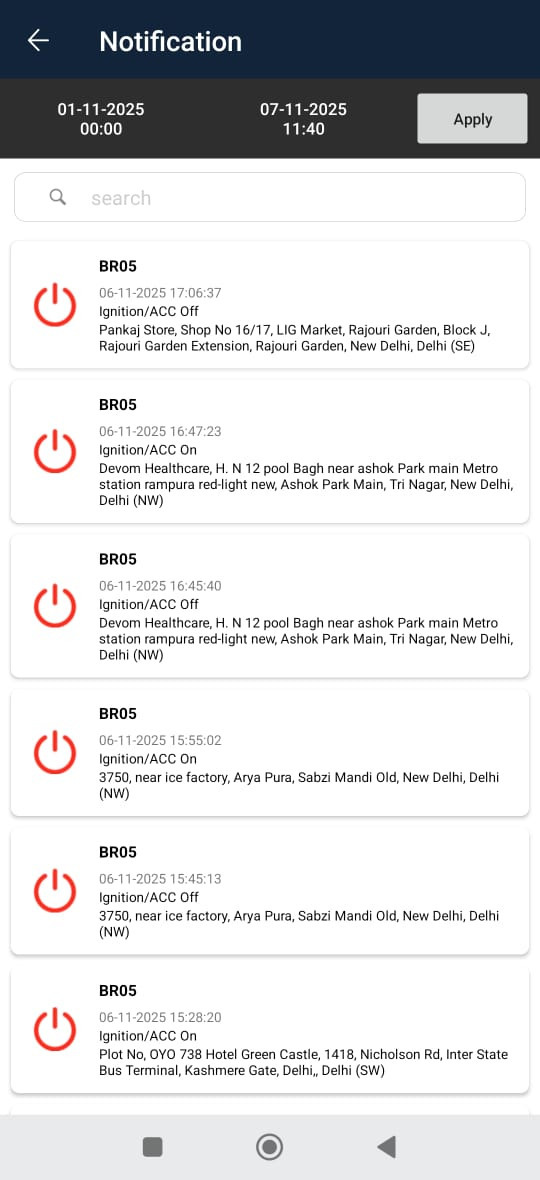
The Notification screen displays all system-generated alerts and activities for the selected date range. It enables users to track real-time events such as ignition on/off, overspeed, idle status, battery disconnection, and more.
This module helps ensure vehicle behavior monitoring and driver activity tracking, providing a detailed log of alerts along with timestamps and locations for each event.
To access
- Dashboard→Alert→Notification
- Menu→ Notification
Screen Overview
- Select the date range filter
- Select apply and the data will be displayed
- Each notification is displayed in a card format with below details
- Vehicle Name / Number
- Date and time
- Event Type
- Address