
The Temperature Trip Summary report provides a consolidated overview of vehicle trips along with temperature sensor readings recorded during the selected period. It combines trip statistics, vehicle movement details, temperature values, speed information, and alert counts into a single report. This report is particularly useful for monitoring cold-chain transportation, refrigerated vehicles, food logistics, pharmaceutical deliveries, and any operation where temperature compliance must be maintained throughout a trip.
This report is available in Trakzee Standard, Trakzee Premium and Smart Waste management
Before You Get Started
Before generating this report, ensure that:
- A temperature sensor is properly connected and configured with the tracking device.
- The device is transmitting valid temperature data.
- Vehicle trips are being calculated using the selected trip calculation method (Ignition or Speed).
- The required vehicles are assigned to your account.
- Temperature alerts and trip data are available for the selected date range.
To Open Temperature Trip Summary
- Log in to your account
- Go to Report→Temperature→Temperature Trip Summary
Filter Explanation
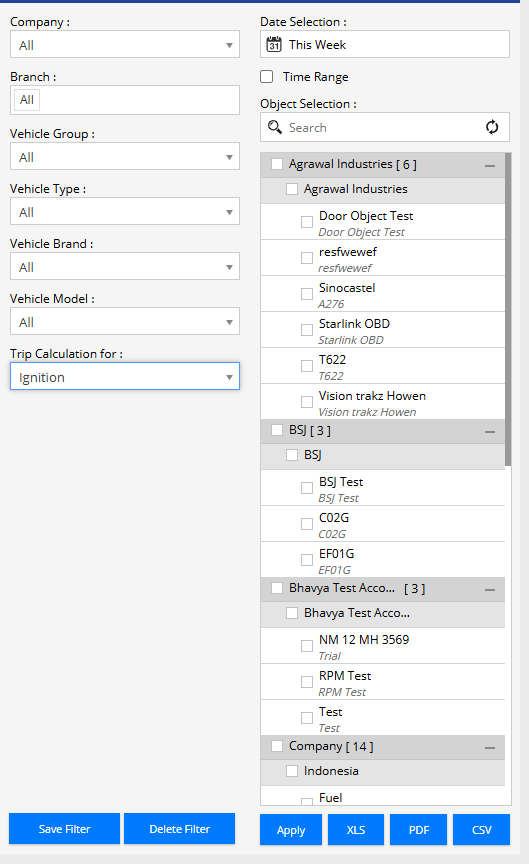
- Company : Select the company whose vehicles you want to analyze.
- Branch : Filter vehicles based on branch.
- Date Selection : Select a predefined date range such as Today, Yesterday, This Week, This Month, etc.
- Time Range : Enable and specify a custom start and end date/time.
- Vehicle Group : Filter vehicles by a specific vehicle group.
- Vehicle Type : Select a vehicle type to narrow the report.
- Vehicle Brand : Filter results by vehicle manufacturer.
- Vehicle Model : Filter results by vehicle model.
- Object Selection : Select one or multiple vehicles for the report.
- Trip Calculation For : Select the method used to calculate trips, such as Ignition-based trips.
Report Explanation
Summary View
- Company : Name of the company associated with the vehicle.
- Branch : Branch under which the vehicle is registered.
- Vehicle : Vehicle name or identifier.
- Vehicle Brand : Vehicle manufacturer.
- Vehicle Model : Vehicle model information.
- Driver : Driver assigned to the vehicle during the trip.
- IMEI No : Unique device identifier installed in the vehicle.
- Distance : Total distance traveled during the trip.
- Running : Total vehicle running duration.
- Idle : Total idle time during the trip.
- Stop : Total stop duration during the trip.
- First Ignition On Time : Timestamp when the vehicle started the trip.
- First Ignition ON Location : Location where the trip began. The location can be displayed as an address or a configured geofence name.
- Start Odometer : Odometer value at trip start.
- Last Ignition Off Time : Timestamp when the vehicle completed the trip.
- Last Ignition Off Location : Location where the trip ended.
- End Odometer : Odometer value at trip completion.
- Speed AVG : Average speed recorded during the trip.
- Speed MAX : Maximum speed reached during the trip.
- Temperature Min : Lowest temperature recorded during the trip.
- Temperature Max : Highest temperature recorded during the trip.
- Temperature Avg : Average temperature maintained during the trip.
- Over Speed : Number of overspeed incidents detected during the trip.
- Alert(s) : Total alerts generated during the trip.
- No of Trip : Number of trips recorded for the selected vehicle.
Detail View
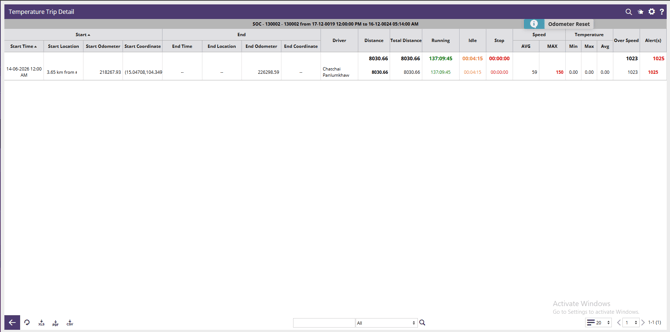
- Start Time : Trip start time.
- Start Location : Starting location of the trip.
- Start Odometer : Odometer reading at trip start.
- Start Coordinate : GPS coordinates of the trip start point.
- End Time : Trip end time.
- End Location : Ending location of the trip.
- End Odometer : Odometer reading at trip completion.
- End Coordinate : GPS coordinates of the trip end point.
- Driver : Driver assigned to the trip.
- Distance : Distance traveled during the trip.
- Total Distance : Total accumulated distance.
- Running : Total running duration.
- Idle : Total idle duration.
- Stop : Total stopped duration.
- Speed AVG : Average vehicle speed.
- Speed MAX : Maximum vehicle speed.
- Temperature Min : Minimum recorded temperature.
- Temperature Max : Maximum recorded temperature.
- Temperature Avg : Average temperature throughout the trip.
- Over Speed : Overspeed event count.
- Alert(s) : Total alerts generated during the trip.