
The Temperature Average Detail report provides detailed temperature and humidity readings collected from temperature sensors during the selected period. The report displays every recorded sensor value along with vehicle operational parameters such as ignition status, AC status, chiller status, speed, and location.
This report is useful for monitoring cold-chain operations, refrigerated transportation, pharmaceutical logistics, food transportation, and temperature-sensitive goods where continuous environmental monitoring is required.
A summary panel at the top of the report displays the overall Minimum, Maximum, and Average Temperature and Humidity values for the selected duration.
This report is available in Trakzee Standard, Trakzee Premium and Smart Waste management
Before You Get Started
Before generating this report, ensure that:
- A temperature sensor is installed and properly configured.
- The tracking device is transmitting temperature data.
- Humidity sensors are configured if humidity monitoring is required.
- Vehicles are assigned to your account.
- Historical temperature data is available for the selected date range.
- Sensor ports are configured correctly in the device settings.
To Open Temperature Average Detail
- Log in to your account
- Go to Reports→Temperature→ Temperature Average Detail
Filter Explanation
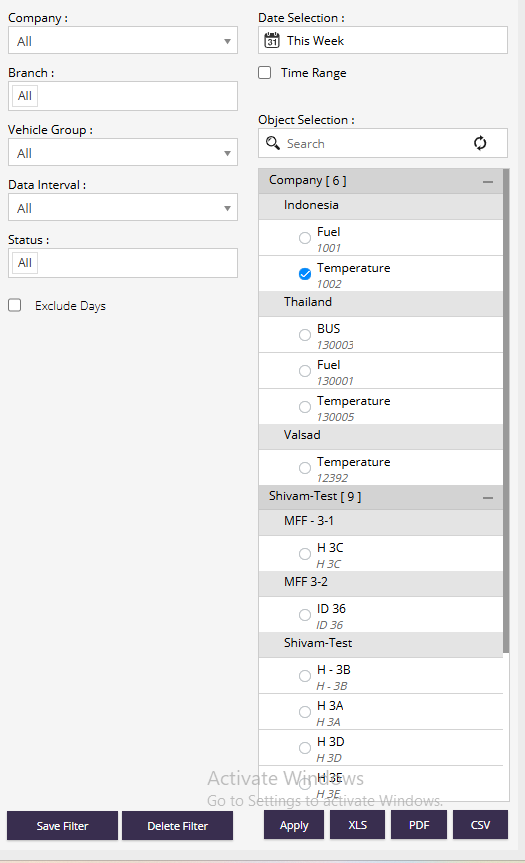
- Company : Select the company whose temperature data you want to view.
- Branch : Filter vehicles by branch.
- Date Selection : Select a predefined date range such as Today, Yesterday, This Week, or This Month.
- Time Range : Enable to select a custom start and end date/time.
- Vehicle Group : Filter vehicles belonging to a specific group.
- Data Interval : Select the interval at which temperature records should be displayed.
- Status : Filter records based on vehicle operational status such as Running, Idle, or Stopped.
- Exclude Days : Exclude specific days from the report calculations.
- Object Selection : Select one vehicle from the list.
Report Explaination

- Temperature Min : Lowest temperature recorded during the selected period.
- Temperature Max : Highest temperature recorded during the selected period.
- Temperature AVG : Average temperature recorded during the selected period.
- Humidity Min : Lowest humidity value recorded.
- Humidity Max : Highest humidity value recorded.
- Humidity AVG : Average humidity value recorded.
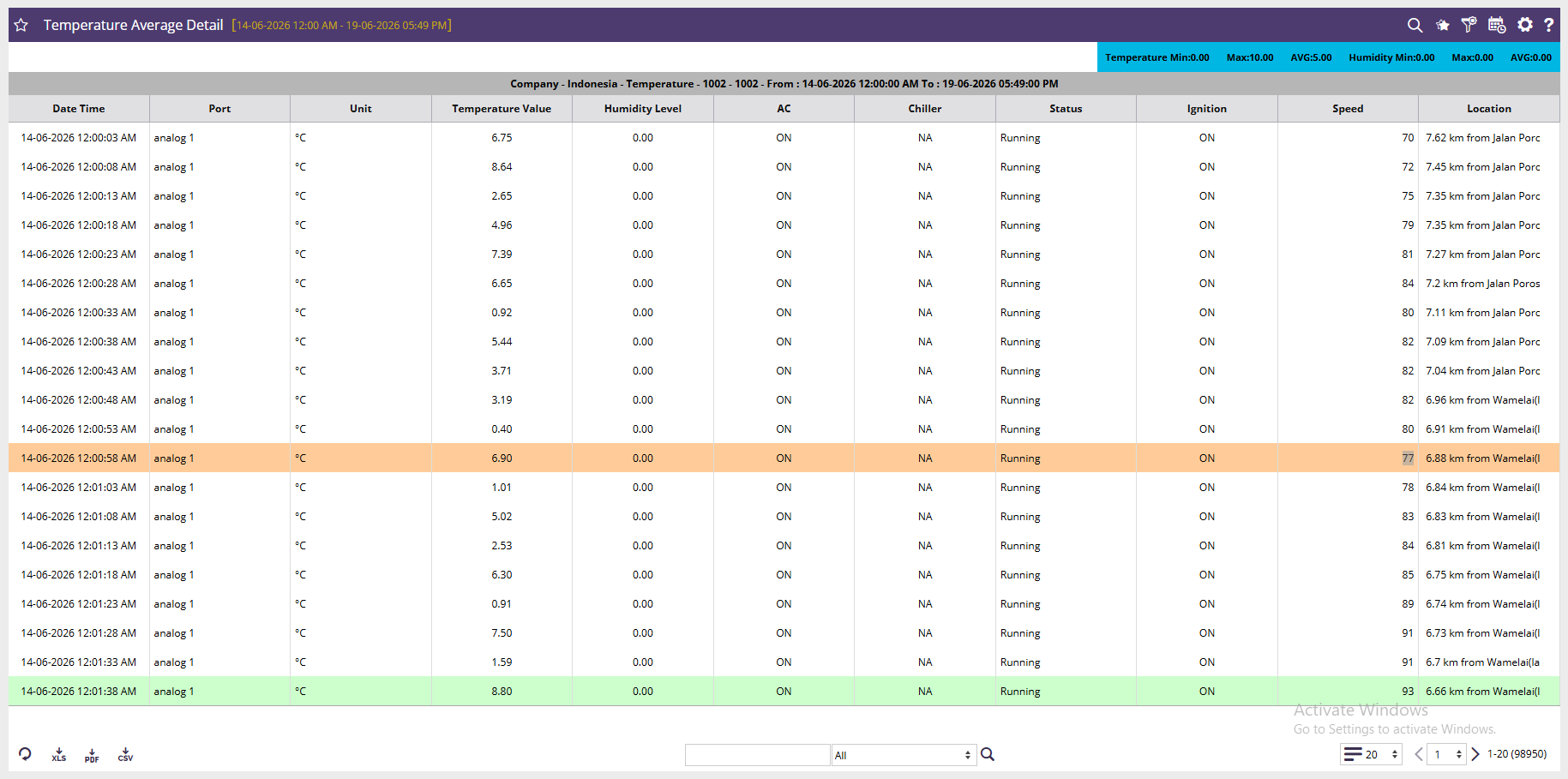
- Date Time : Date and time when the sensor reading was recorded.
- Port : Sensor port from which the temperature value was received.
- Unit : Measurement unit of the temperature reading (°C or °F).
- Temperature Value : Actual temperature recorded by the sensor.
- Humidity Level : Humidity value recorded by the sensor.
- AC : Indicates whether the vehicle's air conditioning system was ON or OFF.
- Chiller : Indicates the operational status of the refrigeration/chiller unit.
- Status : Vehicle operational status such as Running, Idle, or Stop.
- Ignition : Ignition status of the vehicle at the time of reading.
- Speed : Vehicle speed when the temperature reading was captured.
- Location : Vehicle location where the reading was recorded. The location can be displayed as an address or a configured geofence name.