
In the context of our platform, a Pet refers to any animal that can be managed, tracked, or monitored in the system through a tracking device configured with the pet. Pets typically represent real animals equipped with IoT-based GPS devices for activity and location tracking.
To efficiently Edit Pet records, please follow these outlined steps.
To Get Started
- Log in to your account.
- Go to Profile > Pet.
Upon clicking on the Pet, users will be directed to the Pet Overview page, where they can easily view and manage all Pet records.
To Edit Pet Details
- Once you click on Pet, the overview page will open
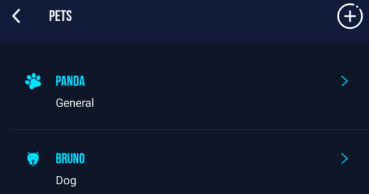
- Tap on the Pet you want to Edit.
- Once you Tap on the Pet the following page will open.
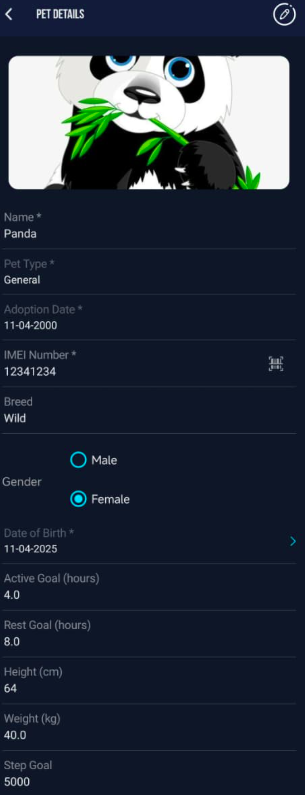
- To edit the Pet click on the
 icon available on the bottom panel of the screen.
-
Click on the
 icon to upload Pet photo
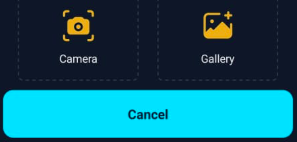
- Select Camera, if you want to click a photo through mobile's camera.
- Select Gallery, if you want to upload image from your phone's gallery.
- Tap on
 delete icon to remove the photo.
- Name: Update the pet’s name for identification.
- Pet Type: Select the type from Dog, Cat, or Pet.
- Adoption Date: Modify the adoption date if required.
-
IMEI Number: Update the GPS device IMEI number.
-
Tap on
 scanner icon to scan the IMEI barcode.
-
Please Note: The IMEI Number must be addded in the Inventory of reseller subuser or else the system will show an error during sign up.
- Breed: Update the pet’s breed.
- Gender: Select the pet’s gender (Male or Female).
- Date of Birth: Update the pet’s D.O.B.
- Active Goal (hours): Set or update the daily active hours target for your pet.
- Rest Goal (hours): Set or update the daily rest duration.
- Height (cm): Enter the pet’s updated height.
- Weight (kg): Enter the pet’s updated weight.
- Step Goal: Update the daily step target.
- Tap on
 Upload icon to upload document related to Pet.
 - Click on Save to apply the updated Pet details.
Learn How to Add New Pets.