
The system offers the ability to configure an SMS service that sends alert notifications directly to users' mobile numbers.
Please Note: Company users can configure the SMS Service on their account. If no Email configuration is set up by the Company, the configuration from the Reseller account will automatically apply to the Company account.
Before You Get Started
You will need to purchase a third-party Bulk SMS service from a service provider that meets your requirements. You can choose from any of the following optionn.
To Get Started
- Log in to your account.
- Go to Settings > General > Company.
- Double-click on the account for which you want to configure SMS service.
- Navigate to SMS.
- Navigate to SMS.
- Double-click on the account for which you want to configure SMS service.

To Configure SMS
- Select SMS Gateway either Inherit or Custom.
- Inherit: Used to inherit the SMS configuration done on the Reseller account.
- Custom: Used to set up the SMS configuration specifically for a Company account.
- For Inherit:
- For Inherit:

-
-
-
- Enter the Monthly SMS Limit: This refers to the maximum number of SMS messages that can be sent from an account within a given month.
- Enter the Daily SMS Limit: This refers to the maximum number of SMS messages that can be sent from an account on a daily basis.
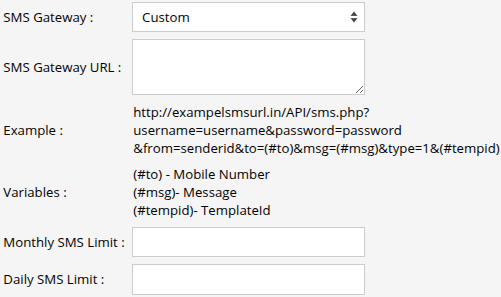
- For Custom:
-
-
-
-
-
- In the SMS Gateway URL field, please input the API URL provided by your SMS service provider into the designated text box.
- Refer to the Example to check the kind of URL you will receive.
- Variable parameters must be specified in the SMS API URL as illustrated in the example. This allows the software to retrieve the mobile number you have provided in the alert configuration and generate the corresponding message alerts accordingly.
- You can also set Monthly SMS Limit and Daily SMS Limit to limit the SMS usage for the company accounts.
-
-
- Click on the Save 💾 icon.